


If you run catalog ads, you already know the product feed is the input. But which parts of it actually move performance, and in what order?
There are a lot of variables that you can tweak such as titles, images, categories, identifiers, custom labels, per-channel overrides. Not all of it helps your conversion in the same way. Some of it keeps products approved, which is table stakes. Some of it widens the set of queries and audiences your products can match into, which is where most of the upside sits.
This guide on product feed optimization shows you the formula for titles that actually match, how to use custom labels to steer spend, and where feed work stops paying so you know when the problem has moved to the creative.
What is ›?
Product feed optimization is the work of improving the product data you send to ad platforms so they can understand what you are selling and show it to the right people. That data is your titles, descriptions, images, categories, identifiers, prices, and any custom fields you add.
Product feed optimization helps you in three ways:
- Your products get approved: That is what puts them into shopping results and catalog ads in the first place.
- They match a wider set of searches: The same product becomes eligible for every query its attributes describe, not just the name you gave it.
- You control where the budget goes: Custom fields let you spend ad money on the products you actually want to sell instead of spreading it evenly across the catalog.
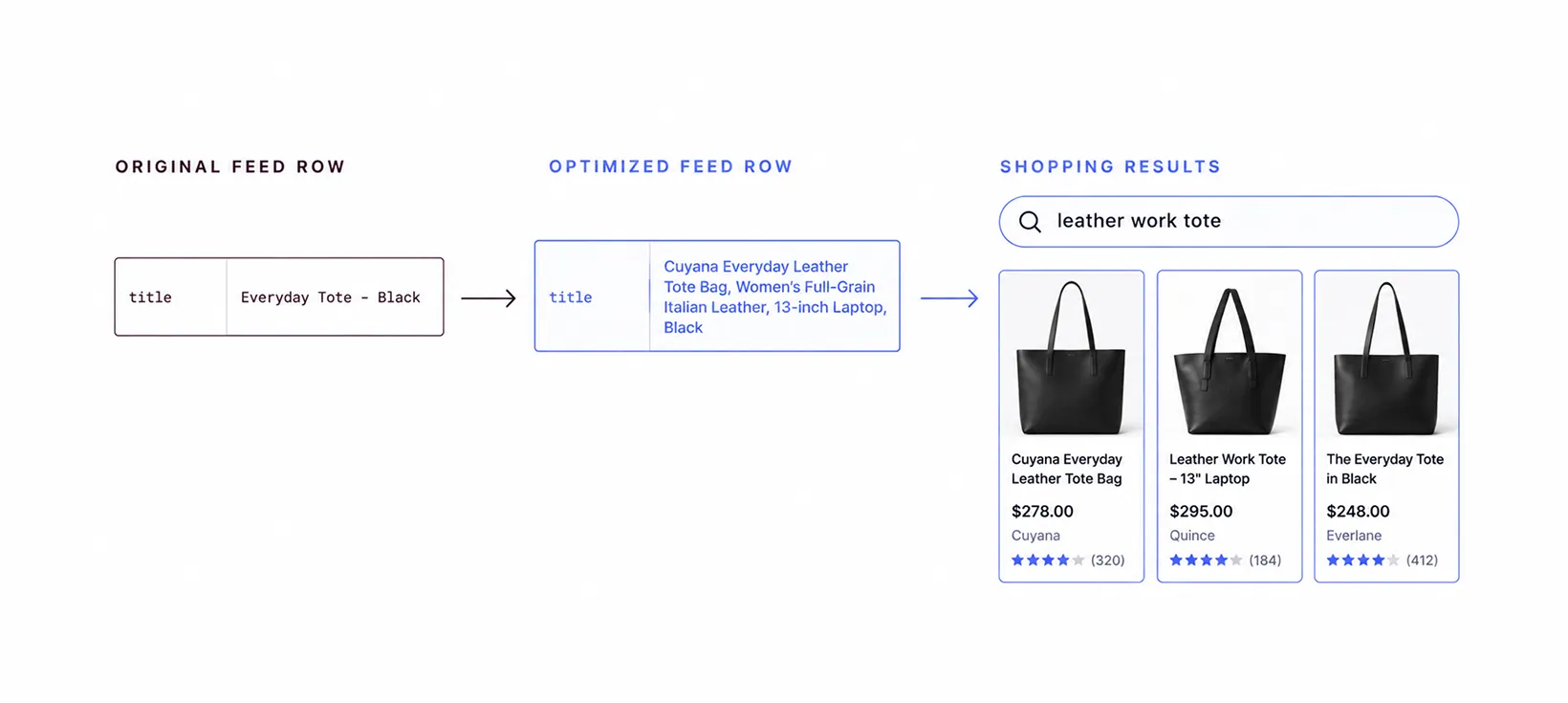
Let's take an example. A feed that sends this:
Everyday Tote - Black
is sending the name your team uses internally. Nobody searches for it, and the platform cannot tell what the bag is made of, who it is for, or how big it is. The optimized version of the same row will look like this:
Cuyana Everyday Leather Tote Bag, Women's Full-Grain Italian Leather, 13-inch Laptop, Black
The difference is that the platform can now match it to someone searching for a leather work tote, and the shopper reading the ad can tell what they are looking at.
Note that product feed management is not the same thing as product feed optimization. Feed management is the plumbing: connecting your store, transforming fields, and delivering the file to each channel. Optimization decides what the data should actually say. You need both, but only one of them moves performance.
Why feed quality decides catalog ad performance
A product feed is not a report the platform files away. It is the live input to three separate decisions, made independently, every time your ad could serve.
- Eligibility: The platform checks your data against its requirements and either approves the product or suppresses it. Missing identifiers, a price that disagrees with your landing page, an image with promotional text baked in, or a stale availability value will all take a product out of the auction before any targeting logic runs.
- Matching: Once a product is approved, the platform decides which searches and which shoppers it belongs in front of. On search-led shopping surfaces, titles, categories, descriptions, and product attributes are important matching inputs. A vague product record gives the platform less information to work with, which can reduce the number of relevant searches or audiences it can match.
- Creative: In a catalog ad, the ad itself is assembled from feed fields. The image is your image link. The headline is your title. The price on the card is your price attribute. The feed provides the base product data and creative assets for catalog ads. Platforms can then apply templates, overlays, video, or automated creative treatments on top of that data.
Poorly titled products do not report the impressions they failed to win, and spend flowing to your worst SKUs looks normal at the campaign level, because campaign ROAS averages winners and losers together.
Which product feed attributes matter most
Not every field earns the same attention. These are the ones that move outcomes.
- Title: It drives matching on search surfaces and it is the visible headline on most catalog ad formats.
- Description: It catches specific and long-tail queries your title cannot fit.
- Image link: Determines whether the product is approved and whether anyone stops on it.
- Product category and product type: Google product category is the platform's own taxonomy and tells it what the item fundamentally is.
- GTIN, MPN, and brand: These identifiers connect your listing to a known product. If a manufacturer-assigned GTIN exists, submit it accurately. Missing or incorrect GTINs can limit visibility and make it harder for Google to identify the product.
- Price, sale price, and availability: These have to match your site exactly. They also drive the promotional treatments platforms render on the ad card.
- Custom labels: Optional, unused by most brands, and the single best lever you have for controlling where budget goes.
If your ecommerce product feed is clean at the source, everything downstream is efficient.
How to optimize product titles in your product feed
A product page title and a feed title have different jobs. On your site, the title sits next to photos, a description, a size chart and a breadcrumb trail, so it can be short.
In a feed it has none of that support. It carries the whole description on its own, and it is also the main text the platform matches against what someone searched.
That means a feed title has two audiences at once. It has to tell the platform what the product is, and tell the shopper enough to click.
A title that works follows a predictable structure:
Brand + Product Type + Key Attribute + Secondary Attribute + Size or Quantity
The ordering matters as much as the words.
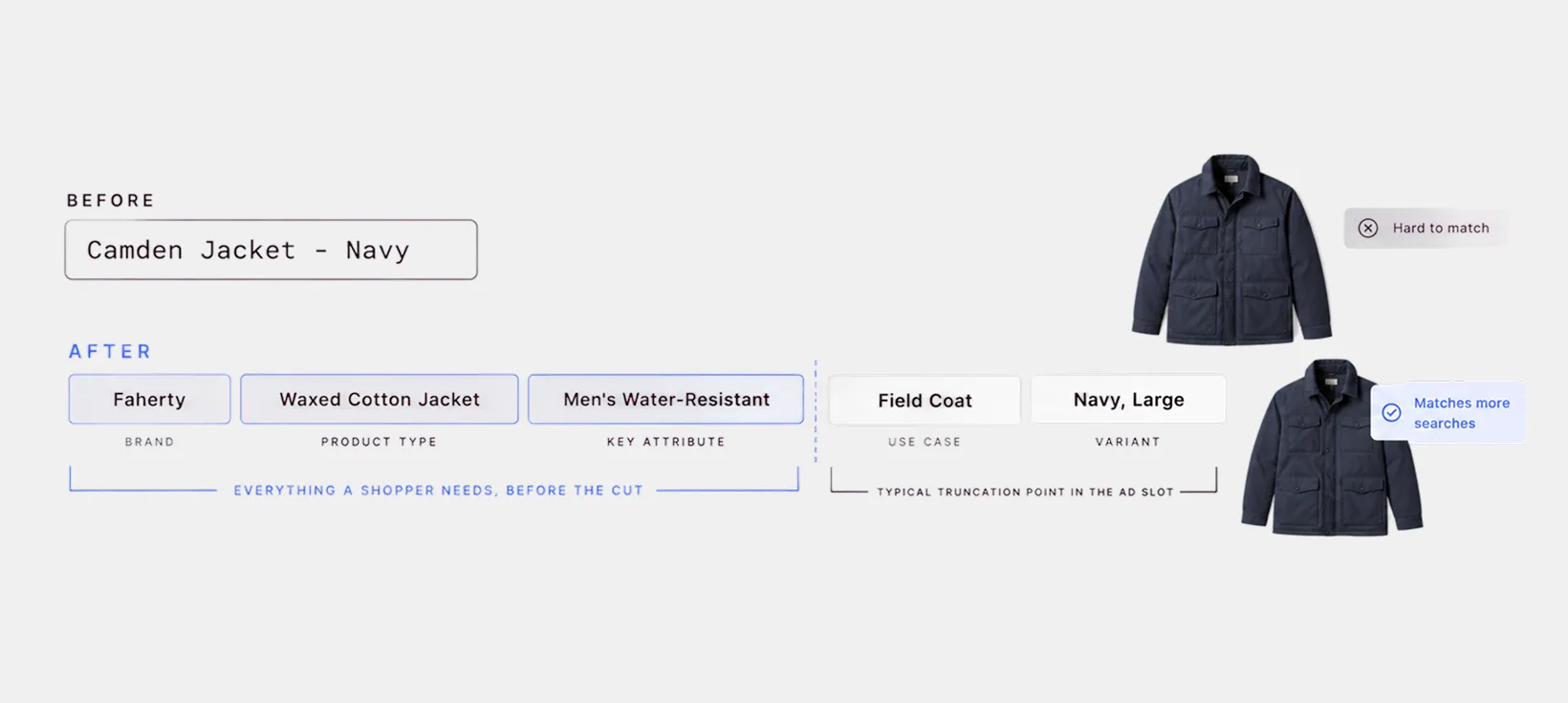
Front-load the details shoppers care about most, because titles are often truncated in ad placements and search results.
Let's see a few examples from different categories:
Apparel
Before: Camden Jacket - Navy
After: Faherty Camden Waxed Cotton Jacket, Men's Water-Resistant Field Coat, Navy, Large
Home goods
Before: Sijo CloudSoft Set
After: Sijo CloudSoft Eucalyptus Sheet Set, Cooling Tencel Bedding, 4-Piece, Queen, Fog
Consumables
Before: Daily Greens 30 servings
After: Ritual Daily Greens Powder, Organic Super Greens Supplement, Unflavored, 30 Servings
Hard goods
Before: 4402-B Wallet
After: Ridge Titanium Minimalist Wallet, RFID Blocking Card Holder, Slim Money Clip, Matte Black
Make sure you follow these three don'ts when writing your title:
- Do not keyword stuff, because platforms penalize titles that read like a tag list.
- Do not repeat the brand name mid-string.
- Do not claim anything the landing page does not confirm.
If your catalog is large, do not try to fix every title at once. Start with the products you spend the most on. Our guide to product title optimization covers the rest.
How to optimize product images
Each platform has its own image requirements for dimensions, formats, and what can appear in the primary image. Meeting those rules gets the product eligible. It does not guarantee the creative will stand out. Meeting those requirements gets you approved.
It does not get you noticed.
A compliant image is a product on a white background, which is exactly what every competitor in the same result also submitted. It doesn't get your target audience's attention.
The fix is to treat the feed as a creative surface rather than a compliance checklist.
- Use the additional image fields, since alternate angles and in-context shots frequently outperform the packshot.
- Keep crop and framing consistent so your ads look like a set instead of a scrape.
- Where the platform allows enhanced creative, use the price, rating, and inventory data you already hold to make the card say something the plain image cannot.
That is the difference between product feed enrichment and feed compliance.
How to use custom labels to control spend
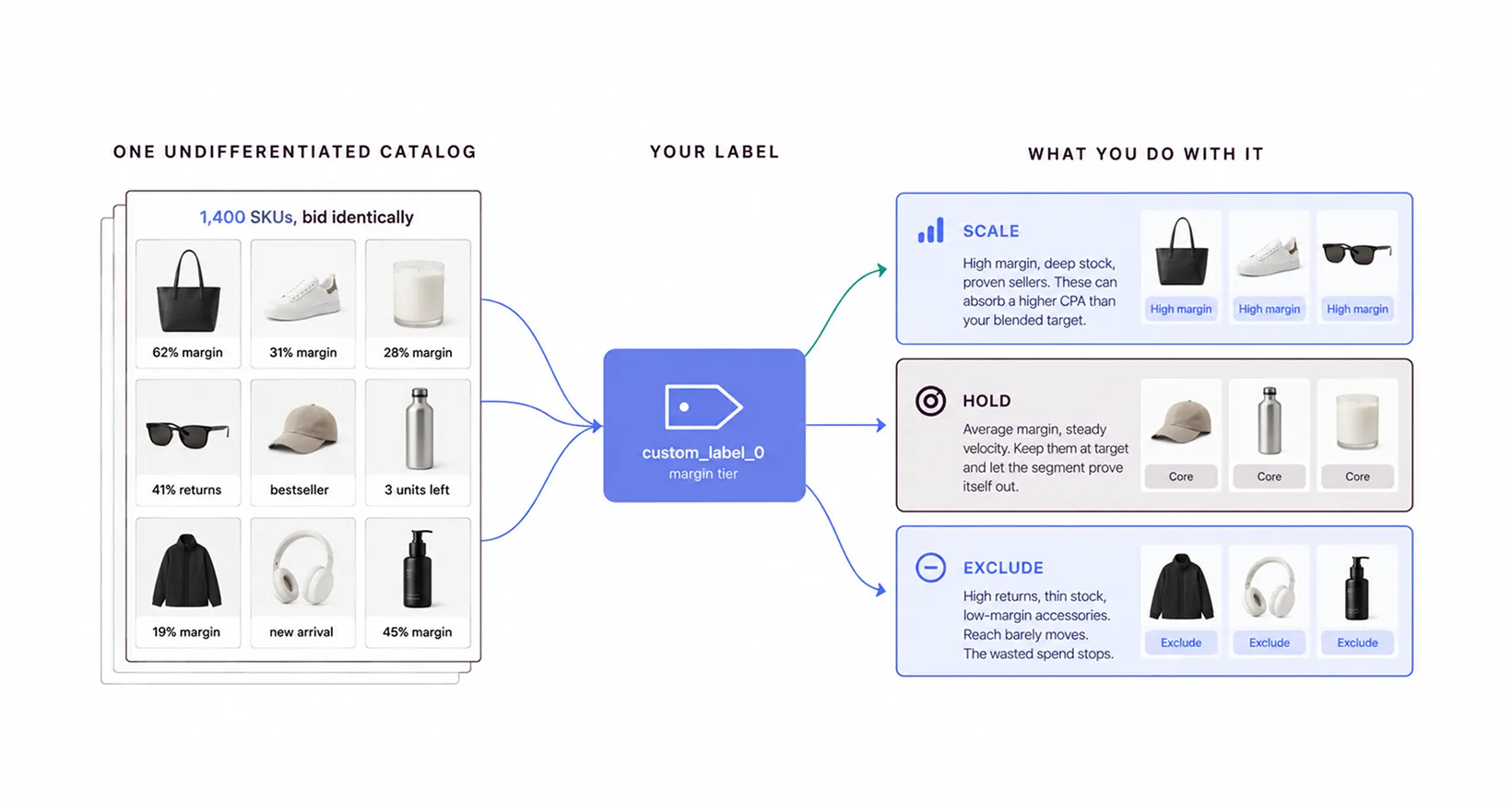
Custom labels are five spare columns in your feed that you fill in yourself: custom_label_0 through custom_label_4. You can put anything you want in them. A margin band, a season, a stock level, a returns flag.
The platform makes no attempt to understand what your values mean. All it does is let you filter on them. That filter is the useful part. Once a product carries high_margin, you can build a product group of everything with that label and bid on it differently, or leave it out of a campaign altogether.
The most valuable use of labels is exclusion.
Almost every catalog contains products that should never be advertised: near end-of-life stock, high return rates, low-margin accessories that earn clicks and no profit.
How feed requirements differ by platform
Every platform wants the same basics: an ID, a title, an image, a price, a link and a stock status. What differs is everything layered on top. Which extra fields are mandatory, how long a title can run, what an image is allowed to show, and which category list you have to map to.
Google Shopping
The most demanding on structured data. Google Shopping feed requirements lean hard on identifiers, category taxonomy, and price accuracy, and Merchant Center tells you exactly what failed. See our guide to Google Shopping feed errors.
Meta
Meta is more forgiving of structure, more dependent on the creative. The feed drives product sets, and product sets drive everything in Advantage+ catalog campaigns. More details in our Facebook product feed guide.
TikTok
On TikTok, shorter titles perform better, and SKU-level video matters more here than anywhere else. Check out our TikTok product feed guide here.
Pinterest and Snapchat
Both reward vertical, lifestyle-leaning imagery over the packshot. Our Pinterest product feed breakdown covers the specifics.
AI shopping surfaces
Assistants now read product feeds directly to answer shopping questions, which puts new weight on descriptive attributes rather than keyword-shaped titles. See how ChatGPT product search uses product feeds.
Turn your optimized feed into ads worth clicking
A clean feed gets your products approved and matched. It does not change how the ad looks. What appears is still a product on a white background, sitting next to a dozen others exactly like it.
Marpipe reads the feed you just fixed and builds the ad out of it. Here's what you can do with it:
- Show a sale price, star rating or low-stock line only where it is true, with conditional rules that read the value from the feed.
- Run video ads without a shoot, using the still photos already in your feed.
- See which products are burning budget, with SKU-level reporting instead of one campaign average.
- Send a clean catalog to six channels (Meta, Google, TikTok, Pinterest, Snapchat and Reddit).
Feed management is free with no limits, so you can connect your catalog and look at your own products rendered as finished ads before committing to anything. Start with free feed management and see what all that product feed optimization work actually looks like as an ad.
Frequently Asked Questions
What is a product feed?
A product feed is a structured file containing your product data: titles, descriptions, prices, images, availability, identifiers, and SKUs, formatted so ad platforms and marketplaces can read it. It is typically delivered as CSV, XML, or via API, and refreshed on a schedule. Think of it as a machine-readable version of your catalog. Every catalog ad, shopping listing, and marketplace listing you run is generated from it, which is why its accuracy directly determines what shoppers see.
What is the difference between product feed management and product feed optimization?
Feed management is the infrastructure: connecting your store, transforming fields, and delivering the file to each channel on schedule.
Feed optimization is the editorial and strategic work of deciding what that data should say, including how titles are structured, which categories are assigned, which images are used, and which SKUs are excluded. Most product feed software handles management well. Optimization is a decision layer that still needs a human owner.
How often should I update my product feed?
Price and availability should be refreshed as often as your inventory and promotions require. Daily is a useful baseline for many catalog channels, with faster updates when prices or stock change frequently.
Structural changes, such as titles, categories, and custom labels, are a separate cadence. Review those monthly, and always after a catalog migration, a seasonal changeover, or a platform requirements update.
Does feed optimization actually affect ad performance, or just approvals?
Both, and the matching effect is usually larger. Approvals determine whether a product can serve at all. Titles, categories, and attributes determine which searches and audiences it is eligible for, which sets your addressable demand.
Custom labels then determine where budget flows within the products that do qualify. A feed can be fully approved and still underperform badly if titles are vague and every SKU is bid on identically.
Do I need a paid tool for product feed optimization?
Not necessarily. A small catalog on a single channel is manageable in a spreadsheet, and most ecommerce platforms generate a basic feed automatically.
The threshold is usually a few hundred SKUs or a second channel, because that is where per-channel rules, manual updates, and version drift start costing real time. Marpipe's feed management tier is free and unlimited, so the cost of moving off spreadsheets does not have to be the deciding factor.
