



If you’re running Shopping, Performance Max, or catalog ads on Meta and TikTok, you already know: the feed is where a lot of performance is won or lost. Your campaigns can look fine on the surface, but if the underlying product data is thin, inconsistent, or generic, you’re asking the platforms to do a lot of guessing.
Most brands stop at “valid.” Shopify or a connector generates a feed, the required columns are there, and that’s where the work ends.
Feed enrichment is the step almost everyone skips. It’s where you move from “the ads are running” to “the catalog is actually set up to perform.”
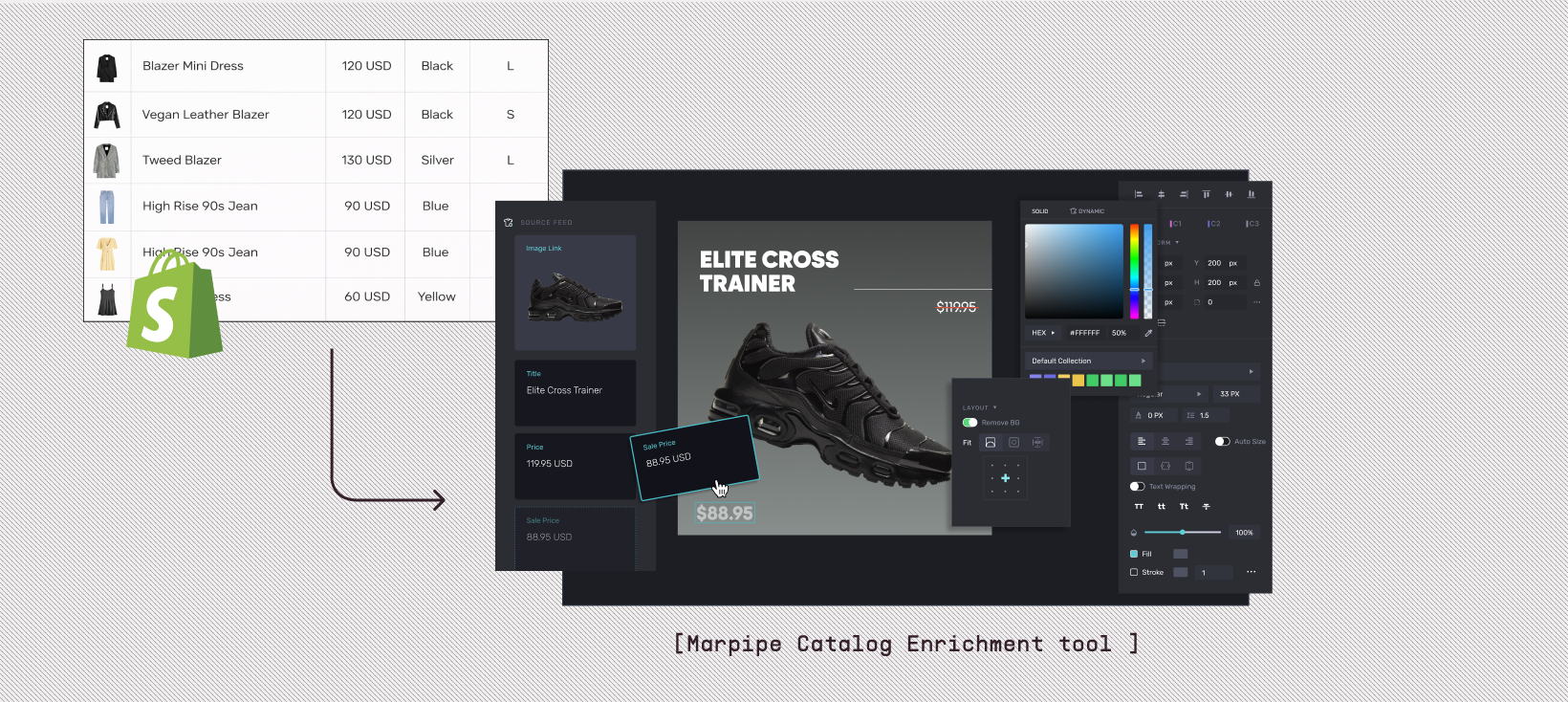
And this is exactly where Marpipe fits. Marpipe isn’t just another paid tool you have to justify. Marpipe is a free and powerful product feed management tool with a Shopify app that plugs directly into your catalog. On top of that, it treats your feed as creative infrastructure so the data work you do shows up in your ads.
What feed enrichment really means
Feed management is about getting the file accepted: required fields are filled, there are no hard errors, and the merchant center is quiet.
Feed enrichment goes a level deeper. It’s about:
- Filling in the fields that let you segment, prioritize, and test
- Making your categories and labels match how you actually sell
- Giving your creative and bidding systems more context than just title, price, and image
You’re not changing what you sell. You’re changing how clearly you describe it to Google, Meta, TikTok, and every other channel.
Marpipe leans into this. Because it’s free to use for feed management, you can do this enrichment work without starting a budget conversation. And because it’s tied tightly to Shopify, you’re editing close to the source instead of fighting CSVs.
Feed enrichment doesn’t stop at adding custom labels or cleaning up taxonomy. The real advantage comes when enriched product data is transformed into high-quality, conversion-ready content. Yarnit for E-Commerce help ecommerce brands turn structured product data into SEO-optimized descriptions, FAQs, and channel-specific copy. Instead of manually rewriting hundreds of SKUs, teams can use AI to generate brand-compliant product narratives that strengthen both organic discoverability and catalog ad performance.
But the impact goes deeper. When enriched fields such as material, use-case, audience segment, margin tier, or seasonal tags are intelligently interpreted, they can power differentiated messaging across channels. A “premium cotton” attribute doesn’t just sit in a feed column, it becomes a comfort-focused headline on a PDP, a breathable-fabric callout in social ads, and an SEO keyword cluster for organic ranking. This is where feed enrichment evolves from operational hygiene to a growth lever.
By connecting structured data to creative execution, brands ensure that every product variation, size, color, bundle, or limited edition carries messaging tailored to its value proposition. The result is not just better ad targeting, but also higher CTR, stronger conversion rates, improved marketplace rankings, and consistent brand storytelling across Shopify, marketplaces, and paid media.
The columns that usually get ignored (but shouldn’t)
Most feeds have the basics: ID, title, description, link, price, image, availability. Those just keep the lights on.
Where you see real gains is in the “optional” columns that give you more control: your own product taxonomy, your labels, your audience fields, your promo logic. When these are enriched, you get cleaner product sets, smarter budget allocation, and creative that feels more intentional.
Product type: your internal structure
product_type should look like how you and your merchandising team talk about the catalog.
If that column is a mess, or only populated for a subset of products, you’re losing a simple way to group and prioritize.
A stronger approach:
- Use a clear hierarchy for every product (e.g., “Women > Tops > Long Sleeve”)
- Keep naming consistent so filters and rules are reliable
- Align this structure with your Shopify collections and navigation where possible
In Marpipe, that same structure becomes the backbone for how you build product sets and templates.
Google product category: helping the channel sort you correctly
google_product_category is mostly for the platform, not for you. When it’s specific and accurate, Shopping and Performance Max have a much easier time understanding what you sell.
If everything is mapped to one generic bucket, you’re adding noise for no reason. Taking the time to assign proper categories is not glamorous, but it’s one of those “boring but meaningful” steps. It’s exactly the kind of field that’s easier to maintain when you have a proper view of your feed, which Marpipe gives you for free.
Custom labels: where your business logic lives
Custom labels are the bridge between how finance, merchandising, and marketing think—and what the ad platforms can actually act on.

Common label schemes:
- Margin tiers: high, medium, low
- Lifecycle: new arrivals, evergreen, clearance
- Strategic sets: hero SKUs, bundles, upsell items
- Seasonality: summer, winter, gifting
Once you’ve decided on a scheme and rolled it out, those labels become practical levers:
- break out campaigns or asset groups by label
- protect low-margin items while pushing high-margin ones
- give “hero” products a different creative treatment
Marpipe reads these labels straight from your feed. Because the feed editor is free, you can test and refine your labeling strategy without adding cost.
Audience and sizing fields: fewer irrelevant impressions
Fields like gender, age_group, size, size_type, and size_system don’t feel urgent, but they quietly reduce waste.
When these are filled in:
- Your product sets can match real buyers more closely
- You avoid serving kids’ products to adults and vice versa
- You can localize sizing where it actually matters
Enrichment here is mostly discipline: pick a standard and stick to it. A tool like Marpipe helps by giving you a single place to see where fields are missing or inconsistent.
Promo fields: getting discounts and urgency into the feed

If you’re running sales or promotions but your feed doesn’t reflect that, your ads are always a step behind your site.
Using fields like sale_price and sale_price_effective_date means:
- Channels can automatically show the right price and discount
- You can build creative rules around “on sale” products
- Your catalog ads stay closer to what shoppers see on site
Because Marpipe is free on the feed side, it’s easier to standardize how you handle promotions across your catalog. You update the data once and let your campaigns and creative follow.
Categories and taxonomy: making your catalog easier to work with
The way you structure your catalog determines how painful or simple your paid setup will be.
If your Shopify collections, your product_type, and your channel categories are all slightly out of sync, every new campaign becomes a small investigation.
A better pattern is:
- Decide on a clear category structure that matches how you actually plan merchandising and campaigns
- Align Shopify collections and product_type to that structure
- Map that structure sensibly into google_product_category
Once that’s done, your feed stops being an afterthought and starts behaving like an extension of your merchandising logic. In Marpipe, you can see this structure and adjust it without constantly exporting data into spreadsheets. The fact that this is free means you can make small improvements regularly instead of waiting for a “replatform” moment.
Creative types that only work when the feed is enriched
Catalog ads are entirely driven by the feed. If the data is thin, you get generic ads. If the data is rich, you can do more without manually designing every variation.
With a more enriched feed, you can support:
- Different templates for new arrivals, evergreen products, and clearance items
- Badges or overlays based on labels like “bestseller,” “limited edition,” or “low stock”
- Layouts that adapt based on category, price tier, or audience fields
- Product-level video that pulls in the right titles, prices, and tags
This is where Marpipe’s positioning matters. Marpipe is not only a free and powerful product feed management tool, but it also treats your feed as creative infrastructure, not just plumbing. You enrich your data once, and Marpipe uses it to generate on-brand catalog templates and product-level videos that stay in sync with your catalog.
You don’t have to choose between “basic dynamic product ads” and a fully custom design sprint. You use the enriched feed to do more with the creative you already have.
A practical way to get started on Shopify with Marpipe
If you’re on Shopify and want to take feed enrichment seriously without adding another line item to your budget, the path is straightforward:
- Connect Marpipe’s free Shopify app.
Install the Marpipe app, let it pull in your catalog, and use the feed management view to see where fields are missing or inconsistent. - Clean the basics first.
Fix obviously bad titles, normalize options, and make sure every active product has core fields and a sensible product_type. - Roll out a simple label strategy.
Pick a small set of custom labels you’ll actually use (margin, lifecycle, seasonality, hero SKUs) and apply them consistently. Use Marpipe’s feed editor to check coverage. - Tidy up categories and audience fields.
Bring google_product_category, gender, age_group, and sizing fields up to a reasonable standard. Don’t chase perfection; aim for consistency. - Plug enrichment into creative.
Once the data looks decent, start building catalog templates in Marpipe that respond to those fields: badges for new arrivals, different layouts for certain categories, small copy changes based on labels.
Because Marpipe is free to use on the feed side, you can iterate as you learn: update labels, tweak structures, refine categories, and watch how those changes affect performance and creative over time.
Why this matters
A lot of teams stay stuck with “good enough” feeds because improving them feels like a big, expensive project. It doesn’t have to be.
With a free tool like Marpipe in your stack, feed enrichment becomes regular maintenance instead of a one-off overhaul. You get closer to the real goal: a catalog that’s easy to work with, clear to the platforms you rely on, and rich enough to power better creative.
If your catalog ads feel generic or your campaigns are hard to control, don’t start with a rebrand or a new bidding strategy. Start by enriching the data you already have, using a tool that doesn’t charge you to do that work. Then let Marpipe turn that improved feed into ads that actually reflect how you run the business.
