


Why most product titles underperform even when they look fine
Google Shopping doesn't rank products the way organic search ranks pages. Every time a shopper types a query, the system runs two steps in sequence. First, it figures out which products in your feed are a relevant match for that query. Then, among the matched products, it decides which ones to actually surface in the auction based on bid, historical performance, CTR, and conversion signals.
Your product title is the single most important input to step one. If Google can't confidently match your product to a query, no amount of bid increases will fix it. Your product will not enter the auction.
For example, a title like ‘Minaro | Premium Cotton T-Shirt’ reads well, but it doesn't give Google much details. There's no gender, no fit, no color, no size, no use case. When a shopper searches for ‘men's crew neck white t-shirt,’ your product might be technically relevant, but the matching algorithm doesn't see enough overlap to include you with confidence.
Here's what Google Shopping actually returns when a shopper searches for "men's crew white tshirt." Every title in the results includes brand name, gender, neckline, and product type:

So the most common reasons titles underperform are structural mistakes:
- Critical product attributes (gender, color, size, material) are missing or buried after the 70-character display cutoff
- A single title template is applied across every product category in the catalog without adjusting for how shoppers actually search in each one
- Titles are written once at feed setup and never updated based on Search Terms data
- Keyword stuffing pushes the title past Google's 150-character limit or trips quality filters that suppress the listing entirely
A strong product title puts the right attributes in the right order. That structure is what gives Google enough signal to match your product to real shopper searches.
The fastest way to see this is in examples. The table below shows what an un-optimized title looks like, what is missing in it, and the optimized version.
| Category | Poor title | What's missing or wrong | Optimized title |
|---|---|---|---|
| Apparel & fashion | Satsuk — Premium Cotton T-Shirt | No gender, neckline, color, fit, or size — Google can't match it to any specific shopper query | Satsuk Men's Crew Neck Cotton T-Shirt — White, Slim Fit, Size M |
| Footwear | Nike Air Max Running Shoes | Missing model number (270), gender, colorway, size — model is what shoppers search by | Nike Air Max 270 Men's Running Shoes — Black/White, Size 10 |
| Furniture & home goods | Modern Grey Sofa | No brand, model, seat count, dimensions, material, or style — none of the signals shoppers use to compare | West Elm Andes 3-Seat Velvet Sofa — Charcoal Grey, 86 inch Wide, Mid-Century Modern |
| Jewelry | Diamond Engagement Ring — Gold | No carat weight, stone cut, gold karat, or ring size — these are the primary match signals in jewelry | Brilliant Earth 1ct Round Cut Diamond Engagement Ring — 14k White Gold, Size 6 |
| Beauty & personal care | Charlotte Tilbury Lipstick | No product line, finish, shade name, shade family, or size — variant is what shoppers actually search for | Charlotte Tilbury Matte Revolution Lipstick — Pillow Talk, Nude Pink, 3.5g |
| Electronics & consumer tech | Sony Wireless Headphones | No model number, key feature, form factor, or color — shoppers search by model, not category | Sony WH-1000XM5 Wireless Noise-Cancelling Over-Ear Headphones — Black |
| Health & wellness / supplements | Optimum Nutrition Whey Protein | No How to do keyword research for product titlesKeyword research for product titles means using real shopper data to decide what words go into your titles. Without research, your titles are shaped by your team's internal vocabulary, your product naming conventions, and whatever feels right to you. You want to make sure your title speaks the same language Google's algorithm is matching against. Here are some ways to do keyword research to find the right words to use in your product titles: 1. Your Google Ads Search Terms reportThis is the highest-signal source by a long margin. It surfaces the exact queries that already triggered your products, with impressions, CTR, and conversions attached. Where to find it: Google Ads → Campaigns → Shopping → Search Terms. There are two patterns to mine:
2. Google Shopping autocompleteOpen google.com/shopping and start typing the name of one of your products. The dropdown shows what real shoppers searched for next, pulled from query volume across the platform. Here's a quick exercise that you can do: Capture autocomplete results for 5–10 of your top-selling product types. The modifiers that show up repeatedly across products are the ones to prioritize in your titles. 3. Competitor titles already winning the placementsSearch the exact queries you care about in Google Shopping and study the top three results. Those titles are matching and converting by definition. A 5-step process:
4. Your own site's search dataIf your store has internal search (Shopify search, Algolia, Klevu, etc.), pull the top queries from the last 90 days. These are shoppers describing your products in their own words on a surface where they're already past consideration. The gold here tends to be language no marketer writes naturally. For example, colorway nicknames like "blush" instead of "pink," style references like "oversized" or "boyfriend fit," material shortcuts like "vegan leather" in place of "polyurethane," etc. 5. Customer reviews and Q&AReviews tell you what attributes matter after the purchase. Q&A tells you what was missing in the title before the purchase. Both surface languages to add to your title vocabulary. 6 Best Practices for Writing Google Shopping Titles That ConvertThese best practices apply to any brand that sells on Google. You don't need to fix them all at once. Pick the two or three that feel most relevant to your catalog and start there. 1. Lead with the attribute that drives the search in your categoryThe first 30 characters of your title carry the most weight in Google's matching layer, and they're also what shoppers see first. Whatever attribute drives the search in your category should sit there. The lead attribute changes by category:
A common mistake is putting the brand first by default, even for brands that aren't search drivers. If shoppers in your category mostly search "men's running shoes size 10" rather than "Nike running shoes," the brand belongs after the gender and product type. Here's a Google Shopping result for "wooden office standing desk." Notice how the top results lead with brand, material, and product type:  2. Make every variant title uniqueEvery SKU in your feed needs a distinct title that includes its specific variant attributes. Shipping 12 colors of the same shirt with identical titles tells Google all 12 SKUs should compete for the same queries, which dilutes performance across all of them. Quick check: search your feed for duplicate titles. Every duplicate is a missed match opportunity. What a unique variant set looks like for the same product:
Same product line, three distinct queries each one can win. 3. Keep promotional language and formatting tricks out of the titleGoogle actively suppresses titles that look like ad copy. The product title's job is matching and describing. Selling belongs in the image and the description below it. Words and formatting that get listings throttled or disapproved:
Google's own product title specification lays out exactly what's allowed and what gets your listing disapproved. They've laid out rules around capitalization, promotional text, and foreign characters. It's worth bookmarking as a reference when cleaning up your feed. 4. Front-load the click signal into the first 70 charactersGoogle reads up to 150 characters of your title for matching, but most placements only show the first 70 to the shopper. Everything past character 70 still helps with long-tail matching, but the visible portion has to do the click work on its own. A practical test is to paste your title into a character counter and look at what's visible at character 70. If that snippet doesn't tell a shopper what the product is and why it fits their search, the front half needs to be rebuilt before you worry about anything past it. 5. Use specific numbers and units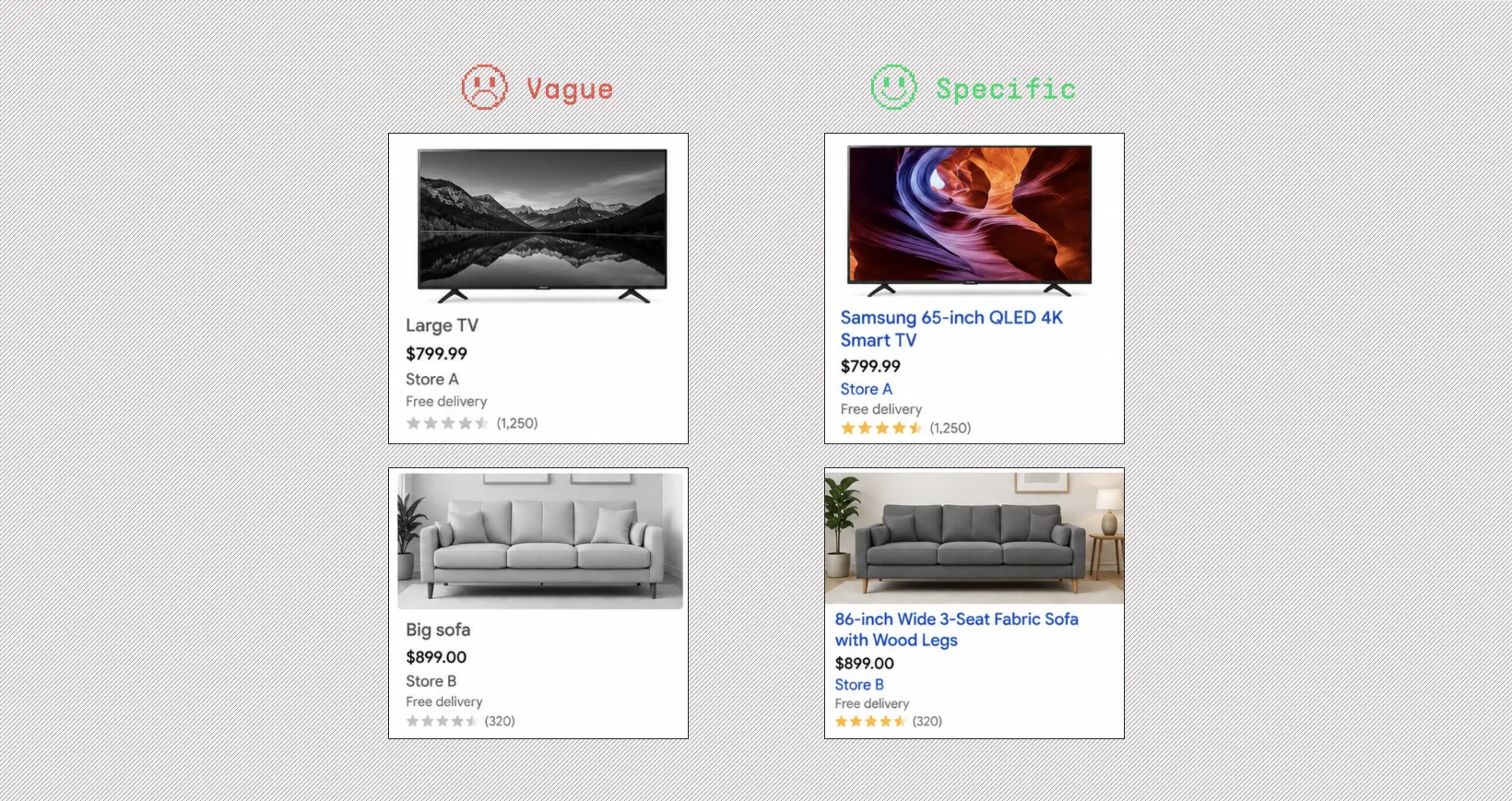 Shoppers search with specifics. A buyer looking for a 65-inch TV types "65 inch TV." A buyer looking for a 5lb protein tub types "5 lb whey protein." Numbers and units are some of the highest-intent search signals you can include in a title. Vague descriptor → specific version:
The rule is to replace every descriptive word with a measurable one wherever possible. 6. Refresh titles when your Search Terms data shiftsTitles written at feed setup go stale. Shopper search language changes with seasons, trends, and new product launches. A title that matched perfectly in January can have a noticeable vocabulary gap by July. A simple maintenance cadence:
Most catalogs benefit from targeted updates a few times a year, driven by what the data is showing. Product Title Formulas That Actually Work on Google ShoppingThere's no one-size-fits-all formula for all ecommerce products. The best title structure depends on what you're selling, because shoppers search differently across categories. Someone looking for a pair of jeans searches by brand, fit, and size. Someone looking for a laptop searches by brand, model, and specs. Your title needs to mirror the way your specific customer thinks and types. Below are category-specific formulas with examples, so you can plug in your own products and start testing. 1. Apparel & FashionFormula: Brand + Gender + Product Type + Key Attribute (Color/Pattern) + Size/Fit
2. Beauty & SkincareFormula: Brand + Product Line + Product Type + Key Benefit + Size/Volume
3. Electronics & GadgetsFormula: Brand + Model Name/Number + Product Type + Key Spec + Variant
4. Home & FurnitureFormula: Brand + Material + Product Type + Style + Dimensions/Color
5. Sports & OutdoorsFormula: Brand + Product Type + Use Case/Sport + Key Feature + Size/Spec
6. Pet SuppliesFormula: Brand + Product Type + Pet Type/Size + Flavor or Variant + Pack Size
7. Baby & KidsFormula: Brand + Product Type + Age/Stage + Key Feature + Color/Pattern
8. Fine Jewelry (Gold, Diamonds, Gemstones)Formula: Brand + Metal Type + Gemstone/Stone + Product Type + Style + Carat/Weight
How Marpipe Handles Product Title Optimization at Catalog ScaleIf you have four or five SKUs, updating product titles is easy. You don't need a tool for that. But once you have thousands of SKUs with new ones added every month, doing it manually is error-prone and wastes hundreds of hours. That's what Marpipe is built for. You write a template using feed attributes like brand, gender, product type, color, and size, and Marpipe generates a unique, properly structured title for every SKU in your catalog. When new products get added, or when colors change, the titles update automatically against the same rules. There's no manual rewriting per variant. That's not all. There are a few other things built into the platform that make managing titles at scale a lot easier:
The simplest way to see this in action is to start with a single category. Pick your highest-revenue product type, write the dynamic title template once, and let Marpipe apply it across every SKU in that category. The lift usually shows up in your Search Terms report within a few weeks. Marpipe's feed management is free with no limits. You can connect your catalog, write your title rules once, and let every SKU update automatically. Start for free here→ |
