


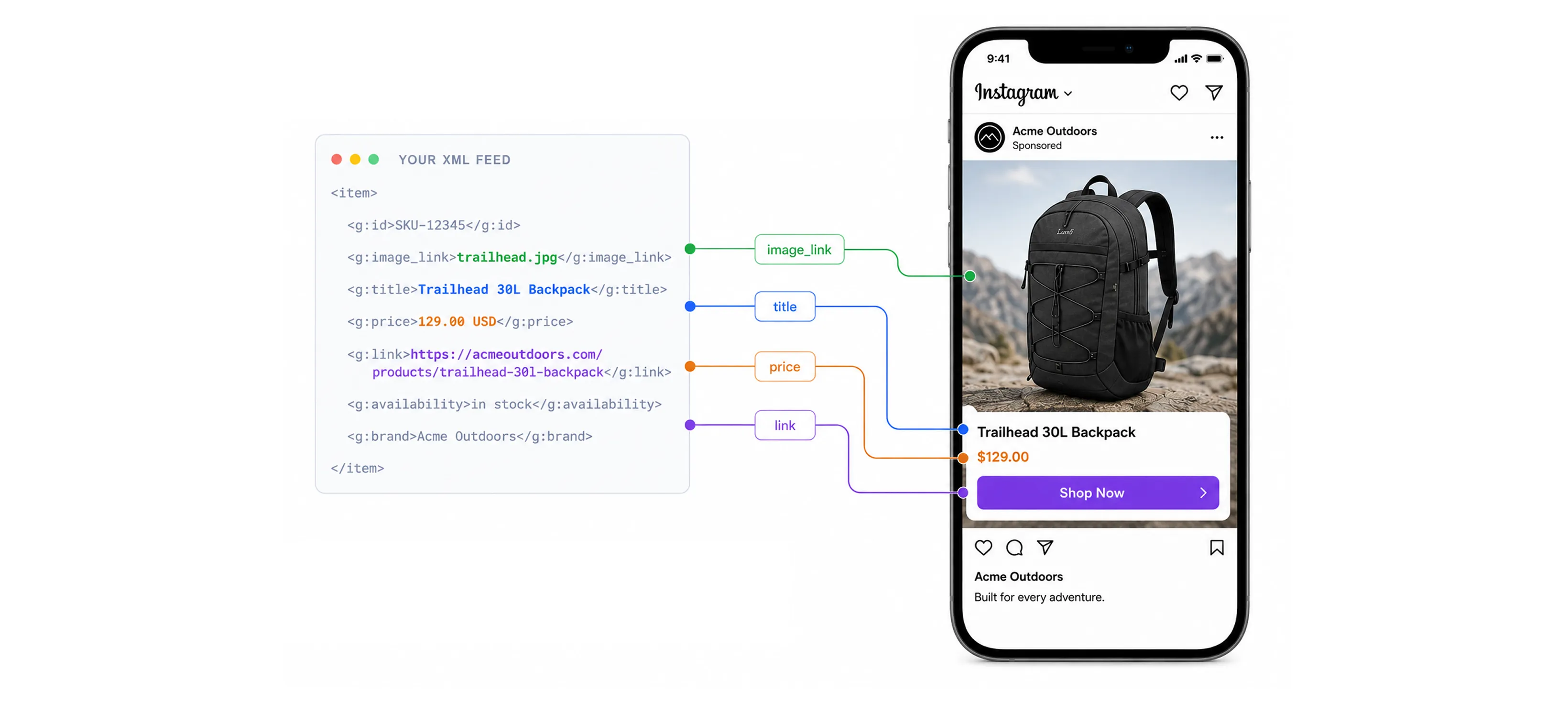
Every product ad you run is built from a file you rarely look at. When someone scrolls past your backpack on Instagram and sees the right photo, the current price, and an "in stock" tag, all of that was pulled from one place: your XML product feed.
This guide covers what an XML product feed actually is, how it's structured tag by tag, and how it stacks up against CSV, TSV, and JSON. You will also learn about the exact field and formatting rules Google Shopping and Meta each expect, so you can maintain one source feed that runs cleanly on both channels.
What is an XML product feed?
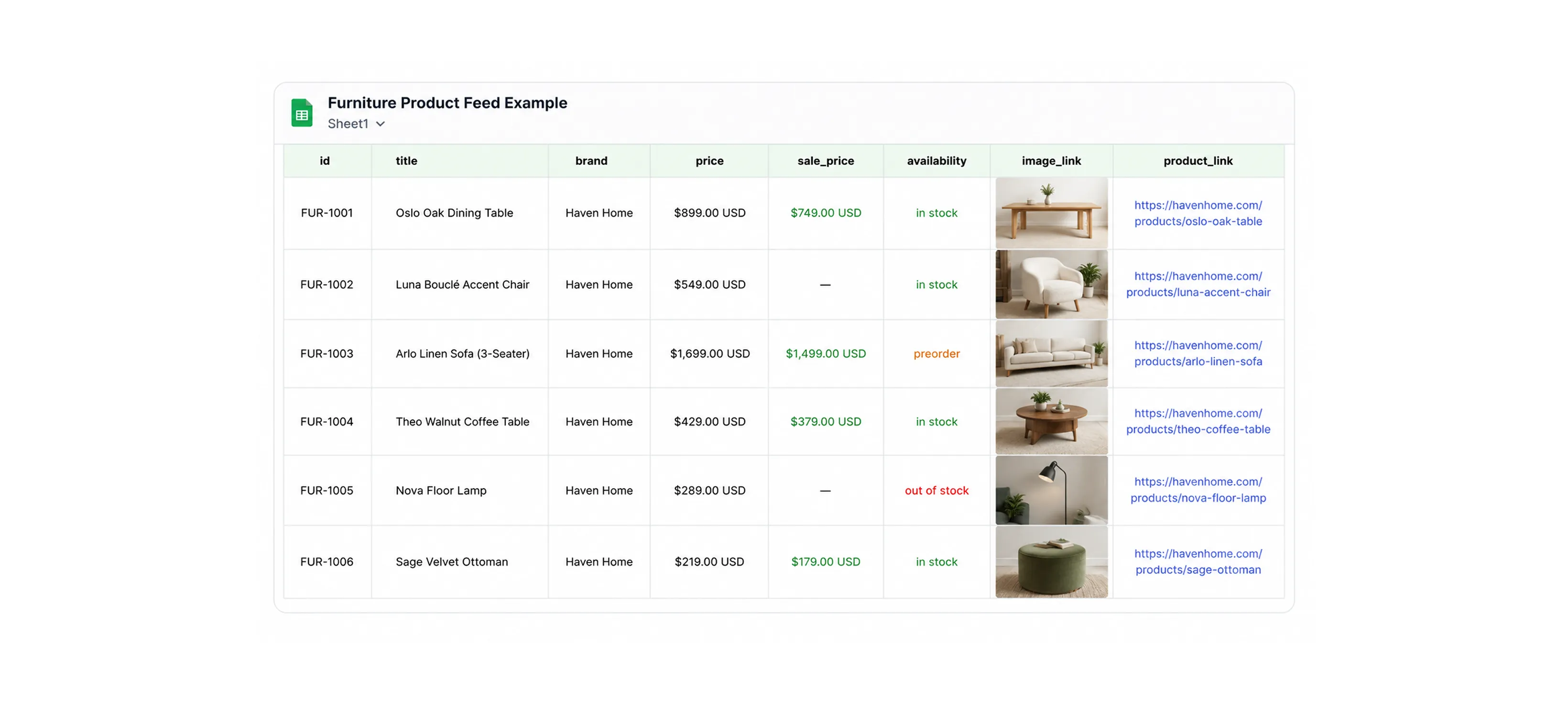
An XML product feed is a structured file that lists every product in your catalog along with the attributes that describe it: ID, title, price, availability, image, link, and so on. The "XML" part just means the data is wrapped in tags instead of sitting in spreadsheet columns. Ad platforms and shopping engines read that file, pull out the products, and use them to build dynamic ads, shopping listings, and catalog campaigns on your behalf.
If you already run Meta catalog ads or Google Shopping, you have one of these working behind the scenes whether you think about it or not. Your catalog is the source of truth, and the feed is how that catalog gets handed to the ad platform in a language it can parse.
Here is the smallest useful example. This is a single product expressed in the RSS 2.0 format that Google Merchant Center expects, using the Google namespace prefix g: for product attributes:
<?xml version="1.0" encoding="UTF-8"?>
<rss version="2.0" xmlns:g="http://base.google.com/ns/1.0">
<channel>
<title>Acme Outdoors Product Feed</title>
<link>https://www.acmeoutdoors.com</link>
<description>Active products for shopping and catalog ads</description>
<item>
<g:id>SKU-12345</g:id>
<g:title>Trailhead 30L Hiking Backpack, Slate</g:title>
<g:description>Lightweight 30-liter pack with a vented back panel and rain cover.</g:description>
<g:link>https://www.acmeoutdoors.com/products/trailhead-30l-slate</g:link>
<g:image_link>https://cdn.acmeoutdoors.com/img/trailhead-30l-slate.jpg</g:image_link>
<g:availability>in_stock</g:availability>
<g:price>129.00 USD</g:price>
<g:brand>Acme Outdoors</g:brand>
<g:condition>new</g:condition>
<g:gtin>0085847001234</g:gtin>
</item>
</channel>
</rss>
Your XML feed is the raw material that dynamic ads are built from. When someone browses the Trailhead backpack on your site and later opens Instagram, Meta does not generate that retargeting ad from scratch. It looks up SKU-12345 in the catalog it ingested from your feed, grabs the title, price, image, and link straight out of that <item>, and drops them into a template. The same is true for Advantage+ catalog ads choosing which products to show a cold audience.
That is why product feed quality is performance work, not just plumbing. The platform decides who sees an ad and when, but the creative it shows is assembled from your feed. A blurry image_link, a stale price, or an availability that says in_stock when the warehouse is empty all show up as worse ads and wasted spend. Get the feed right and you have given the algorithm clean, rich material to work with. That is the foundation everything in the rest of this guide builds on.
The anatomy, top to bottom
Read that XML file example from the outside in to understand the structure.
The <rss> element is the root, and it does one important job beyond declaring the version: the xmlns:g attribute imports the Google namespace. That is what lets you write <g:price> instead of plain <price>. The namespace prevents collisions and tells the platform exactly which dictionary of attribute names you are speaking. Drop it and your g: tags become meaningless.
Inside the root sits a single <channel>, which holds metadata about the feed itself (title, link, description) and then every product as a sibling list of <item> elements. One <item> equals one product. A real feed simply repeats the <item> block once per SKU, so a 50,000 product catalog is the same file with 50,000 item blocks.
Each <item> is a flat bag of attributes. Some are required for the feed to be accepted at all (id, title, description, link, image_link, availability, price), and the rest add targeting power and eligibility (brand, gtin, condition, product_type, google_product_category, and more). The platform validates these per product, so one malformed item gets disapproved while the rest of your catalog keeps running.
XML vs CSV vs TSV vs JSON: which product feed format to use
By now you know what an XML feed is, so a common question is why bother with it? CSV is a file you can open in a spreadsheet, TSV is even simpler, and JSON is what your developers already work in. So why does XML keep coming up as the recommended format, and when is one of the others actually the better call?
The answer is that the format is just a container.
The fields you send to Meta (id, title, availability, price, image_link, and the rest) stay the same no matter which one you pick. What changes is how the feed gets generated, how it breaks, and how easy it is to debug. XML earns its place by being the format that breaks in the fewest surprising ways at catalog scale. The fastest way to see the difference between different formats is to take one product and express it in all four.
CSV (comma-separated values)
A flat table. The first row is the header, every row after that is a product, and commas separate the columns.
id,title,description,availability,condition,price,link,image_link,brand
SKU123,Merino Wool Runner Natural Black,Lightweight everyday sneaker in breathable merino wool,in stock,new,98.00 USD,https://example.com/p/sku123,https://example.com/img/sku123.jpg,Example
Product descriptions are full of commas, so any field containing one has to be wrapped in double quotes, and a quote inside that field has to be escaped by doubling it. Miss one and the parser shifts every following column by one, which is how a price lands in the brand field.
TSV (tab-separated values)
Structurally identical to CSV, but columns are separated by a tab character instead of a comma.

Because real product copy almost never contains literal tab characters, TSV sidesteps the quoting and escaping problems that plague CSV. The downside is invisibility. A tab and a run of spaces look the same in most editors, so a feed that opens fine to the eye can still be malformed underneath.
XML (RSS 2.0 with the g: namespace)
A nested, tagged document. Meta reads the same RSS structure Google uses, where each product is an <item> and each field is a namespaced tag.
<?xml version="1.0" encoding="UTF-8"?>
<rss xmlns:g="http://base.google.com/ns/1.0" version="2.0">
<channel>
<title>Example Store</title>
<link>https://example.com</link>
<description>Product feed</description>
<item>
<g:id>SKU123</g:id>
<g:title>Merino Wool Runner Natural Black</g:title>
<g:description>Lightweight everyday sneaker in breathable merino wool</g:description>
<g:availability>in stock</g:availability>
<g:condition>new</g:condition>
<g:price>98.00 USD</g:price>
<g:link>https://example.com/p/sku123</g:link>
<g:image_link>https://example.com/img/sku123.jpg</g:image_link>
<g:brand>Example</g:brand>
</item>
</channel>
</rss>
Every field is explicitly labeled by its tag, so there is no column-order dependency and no delimiter to collide with your copy. Special characters still need care: &, <, and > have to be entity-encoded (&, <, >) or wrapped in CDATA. XML also handles repeated fields cleanly, so a product with several additional_image_link values or multiple variants is just more nested tags rather than an awkward pile of extra columns.
JSON (JavaScript Object Notation)
This is the format you reach for when you stop uploading files and start talking to the API. Meta does not accept JSON as a flat feed file. It is the payload format for the Catalog Batch API, where you push product updates programmatically instead of hosting a file for Meta to fetch.
{
"requests": [
{
"method": "CREATE",
"data": {
"id": "SKU123",
"title": "Merino Wool Runner Natural Black",
"description": "Lightweight everyday sneaker in breathable merino wool",
"availability": "in stock",
"condition": "new",
"price": "98.00 USD",
"link": "https://example.com/p/sku123",
"image_link": "https://example.com/img/sku123.jpg",
"brand": "Example"
}
}
]
}
JSON gives you typed values, nested objects, and arrays without ceremony, which makes it the natural fit for real-time inventory and price updates. The cost is that it is not a file you schedule and forget. It is an integration you build and maintain.
Side-by-side comparison
What this means for a Meta catalog
Meta Commerce Manager accepts product feeds as CSV, TSV, RSS XML, ATOM XML, XLSX, and Google Sheets, either as a one-time upload or a scheduled feed that refetches on a set interval.
Here's how you can make a decision:
- For a hosted file feed into Meta, you are really choosing among CSV, TSV, and XML.
- Pick CSV or TSV when your catalog is straightforward and your platform exports clean tabular data, and prefer TSV if your product copy is full of commas.
- Pick XML when you already maintain a Google Shopping feed and want one structure feeding both channels, or when your data has nested attributes that a flat table handles poorly.
- Choose JSON and the Batch API when file-based scheduling is too slow for how often your prices and inventory move, and you need updates to land in minutes rather than on the next scheduled fetch.
Whichever container you choose, the feed only decides what Meta knows about each product. Once delivery and Advantage+ take over, the creative built on top of that data is what decides whether the ad converts.
Google Shopping XML format requirements
Google reads two XML dialects for product feeds: RSS 2.0 and Atom 1.0. RSS 2.0 is what almost everyone uses, and the one rule that makes it a Google feed rather than a generic RSS file is the namespace declaration on the root element: xmlns:g="http://base.google.com/ns/1.0". That namespace is what gives you the g: prefixed attributes (g:id, g:price, and so on). Everything Google-specific lives under that prefix.
Here is a valid Google Shopping item with the attributes Google actually requires, plus the identifier attributes that decide whether your product is eligible at all:
xml
<?xml version="1.0" encoding="UTF-8"?>
<rss version="2.0" xmlns:g="http://base.google.com/ns/1.0">
<channel>
<title>Acme Outdoors</title>
<link>https://www.acmeoutdoors.com</link>
<description>Product feed for Google Shopping</description>
<item>
<g:id>SKU-12345</g:id>
<g:title>Trailhead 30L Hiking Backpack, Slate</g:title>
<g:description>Lightweight 30-liter pack with a vented back panel and a packable rain cover.</g:description>
<g:link>https://www.acmeoutdoors.com/products/trailhead-30l-slate</g:link>
<g:image_link>https://cdn.acmeoutdoors.com/img/trailhead-30l-slate.jpg</g:image_link>
<g:availability>in_stock</g:availability>
<g:price>129.00 USD</g:price>
<g:brand>Acme Outdoors</g:brand>
<g:gtin>0085847001234</g:gtin>
<g:mpn>TH30-SLT</g:mpn>
<g:condition>new</g:condition>
</item>
</channel>
</rss>
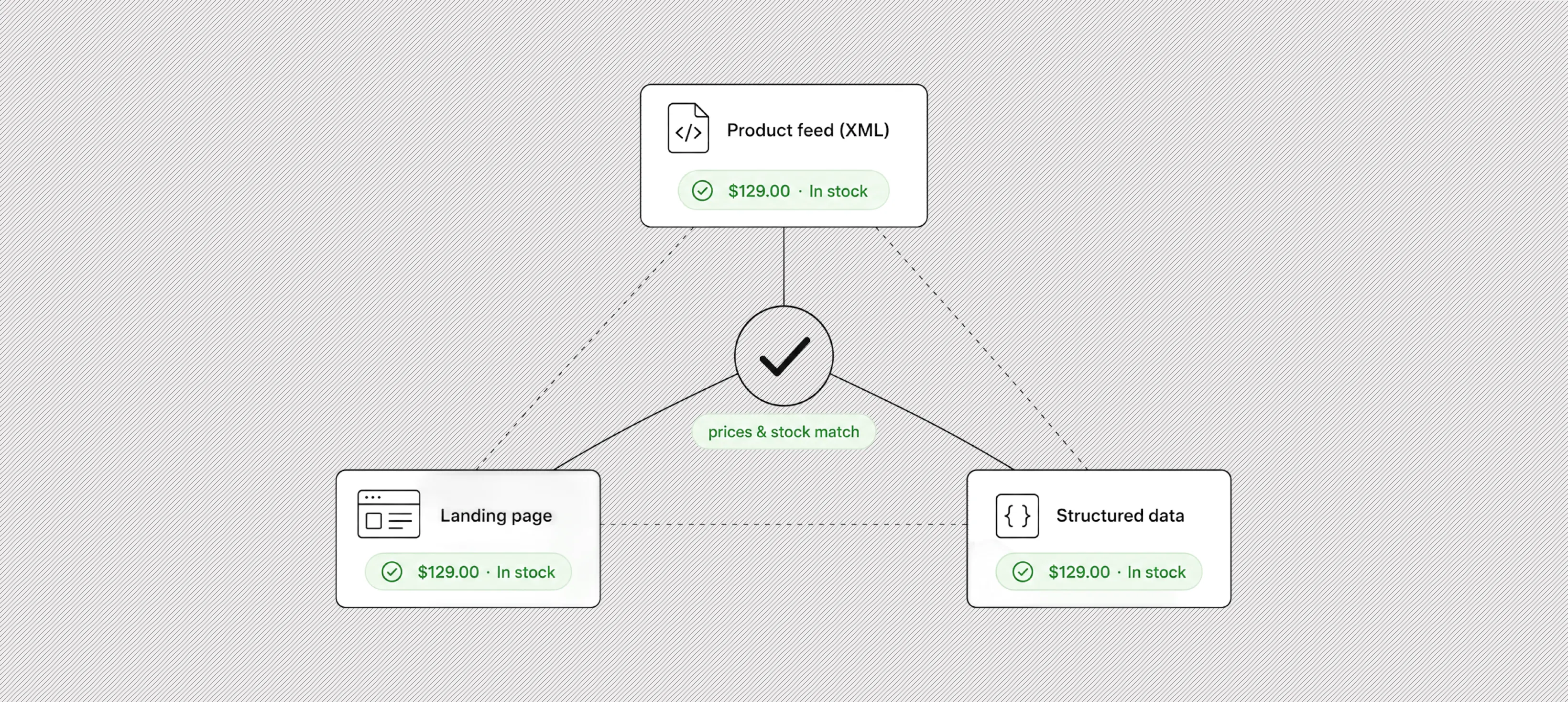
Google ingests the feed on a schedule you set, and it caches whatever it last fetched. Price and availability in the feed must match the landing page and your structured data, or the product gets disapproved. Treat the feed, the page, and the schema markup as three copies of the same truth.
What Google treats as required for every product is a short list: id, title, description, link, image_link, availability, and price. The formatting rules on those are strict and worth memorizing.
id must be unique per product, stay stable over time, and is capped at 50 characters. title is capped at 150 characters and description at 5000, both plain text, with no promotional language like "free shipping" and no all-caps. availability accepts exactly four values: in_stock, out_of_stock, preorder, or backorder. price must be a number followed by a space and the three-letter ISO 4217 currency code, using a period as the decimal separator, like 129.00 USD, with no currency symbol.
Then there are the identifier attributes, which Google handles conditionally rather than as a flat requirement.
- brand is required for all new products except movies, books, and musical recordings.
- gtin is strongly recommended whenever a manufacturer-assigned barcode exists, because supplying it improves matching and eligibility.
- mpn is required only when the product has no manufacturer-assigned GTIN. If a product genuinely has none of these unique identifiers, you set g:identifier_exists to no rather than leaving the fields blank and hoping.
- condition (values new, refurbished, or used) is required whenever the item is not new.
Google has announced a minimum image size of 500 by 500 pixels for all product images, with enforcement beginning January 31, 2027. If your image_link images are smaller, fix them before that date.
Meta XML feed format
Meta did not invent its own XML dialect. A Meta (Facebook and Instagram) catalog feed in XML uses the exact same RSS 2.0 structure and the exact same Google namespace, xmlns:g="http://base.google.com/ns/1.0", with the same g: prefixed tags. That is why a Google Shopping feed can often be pointed at Meta Commerce Manager with only small changes. Meta accepts XML in both RSS and Atom flavors, alongside CSV, TSV, XLSX, and Google Sheets.
Here is a Meta-ready item. Note the variant grouping with item_group_id and the apparel attributes, which matter more on Meta than they do for a basic Google listing:
<?xml version="1.0" encoding="UTF-8"?>
<rss version="2.0" xmlns:g="http://base.google.com/ns/1.0">
<channel>
<title>Acme Outdoors Catalog</title>
<link>https://www.acmeoutdoors.com</link>
<description>Product feed for Meta Commerce Manager</description>
<item>
<g:id>SKU-12345-M</g:id>
<g:title>Trailhead Insulated Jacket, Slate, Medium</g:title>
<g:description>Packable insulated jacket with a water-resistant shell and zip hand pockets.</g:description>
<g:availability>in stock</g:availability>
<g:condition>new</g:condition>
<g:price>189.00 USD</g:price>
<g:link>https://www.acmeoutdoors.com/products/trailhead-jacket-slate</g:link>
<g:image_link>https://cdn.acmeoutdoors.com/img/jacket-slate.jpg</g:image_link>
<g:brand>Acme Outdoors</g:brand>
<g:item_group_id>TRAILHEAD-JACKET</g:item_group_id>
<g:color>Slate</g:color>
<g:size>M</g:size>
<g:gender>unisex</g:gender>
<g:age_group>adult</g:age_group>
</item>
</channel>
</rss>
Meta's required fields for a standard catalog are id, title, description, availability, condition, price, link, image_link, and brand. The formatting differs from Google in a few specifics worth catching.
- id allows up to 100 characters and is case sensitive, so item101 and ITEM101 are two different products.
- title allows up to 200 characters, though Meta recommends staying under 65 so it does not get truncated in placements.
- description is plain text up to 9,999 characters. condition uses new, refurbished, or used.
- price follows the same convention as Google: a number, a space, and the ISO 4217 code, with a period decimal and no currency symbol, like 189.00 USD, and a single currency per feed.
Availability is the field where people get tripped up. Meta's primary values are in stock and out of stock, and it also supports available for order, preorder, and discontinued. Meta tolerates both the spaced form (in stock) and the underscored form (in_stock), but pick one convention and keep it consistent across the feed.
Images on Meta must be JPEG or PNG, at least 500 by 500 pixels (1024 by 1024 recommended), and under 8 MB. As with Google, changing an image requires changing its URL for Meta to pick up the new version, so do not reuse a URL for a swapped image.
Two areas pull Meta feeds beyond a plain Google feed. The first is variants and apparel: products that come in sizes and colors should share an item_group_id, and clothing and footwear typically need color, size, gender, and age_group to run well in catalog ads. The second is on-platform checkout for the US, which adds required fields such as quantity_to_sell_on_facebook so Meta can decrement inventory as orders come in.
Meta accepts up to 100 MB for a one-time upload and up to 4 GB for a scheduled feed, with ZIP or GZIP compression supported for large files, and a practical ceiling of around one million items per feed before you should split it. Scheduled fetches can run hourly, daily, or weekly, which is the lever you use to keep price and stock current.
How Marpipe turns your product feed into ads that convert
Here's the thing though: just having a clean feed isn't enough. Getting the format right is the foundation, the fields valid, prices matched, images sized, variants grouped the way Meta and Google expect. But that only gets your products into the system. It doesn't decide whether the ads built from them actually sell.
Once the data is correct, the platform builds each ad from whatever creative you hand it. Across a catalog of hundreds or thousands of SKUs, that means producing enough on-brand creative for every product, and keeping the feed itself clean as prices, stock, and products change. That's the part that's hard to do by hand, and it's usually where performance stalls.
This is where Marpipe fits. It works on both halves of the problem: keeping your feed clean and enriched close to the source, and turning that feed into test-ready creative at the volume catalog ads reward.
- Clean and enrich your feed: Fix titles, images, prices, and missing attributes before they ever reach Meta or Google.
- Generate creative variants at scale: Build dozens of on-brand ad versions per product in an editor, with no design bottleneck.
- Use AI for the repetitive work: Background removal, messaging, and layout, handled so your team can focus on what sells.
- Produce image and video: Give every placement the format and variety it rewards.
- Test and keep what works: Spot the variants driving sales and double down instead of guessing.
Book a demo and we'll take a single product from your XML product feed and show you a full set of test-ready ads built from it in minutes.
Frequently asked questions
Can I use the same XML feed for both Google Shopping and Meta?
Often yes, with small edits. Both read RSS 2.0 with the same Google namespace and the same g: prefixed tags, so a working Google feed can usually be pointed at Meta Commerce Manager. The differences are in the details, like availability values (in_stock vs in stock) and Meta-specific fields such as item_group_id for variants. Keep one source feed, then adjust those fields per channel rather than maintaining two feeds from scratch.
Which feed format should I use: XML, CSV, TSV, or JSON?
For a hosted file feed into Meta, you are really choosing among CSV, TSV, and XML, since JSON is API-only. Pick CSV or TSV when your catalog is simple and exports cleanly, and prefer TSV if your product copy is full of commas. Choose XML when you already run a Google Shopping feed and want one structure feeding both channels, or when your data has nested attributes. Use JSON and the Batch API only when you need near real-time price and inventory sync.
How often does my product feed update?
It updates on the schedule you set, not instantly. Both Google and Meta fetch the feed on an interval (hourly, daily, or weekly) and cache whatever they last pulled. So a price change on your site does not reach the ad platform until the next scheduled fetch. If your prices or stock move faster than that, use scheduled hourly fetches or push updates through the API instead of waiting on a file refresh.
Why do products get disapproved in my feed?
The most common causes are mismatches and missing required fields. If the price or availability in the feed does not match the landing page and your structured data, the product gets disapproved, so treat the feed, the page, and the schema as three copies of one truth. Other frequent culprits are images below the minimum size, missing identifiers like GTIN or brand, and malformed values such as a price with no currency code.
Do I really need GTINs in my feed?
It depends on the product. GTIN is strongly recommended whenever a manufacturer-assigned barcode exists, because supplying it improves matching and eligibility. If a product has no GTIN, you provide an MPN instead, and brand is required for most new products. When an item genuinely has none of these unique identifiers, set identifier_exists to no rather than leaving the fields blank.
How do I handle product variants like sizes and colors?
Group them with a shared item_group_id so the platform knows they are versions of one product. Each variant is still its own item with its own unique id, price, and image, but the matching item_group_id ties them together. For apparel and footwear, you also want color, size, gender, and age_group filled in, since Meta leans on those attributes to run catalog ads well.
