



If you sell products on TikTok, building a separate TikTok ad for each one is a tedious task. TikTok Dynamic Showcase Ads fix that. You connect your product catalog once, and TikTok assembles personalized, shoppable ads from it, showing each viewer the items they are most likely to buy. Someone who browsed your running shoes sees those shoes again. Someone who looked at jackets sees outerwear.
This guide shows you what ads TikTok Dynamic Showcase Ads are, what you need in place before you start, the product feed fields TikTok requires, how to build the campaign in Ads Manager step by step, and the catalog habits that keep it performing. Get those right and you have a feed and a campaign that drive customers to your store.
What are TikTok Dynamic Showcase Ads?
TikTok Dynamic Showcase Ads (DSAs) are automated ads that pull products straight from your catalog and show each viewer the items they are most likely to care about. Instead of building one ad per product, you connect your catalog once and TikTok generates personalized product ads at scale, matched to what each person has browsed or shown interest in.
The "dynamic" part is the personalization.
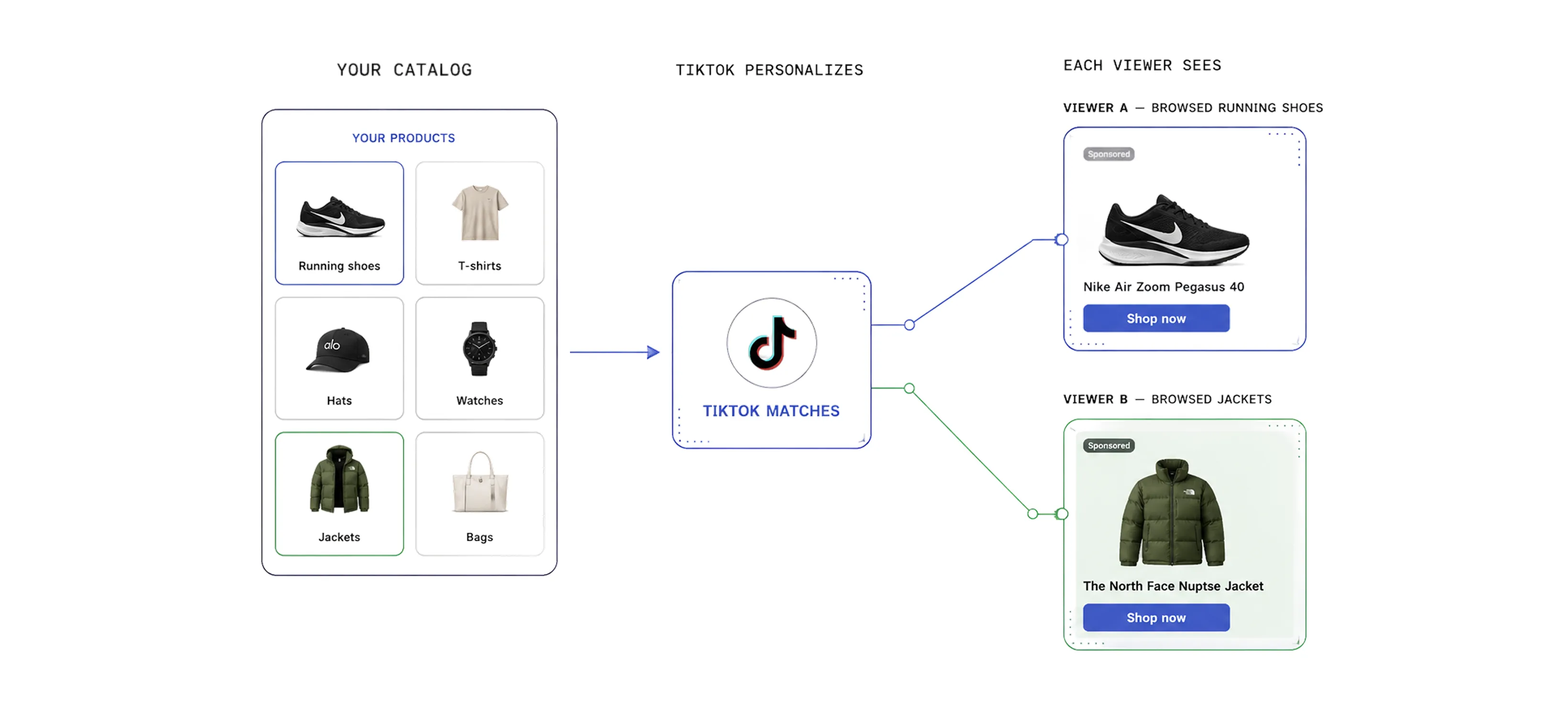
Two people scrolling TikTok can see the same campaign but different products inside it, based on their behavior. A shopper who viewed a pair of running shoes on your site might see those exact shoes again in their feed, while someone who browsed your jackets sees outerwear instead. This makes DSAs especially useful for retargeting, where you re-engage people who looked at a product but did not buy.
TikTok no longer uses "Dynamic Showcase Ads" as an official product name. The format and its benefits now live inside Catalog Ads, set up under the Sales objective, with an AI-automated version called Smart+ Catalog Ads. Many marketers still call them Dynamic Showcase Ads out of habit, so this guide uses the current names while pointing out where the old term fits.
What you need before you start
Before you build a Catalog Ads campaign, a few things need to be in place. Get these sorted first, because a missing piece will stop the setup partway through.
Here's the checklist:
- A TikTok Ads Manager account. This is where you build the catalog and the campaign.
- A product catalog with at least 4 products that are in stock, approved, and active. Catalog ads will not run below that minimum.
- A few videos or carousels built from your catalog products, with at least 6 videos recommended so the system has room to optimize.
- Your product data ready. This is the catalog feed itself, and it pays to get it right the first time.
Detailed catalog product parameters are available for managed accounts in markets where Video Shopping Ads (Catalog) has launched. If you are unsure whether your account qualifies, check with your TikTok representative before you build the feed.
That product feed is where most of the work sits. TikTok uses 9 required fields and 27 optional ones. The required fields are the bare minimum to get a product into the catalog, and the optional fields are what sharpen targeting and recommendations. Treat the whole set as one job rather than doing the minimum, because the optional fields are often what decide who sees your products.
At minimum, every product needs all 9 of these:
- SKU ID (required): a unique identifier for the item. Reuse the same ID when you update a product so it replaces the right one.
- Title (required): the product name. Keep out promotional text like "free shipping" or "high quality," which can get products rejected.
- Description (required): a short, plain description of the item.
- Availability (required): the stock status, using one of TikTok's set values (in stock, available for order, preorder, out of stock, discontinued).
- Condition (required): new, refurbished, or used.
- Price (required): the cost and currency, matching the price on your landing page exactly.
- Link (required): the product landing page URL. Check these regularly so you avoid 404s and dead pages.
- Image link (required): the URL of the product image, ending in JPG or PNG. For 1:1 carousel images, use at least 500x500 pixels.
- Brand (required): the real brand name, not a placeholder.
Then add as many of the optional fields as you can. The ones worth prioritizing are:
- Product category and product type: map your item into Google's taxonomy and your own, so TikTok places it in the right context.
- Video link: supplies the video used in video placements, ideally vertical 9:16.
- Additional image links: up to 10 extra images per product.
- Item group ID: ties variants of the same product together, like sizes or colors, so your ads do not compete with themselves.
- Color, size, gender, age group, material, pattern: product attributes that help TikTok match items to the right shoppers.
- Sale price (and sale price effective date): shows discounts, and is required if you want to use a discount overlay.
- GTIN and MPN: standard identifiers that improve recognition.
- Shipping, shipping weight, and tax: fill out delivery and cost details.
- iOS URL and Android URL: marked optional, but actually required for app retargeting and deeplinks.
- Custom labels: up to five fields for your own grouping, useful for bidding and reporting.
The rule of thumb is the same as any catalog ad platform. The more accurate detail you give, the better TikTok can match your products to the right people, and the more your ads can do.
TikTok does not accept images hosted on some common services, including Pinterest, Dropbox, Google Drive, and Flickr. Host your images somewhere TikTok can reliably reach them, or products may stall in review.
How to create TikTok Catalog Ads
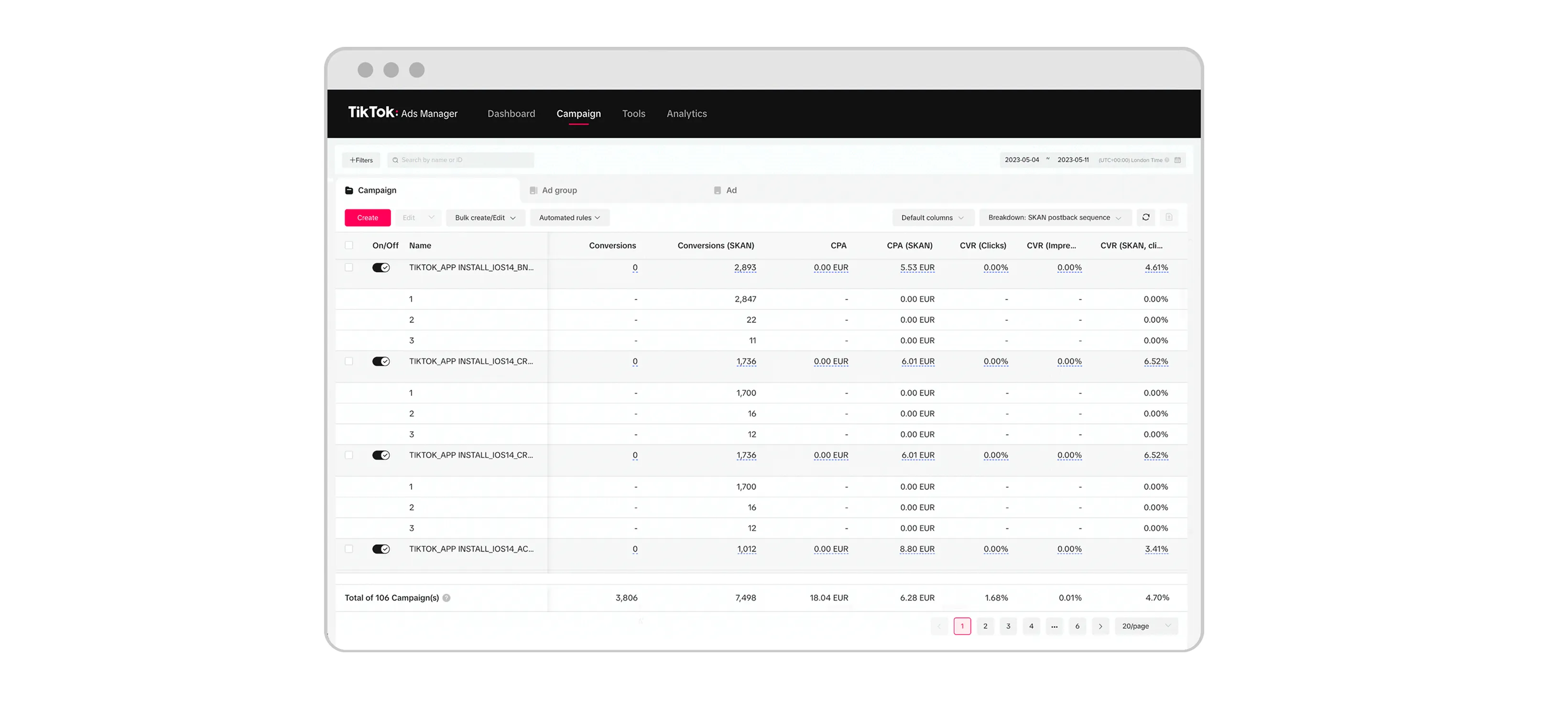
Setting up TikTok Catalog ads takes two stages. First is getting your catalog ready, then building the campaign in TikTok Ads Manager. The flow below uses Smart+ Catalog Ads, the AI-automated version, since it handles most of the targeting and optimization for you. No TikTok Shop is required. If your product source is a catalog, you can run these without setting up a Shop.
Before you begin make sure these are ready:
- A product catalog with at least 4 products that are in stock, approved, and active.
- A few videos or carousels built from your catalog products. TikTok recommends having at least 6 videos to give the system room to optimize.
Step-by-step setup
Once your catalog is ready, here is the path inside TikTok Ads Manager:
- Log in to TikTok Ads Manager and click Campaign, then +Create.
- Select Sales as your objective, then choose Website as the destination.
- Choose Smart+ campaign as the campaign type and click Continue.
- In the Catalog section, turn on Use catalog and pick the catalog you want, or create a new one.
- Fill in your ad group settings and click Continue.
- Choose which products to feature:
- All products: everything in your catalog.
- Product set: a defined group, with products served dynamically.
- Specific products: hand-pick up to 20.
- In the Ads generation section, optionally turn on Use TikTok account to run Spark Ads from authorized posts or accounts.
- Add the destination URL, plus any URL parameters you want for tracking which ads drove the visit.
- In Creatives, click Edit Creative Assets to choose images or videos from your catalog, or upload new ones. Use Preview to check them before publishing.
- Toggle on Add videos to catalog and link products so new videos sync to Catalog Manager for reuse later. TikTok auto-maps SKUs to videos, and you can click View linked products to confirm or adjust the matches.
- Leave the dynamic add-ons on. These are the interactive elements, like product cards and tiles, that let people browse your products inside the ad.
- In the Tracking section, add any third-party tracking you use, then finish your remaining ad settings and click Publish.
Once you publish, your ads and the products in your catalog go to review. After approval, the campaign starts optimizing toward your goal, and you can edit anything later from the Campaign tab.
Best practices for your TikTok catalog
Keeping your ad campaign performing comes down to catalog hygiene, because TikTok can only recommend products that are accurate, in stock, and free of errors. These habits keep the system working with good data:
- Refresh your catalog daily. Sync prices and availability between your catalog and your website every day. When the two drift apart, shoppers see one price in the ad and another at checkout, which hurts both performance and trust.
- Keep products in stock. Monitor inventory and restock actively so items stay eligible to show. An out-of-stock product drops out of rotation, so the more of your catalog that stays available, the more TikTok has to work with.
- Resolve catalog and event issues quickly. Unresolved errors in your catalog or your pixel and app events can stop products from being shown at all. Use the Diagnostic dashboard in Catalog Manager to find and fix problems before they limit your reach.
- Keep everything in one catalog. Upload all your products to a single catalog rather than splitting them across several. One catalog gives you higher event match rates and lets you manage all your product sets in one place, so you can slice them for different campaigns without duplicating work.
- Retarget with your full catalog. Give the system your entire product range for retargeting instead of a narrow slice. The wider the pool, the better TikTok can pick the most relevant item for each viewer.
Choose Marpipe to make your TikTok catalog ads convert
Once your catalog is clean and your campaign is live, you have solved the targeting problem. TikTok can now match the right product to the right viewer. But matching is only half the job. On a platform built on video, what actually stops the scroll is the creative, and a catalog ad pulling a bare product image rarely earns that pause.
This is where most TikTok catalog campaigns leave performance on the table. Standard catalog ads serve the plain product shot straight from your feed, so they look like ads in a place where people come for content. The feed gets your products in front of the right people, but a static image gives them little reason to stop.
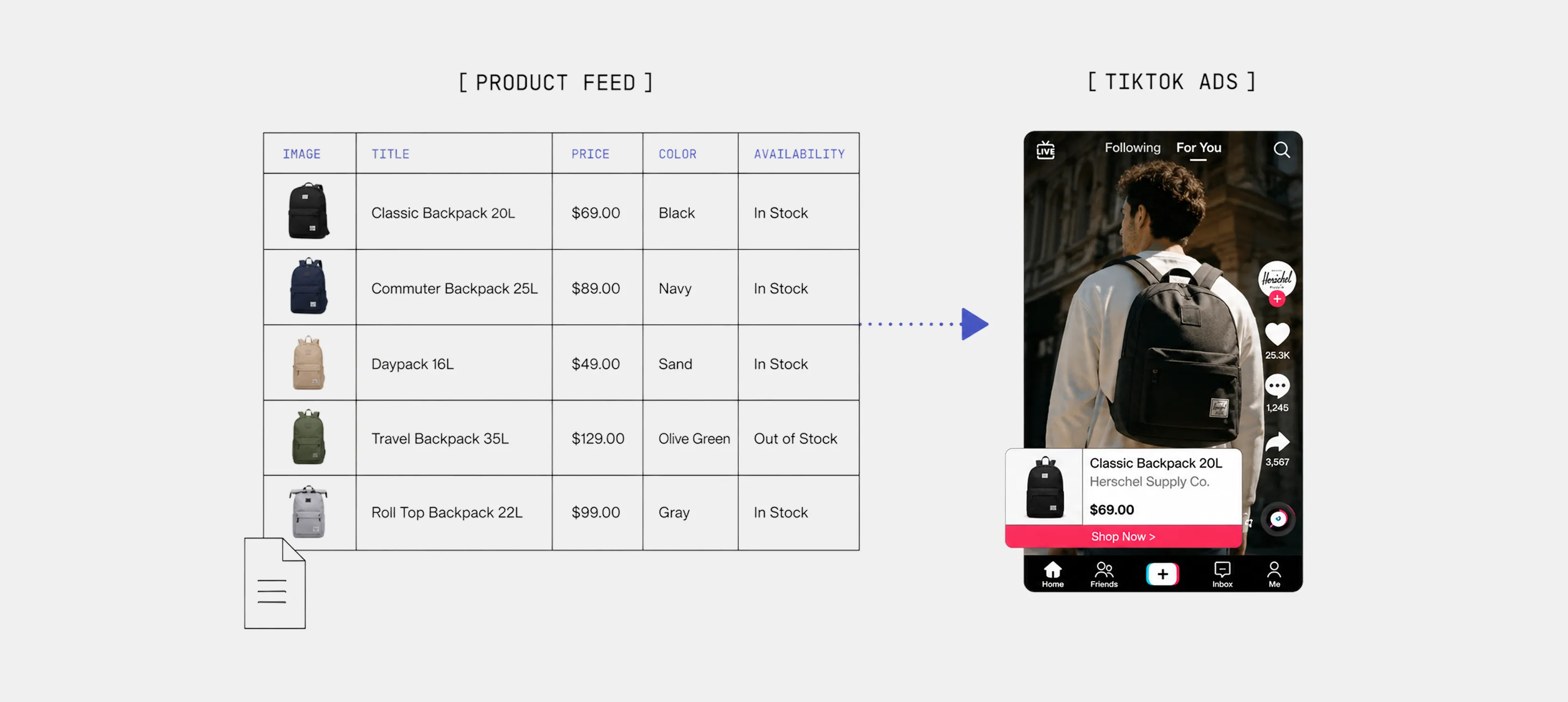
Marpipe works on that gap. It turns your product catalog into designed, testable creative built for social commerce, so your catalog ads look native to TikTok instead of auto-generated.
- Apply branded templates, dynamic text, and countdown or inventory overlays across your whole catalog at once.
- Turn any product image into a short, thumb-stopping video ad, the format TikTok rewards most.
- Test many creative variations to find what actually resonates with a TikTok audience, then keep the winners in rotation.
The principle runs through this whole guide. Your catalog decides who sees your products. Your creative decides whether they stop and buy. Get the feed right first, then make the creative work as hard as the data behind it.
Book a demo with Marpipe to turn your product catalog into scroll-stopping TikTok ads that help you sell faster.
FAQs
Are TikTok Dynamic Showcase Ads the same as Catalog Ads?
Yes, in practice. Dynamic Showcase Ads is the older name for the format. TikTok has folded its functionality into Catalog Ads, set up under the Sales objective, with an AI-automated version called Smart+ Catalog Ads. The core idea has not changed: both pull products from your catalog and show each viewer personalized recommendations. If you go looking for "Dynamic Showcase Ads" in Ads Manager today, you will set them up through Catalog Ads instead.
Do I need a TikTok Shop to run Catalog Ads?
No. If your product source is a catalog, you can run Catalog Ads without setting up a TikTok Shop. You connect your product feed, and TikTok builds the ads from that. A TikTok Shop is only required if you want to run Video Shopping Ads that sell directly through the Shop. For ads that drive people to your own website, a catalog is all you need on the product side.
How many products do I need to run TikTok Catalog Ads?
At least 4. Your catalog needs a minimum of 4 products that are in stock, approved, and active before Catalog Ads will run. TikTok also recommends adding at least 6 videos so the system has enough creative to test and optimize. In general, the more of your catalog that stays available and accurate, the better TikTok can match the right product to each viewer, so keep your full range live where you can.
What is the difference between Smart+ Catalog Ads and manual Catalog Ads?
Smart+ Catalog Ads are the AI-automated version. TikTok handles targeting, creative selection, and budget optimization for you, which keeps setup simple. Manual Catalog Ads give you direct control over each setting, including audience and creative choices, in exchange for more hands-on work. Smart+ suits teams that want to scale quickly and let the system optimize. Manual suits advertisers who want tighter control over specific levers. Both pull from the same catalog and serve personalized product ads.
Why are my products not showing in my TikTok ads?
Usually it comes down to catalog health. Products that are out of stock, rejected, or carrying unresolved errors get held back from delivery. Mismatched prices or broken landing page links can also limit reach. Check the Diagnostic dashboard in Catalog Manager to find and fix issues, keep your feed refreshed daily so prices and availability stay accurate, and make sure images are hosted somewhere TikTok can reach. A clean, current catalog is what keeps products eligible to show.
