


%20Examples_result.webp)
The reason most catalog ads underperform has nothing to do with budget or targeting. It's that they all look identical. Same product tile, same price, same auto generated headline, sitting in the same feed as a dozen competitors selling the same thing. Platforms like Meta make dynamic product ads easy to launch, and that is exactly why most of them get ignored.
The brands winning with dynamic product ads aren't spending more. They're structuring the creative differently. They take the same catalog data everyone has access to and frame it in a way that stops the scroll, whether that's social proof, urgency, a price drop, or real people using the product.
Below are eight dynamic product ad setups that do this well, from retargeting carousels to broad catalog prospecting. Start with the ones that match where your campaigns are stuck right now, and build from there.
1. The Retargeting Carousel
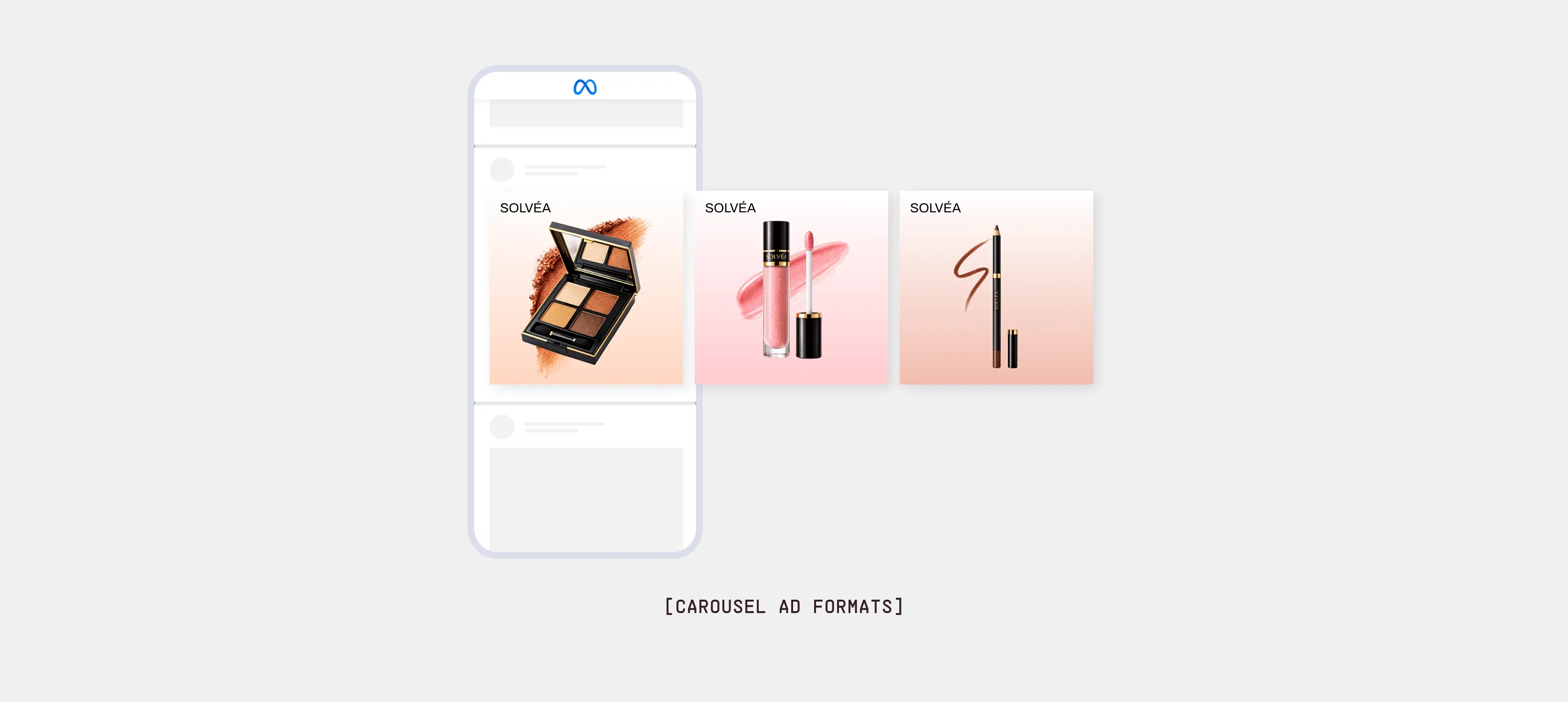
This is the most common dynamic product ad there is. Someone browses a few products, leaves, and later sees those same products again in a swipeable carousel. The intent is already there. The ad's only job is to bring them back without making them think.
That low bar is what makes it deceptively easy to get wrong. The audience is warm, so the ad converts even when it's ugly, which means most brands never bother to improve it. They let the raw feed populate everything: cropped-off product shots, default titles like "Mens Cotton Crew Tee - Navy - M," prices floating on plain white. It works, but it leaves money on the table, because the warmest audience you have is looking at your least considered creative.
The brands that win this format treat the carousel as designed creative, not an automated afterthought. The product images are framed consistently so the set looks like one brand instead of a scraped spreadsheet. The titles read like a human wrote them. And there is a reason to act now layered on top, whether that's a price the shopper already saw, low stock, or a small badge of social proof.
If your retargeting carousel looks identical to your competitor's, you're relying on the platform to do the convincing. It won't. The shopper already knows the product. What pulls them back is seeing it presented in a way that makes the brand feel worth returning to.
2. The "Still Thinking About This?" Carousel
This is a close cousin of the retargeting carousel, but with a message layer added on top. Instead of just showing the products back, the ad names the behavior: "Still thinking about this?" or "Left something behind?" The product stays the focal point, but a line of copy acknowledges that the shopper was here before and didn't finish.
It's for warm retargeting audiences, especially cart and checkout abandoners. It works best when there was clear intent to buy, like an add-to-cart or a started checkout, where a small nudge can tip a hesitation into a purchase.
The copy does the work here, and most brands push it too hard. "DON'T MISS OUT" stacked with a countdown and a discount reads as desperate, and it trains shoppers to wait for a deal every time.
The better version sounds like a helpful reminder, not a sales pitch. Acknowledge the hesitation, keep it light, and let the product carry the weight. If you add an incentive, make it a reason rather than a panic button: free shipping over a threshold, a size back in stock, a price that hasn't moved. The goal is to feel relevant, not pushy.
3. The Price Drop Trigger
Some of the best dynamic product ads don't rely on clever copy at all. They just show the shopper that something changed. The price drop ad does exactly that: a person looks at a product, doesn't buy, and the next time they see it, the price is lower. The number does the convincing, and the ad pulls the new price straight from your feed the moment it updates.
It's useful during seasonal markdowns, end-of-line clearance, a flash promo, a price test that finally landed. Anyone who showed interest before a drop is the perfect person to re-reach the instant it happens, because they already wanted the thing and now have a concrete reason to act.
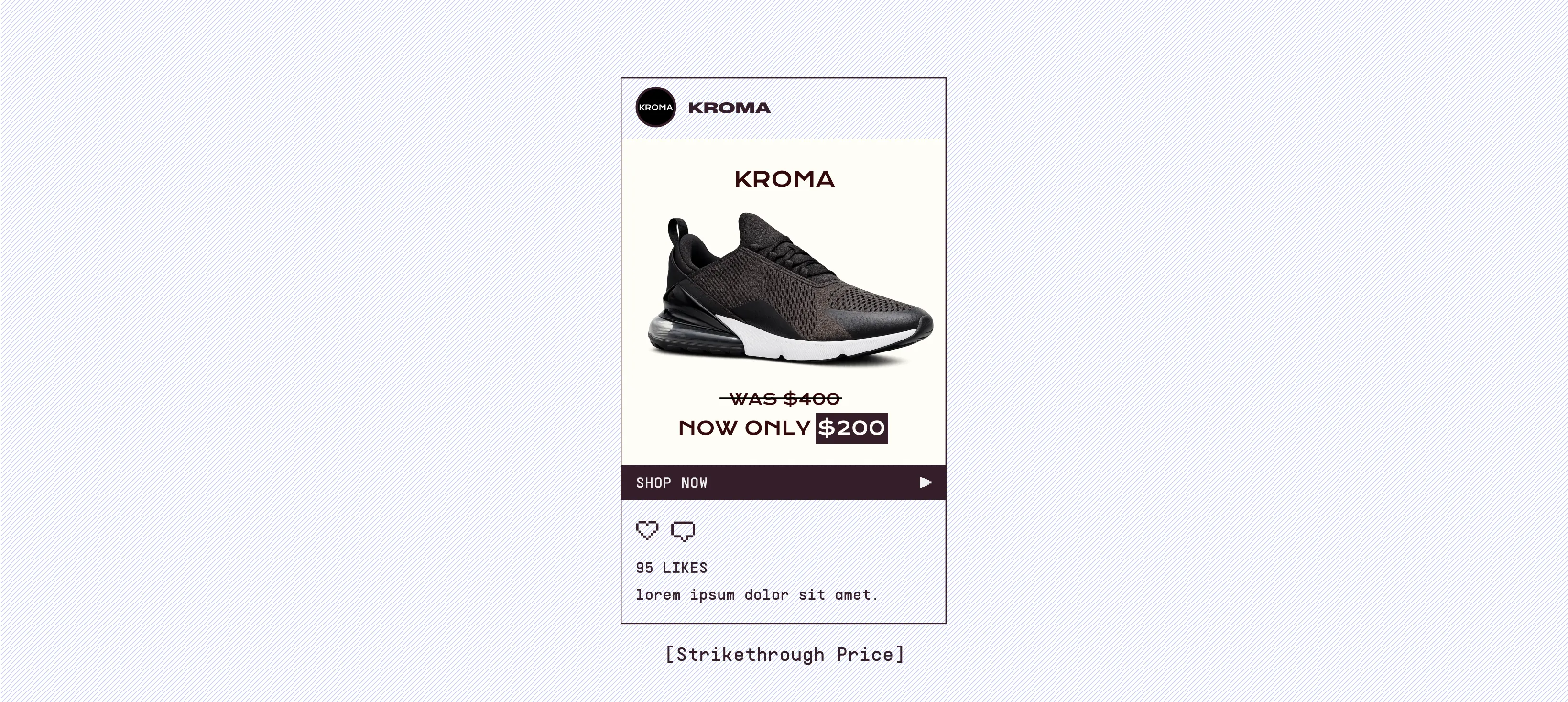
The part that trips brands up is timing and trust.
If your feed and your ads aren't synced, you end up advertising a discount that no longer exists or, worse, showing an old higher price next to a "sale" that isn't one. The whole effect depends on the strikethrough being real and current. Get that right and the ad sells itself, because you're not asking the shopper to feel anything new. You're just telling them the one thing that changed in their favor.
4. The Best Seller Highlight
This ad shows off your most popular products instead of reacting to what a shopper looked at. The creative adds a label like "Best Seller," "Most Loved," or "Trending Now," and your product feed decides which items qualify based on real sales or performance data.
It's a good fit for cold audiences who don't know your brand yet. If someone has never heard of you, telling them "this is the one people buy most" is easier than showing a random product. It puts your social proof right on the ad, where a new visitor can actually see it.
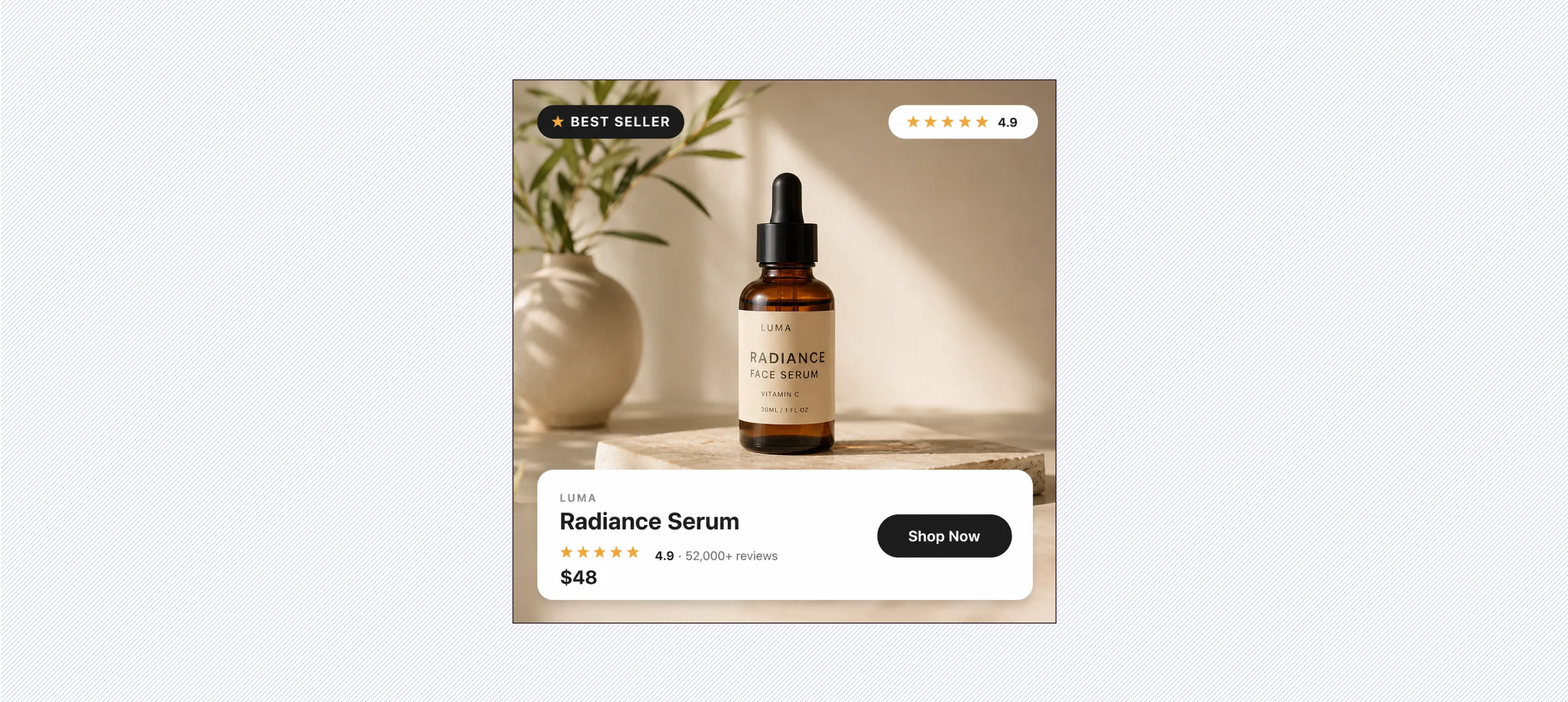
The label only works if it's true. If every product says "Best Seller," people stop believing it. Use it on the items that have really earned it, and be specific where you can. "Over 4,000 sold" works better than "popular" because it's a real number, not a claim.
5. The Collection-Based Layout
This ad groups products by theme instead of showing them one at a time. Rather than a random mix from your catalog, the shopper sees a set that belongs together, like "Summer Essentials," "Top-Rated Running Shoes," or "Under $50 Favorites." The grouping comes from your feed, so you can build it around category, price, or any tag you use.
It works well for shoppers who are still browsing and haven't settled on one product yet. A themed set helps them picture a few options at once and feels more like a curated shelf than a scattered catalog. It's also a nice fit for prospecting, since a clear theme gives a new audience an easy way in.
The main thing that makes or breaks this one is how clean your feed is. If your products aren't tagged in a sensible way, the groups end up feeling random and the whole effect falls apart. Good category, price, and seasonal tags are what let you build collections that actually look intentional.
6. The UGC and Catalog Hybrid
This ad mixes real customer content with your catalog. Instead of a plain product tile on a white background, the creative includes something like a short lifestyle video, a customer clip, or a real-use photo, with the product still pulled from your feed. The catalog handles which product shows up, and the human content makes it feel less like an ad.
It's a good fit for cold and mid-funnel audiences who don't trust a polished product shot yet. Seeing the product used by a real person answers the quiet question every new shopper has, which is whether the thing actually looks and works the way the photos suggest.
The hard part is keeping the content and the product matched.
A lifestyle clip of one item next to a different product in the feed feels off and breaks the trust you were trying to build. Plan which content pairs with which products, and lean on clips that show the product clearly rather than ones that just look nice.
7. The Cross-Sell Follow-Up
This ad runs after someone buys. Instead of advertising the product they already own, it shows things that go with it. Someone buys running shoes, and later they see socks, insoles, or a water bottle. The feed handles which products pair together, so the recommendation feels related instead of random.
It's for existing customers, and it's one of the easier ways to get more value from people who already trust you. The first purchase is the hard part. Once someone has bought once, a useful follow-up is a natural next step, not a cold pitch.
The thing to get right is which products you pair.
If the matches are sloppy, you end up showing shoes to someone who just bought shoes, and it feels like the brand isn't paying attention. Set up your product relationships or tags so the follow-up actually complements the first order. Done well, it lifts repeat revenue without you spending more to find new customers.
8. The Broad Catalog Prospecting Ad
This ad uses your catalog to reach brand-new people instead of retargeting past visitors. The platform looks at behavior, interests, and conversion signals to decide which products to show to audiences who have never been to your site. You're not picking the exact product for each person. The system matches items from your feed to people it thinks will respond.
It's a good fit for brands with wide-appeal products and enough sales history for the platform to learn from. If your catalog is broad and your tracking is solid, this becomes a way to grow past the limited pool of people who already know you.
On a cold audience, a plain product tile blends into everything else and gets ignored, because these people have no reason to care yet. The versions that work give the platform real creative to choose from, like clean branded layouts, a few different angles, and the kind of design that stands out next to everyone else's defaults. Automation decides who sees the ad. The creative decides whether they stop.
Marpipe Helps Brands Create Winning Catalog Ads
Every example here points to the same shift. Showing the product is no longer enough. The feeds are more crowded every quarter, attention spans keep shrinking, and a plain catalog tile asks a shopper to do all the work of getting interested. The ads that win now carry design, branding, social proof, and urgency, all pulled live from the same product feed.
That is exactly what Marpipe is built to do.
It gives you full design control over every SKU in your catalog, so your ads look like your brand instead of a spreadsheet. You build one dynamic template and generate thousands of brand-perfect creatives, then layer on the angles that actually move people: real-time social proof, countdown timers, inventory scarcity, strikethrough pricing, dynamic color, and more.
You stop running one flat layout and hoping. You test real creative at catalog scale and let performance decide what wins. That is how catalog ads go from a checkbox to your best-performing channel.
Book a demo and we'll show you how to turn one product into a full set of dynamic product ads that actually win against your competitors, and get you higher conversions.
Frequently Asked Questions
What is a dynamic product ad (DPA)?
A dynamic product ad pulls items straight from your product feed and automatically builds the creative for each shopper, instead of you designing one ad per product. The platform decides which product to show based on what someone browsed or what it predicts they'll respond to. It's how brands advertise large catalogs without making a separate ad for every SKU.
Why do most dynamic product ads underperform?
Usually not budget or targeting, but creative. Most DPAs let the raw feed populate everything, so they end up as a plain product tile sitting next to a dozen near-identical competitors. Nothing makes a shopper stop. The ones that convert treat the catalog ad as designed creative, with consistent framing, readable titles, and a reason to act like social proof, urgency, or a price drop.
What's the difference between retargeting and prospecting with DPAs?
Retargeting shows people the products they already browsed, so the intent is there and the ad just has to bring them back. Prospecting uses your catalog to reach brand-new people who've never visited, with the platform matching feed items to audiences it thinks will respond. Retargeting forgives weak creative because the audience is warm; prospecting punishes it, because a cold audience has no reason to care about a plain tile yet.
Do I need a clean product feed to run dynamic product ads?
Yes, the feed is what makes or breaks most of these formats. Collections only group sensibly if your products are tagged well, price-drop ads only work if the feed and ads stay synced, and cross-sell only feels relevant if your product relationships are set up. A messy feed produces random-looking groups, fake-looking sale prices, and mismatched recommendations.
Which type of dynamic product ad should I start with?
Start with the one that matches where your campaigns are stuck. If you're leaving warm traffic on the table, fix the retargeting carousel or add a "still thinking about this?" message layer. If you're trying to reach new people, focus on best-seller highlights, UGC hybrids, or broad catalog prospecting, where strong creative matters most. Pick one, get it right, then build from there.
