



“DPA is bigger than anyone thinks. People are usually shocked to hear that 1/4th of all digital ads in paid social were dynamic product ads. Most major retailers and most major DTC brands are relying on DPAs as a workhorse in their ad accounts." - Dan Pantello, CEO of Marpipe
That reality is now playing out on TikTok. TikTok dynamic product ads have quickly become a core part of how brands drive consistent sales, not by creating more ads, but by building a system that automatically matches products to the right people.
Instead of guessing what might work, these ads use your product catalog and real user behavior to deliver relevant products at the right time. The result is not just more reach, but better efficiency, which is what ultimately drives stronger ROAS.
In this guide, we’ll break down how TikTok dynamic product ads work, how to set them up properly, and what actually moves performance once they’re live.
What Are TikTok Dynamic Product Ads?
TikTok dynamic product ads are a type of ad that automatically shows products from your catalog to the right people based on what they’ve already shown interest in. Instead of building ads one by one, TikTok pulls product details like images, pricing, and descriptions directly from your product feed and turns them into personalized ads.
Think of it like this. Someone visits your site, looks at a pair of sneakers, then leaves. Later, while scrolling TikTok, they see a video featuring that same pair. That’s not random. That’s TikTok dynamic product ads working in the background.
If you’re not familiar with Dynamic Product Ads (DPAs), let’s get you up to speed! They’ve become so effective at driving sales that 25% of all paid social ad spend goes towards DPAs.
On TikTok, dynamic product ads are part of what’s now called Video Shopping Ads. While other platforms like Meta use static images heavily, TikTok focuses on video-first experiences. That means your products are not just shown, they’re presented in motion, often blended into the feed like organic content.
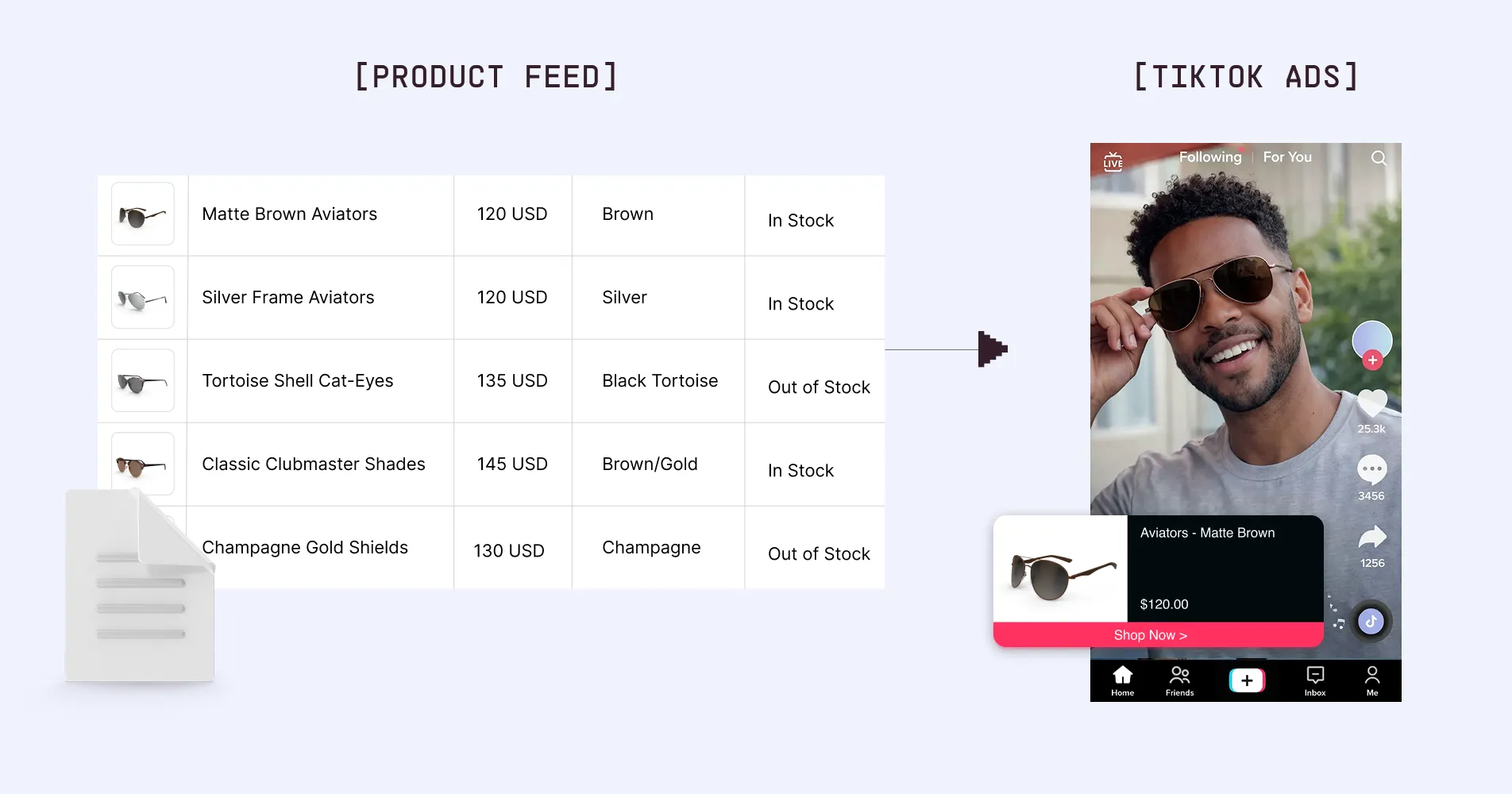
DPAs, DSAs, & Video Shopping Ads on TikTok
So far, we’ve referred to feed-powered catalog ads as Dynamic Product Ads; however, DPA is actually a name specific to and popularized by Meta (Facebook & Instagram). TikTok’s ad platform includes dynamic product ad functionality, but by a different name.
Originally, TikTok launched their equivalent to Dynamic Product Ads as Dynamic Showcase Ads (DSA). However, this ad format has become so popular that, as of September 2024, TikTok has rolled up dynamic product & catalog ads as a core feature of its TikTok’s main Video Shopping Ads. RIP to the DSA.
For this article and others, we’ll use both “dynamic product ads” and “catalog ads” as an umbrella term across all platforms.
How to Set Up TikTok Dynamic Product Ads
What you’re really doing is connecting your product data, tracking, and creative so TikTok can automatically match products to the right users.
Step 1: Create and Upload Your Product Catalog
Everything starts with your catalog. This is what TikTok uses to build and deliver your ads.
To run TikTok dynamic product ads, you need:
- At least 4 approved products in your catalog
- A properly structured product feed
TikTok’s feed includes:
- 9 required fields (like title, price, image)
- 27 optional fields that help improve performance
You can also include:
- Up to 10 images per product
- A video URL field for video-based creatives - we make this easier by generating video variations at scale, so each product has its own video asset ready to be pulled into your TikTok dynamic product ads.
TikTok supports catalogs with up to 20 million products, so this setup works whether you have a small store or a massive inventory.

Step 2: Create a Campaign in TikTok Ads Manager
Once your catalog is ready:
- Go to TikTok Ads Manager
- Create a new campaign
- Select Product Sales as your objective
This is what enables catalog-based delivery and tells TikTok to optimize for purchases, not just traffic.
Step 3: Select Your Product Catalog
Inside your ad group:
- Go to the Product Source section
- Select the catalog you just uploaded
You can also create product sets to control what gets shown, such as:
- Best sellers
- Categories
- Price ranges
This gives you more control over how your TikTok dynamic product ads are distributed.
Step 4: Choose Your Creative Format
TikTok allows multiple formats within dynamic product ads:
- Single video (recommended)
- Carousel images
- Template-based video creatives
You can also use the video URL field from your catalog, which lets TikTok pull in product-specific videos automatically.
Video usually performs best because it matches how people browse TikTok, but testing different formats is key.
Step 5: Define Audience, Budget, and Launch
Finish setting up your campaign by:
- Defining your audience (retargeting or broad)
- Setting your budget
- Finalizing placements and bidding
Once everything is in place, publish your campaign.
TikTok Dynamic Product Ads Optimization Strategies
Once your campaign is live, performance comes down to how well you improve the inputs feeding into TikTok’s system. TikTok handles delivery and matching, but your product feed, creative, and campaign structure determine how effective that matching is. If those inputs are strong, ROAS improves. If they’re weak, performance stalls no matter how much you spend.
At a high level, improving ROAS with TikTok dynamic product ads comes down to improving your inputs. The better your feed, creative, and structure, the better TikTok can do its job.
Product Feed Optimization
Your product feed is the foundation of TikTok dynamic product ads. Every decision TikTok makes, from which product to show to who sees it, depends on the data in your feed. That includes titles, images, pricing, and availability. If that data is incomplete or inconsistent, TikTok has less to work with, which leads to weaker performance.
Tools like our Feed Management help by centralizing and optimizing product data at scale. Instead of manually updating fields or fixing inconsistencies, you can clean, enrich, and structure your feed in a way that improves how TikTok interprets your products.
Tips to improve your product feed:
- Use clear, descriptive product titles with key attributes included
- Maintain consistent, high-quality images or videos across all products
- Keep pricing and availability accurate and updated in real time
- Group products into logical sets (best sellers, categories, margins)
- Continuously audit and clean your feed instead of treating it as static
Creative Optimization
Even though TikTok dynamic product ads are automated, creative still plays a major role in performance. TikTok is a content-driven platform, so how your product is presented can significantly impact engagement and conversion.
Most brands rely too heavily on static product images. This makes ads feel native to TikTok and gives the algorithm more options to test and optimize. Creative fatigue is another common issue. If you use the same template or visuals across all products, performance will drop over time. Rotating formats, styles, and messaging helps maintain engagement and keeps results stable.
Tips to improve creative performance:
- Use video whenever possible, especially at the product level
- Test different formats like lifestyle, demo, and UGC-style content
- Rotate templates regularly to avoid creative fatigue
- Avoid relying on plain product-on-white-background visuals
- Match creative style to how users naturally consume content on TikTok
Audience & Targeting Optimization
TikTok’s strength is its ability to find the right audience based on behavior, not just predefined targeting. Because of that, overly restrictive targeting often limits performance instead of improving it.
A better approach is to start broader and let TikTok learn which users convert. You can then layer in retargeting for users who have already shown intent, such as viewing a product or adding to cart. The goal is to give TikTok enough data and flexibility to optimize delivery while still maintaining control where it matters.
Tips to improve audience performance:
- Start with broader targeting to allow TikTok to learn faster
- Use retargeting for high-intent users like product viewers or cart abandoners
- Avoid over-segmenting early in the campaign lifecycle
Campaign Structure Optimization
How you structure your campaigns affects how quickly TikTok can learn and how efficiently it can scale. Overcomplicating the structure too early often slows down performance. Instead, start with a simple setup and then segment based on actual results. For example, separating best-selling products from long-tail inventory allows you to allocate budget more effectively.
Tips to improve campaign structure:
- Keep the initial campaign structure simple to speed up learning
- Segment high-performing products into their own groups
- Allocate more budget to best sellers and proven SKUs
- Avoid creating too many ad groups early on
Ongoing Testing and Iteration
Optimization is not a one-time setup. TikTok dynamic product ads improve over time, but only if you continue feeding the system better data and creative.
This means regularly updating your feed, refreshing creatives, and analyzing product-level performance. The brands that see the best results treat this as an ongoing process, not a set-and-forget campaign.
Tips for ongoing optimization:
- Refresh creatives consistently to maintain engagement
- Monitor product-level performance, not just campaign-level metrics
- Update your product feed as inventory and pricing change
- Test new formats, templates, and product groupings regularly
Creative Formats for TikTok Dynamic Product Ads
TikTok actually offers both video and image formats within its Video Shopping Ads.
Video Shopping Ads
Video shopping ads are the most popular format that TikTok has made available to their advertisers.
These video shopping ads appear directly in users’ feeds as they scroll through the app. While they can easily skip past them, the ads showcase products to users who’ve already engaged with similar product content, making them far more likely to engage compared to a more broadly targeted audience.
Carousel Image Ads
You can serve static imagery within your catalog-powered ad with TikTok’s carousel image ads. This ad format allows advertisers to showcase multiple static images within a single ad unit, creating a scrollable carousel. Users can swipe through the images, and each image can have its own caption and link, giving advertisers the flexibility to highlight different products, features, or messages within one ad.
Key Specs for TikTok Dynamic Showcase Ads/Video Shopping Ads
Since TikTok Dynamic Showcase ads are videos, they follow the required ad specs for videos on TikTok.
- Resolution (Pixels): 720x1280, 640x640, 1280x720
- File Formats: MP4, MPEG, MOV, AVI
- Video Duration: :05s - :16s
- File Size: Maximum 500MB
The Benefits of Dynamic Product Ads on TikTok
Audience Reach
TikTok's user base is absolutely huge, with 1 billion people scrolling for hours on the platform every month; think of all that attention your company is missing out on. If you choose to advertise on TikTok, you get access to their entire user base. But they'll make sure you reach the right customers who want to buy your products rather than wasting your ad spend and just showing your catalog to random people.
Creative Efficiency
TikTok’s catalog ads are programmatically generated, helping you and your team cut down 100s of hours in creative production time and ad campaign setup as you scale. You can now instead focus on maintaining and optimizing a robust product feed while setting high-level goals for the ad campaigns in your account.
Improved Conversion
TikTok doesn't just display your dynamic ads to a wide audience; they’re carefully tailored to each user based on their interests, location, behavior, age, and gender.
Whether you’re retargeting ad engagers and site visitors or reaching new audiences with a DABA strategy, the growing popularity of catalog-powered ads stems from their proven ability to drive conversions for brands like yours.
Differentiate Your TikTok Dynamic Product Ads with Marpipe
Now that you’ve mastered the technical ins and outs of TikTok dynamic product ads, your greatest challenge as a marketer on TikTok will be differentiation. On one end of the differentiation spectrum, a sea of brands chasing the latest meme trend; on the other end, brands default to the standard product on a white background image.
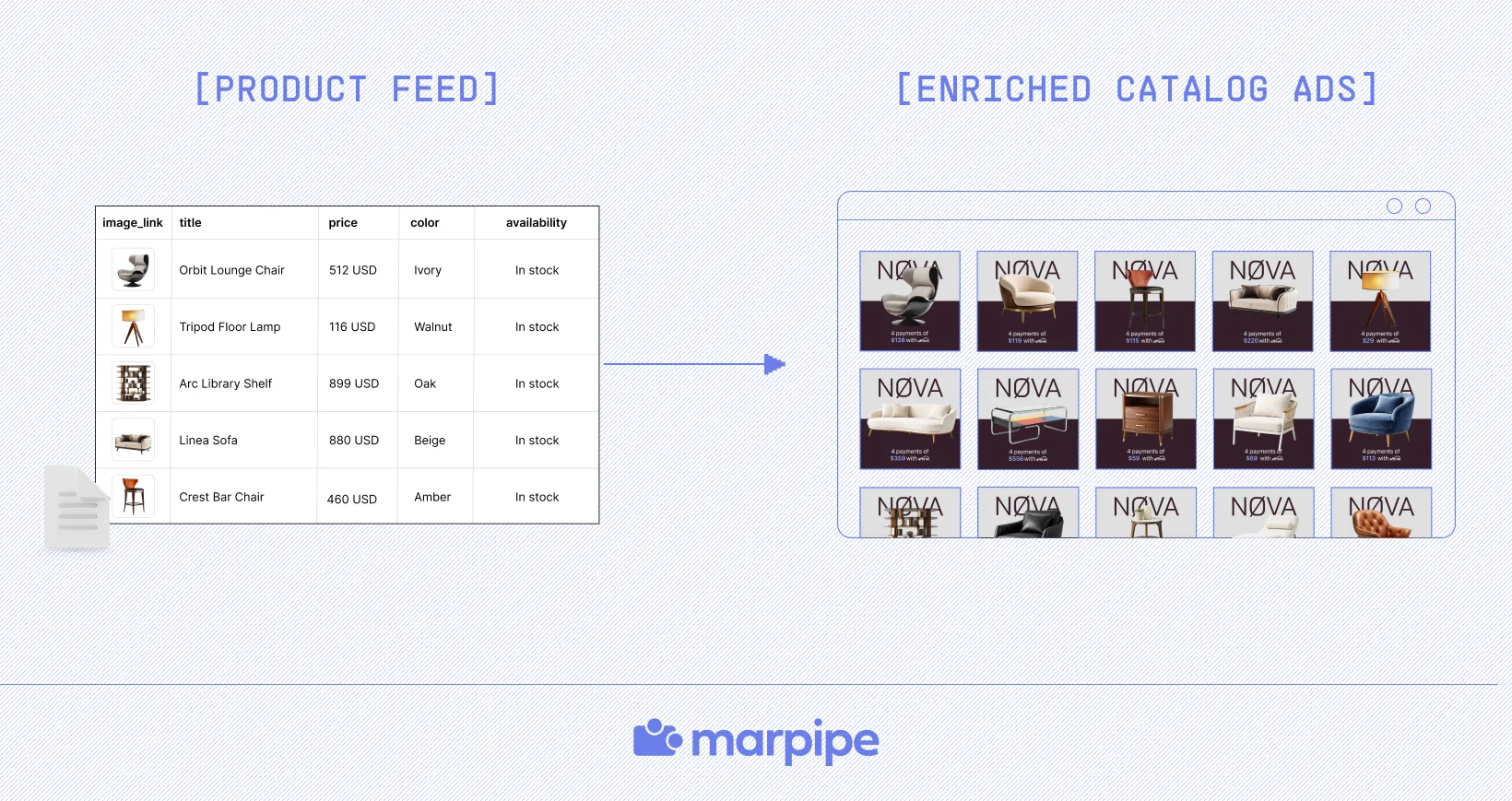
Marpipe makes it easy to create scroll-stopping DPA ads with generative AI tools, templates, and much more. The beauty of Marpipe is that our creative editor is powered by the same product feed that fuels your catalog ads.
Instead of guessing what might work, you can produce and test variations across your entire catalog, giving TikTok more to optimize and improving results over time.
What this unlocks:
- Scalable creative tied directly to your product feed
- Faster testing without manual production bottlenecks
- More variation across products to improve engagement
- Better alignment between feed, creative, and performance
Ready to see how this works in practice? Book a demo with Marpipe and see how to scale TikTok dynamic product ads more effectively.
Frequently Asked Questions
How are TikTok dynamic product ads different from regular TikTok ads?
Regular TikTok ads are manually created and show the same message to everyone. TikTok dynamic product ads are automated and personalized. They pull products from your catalog and match them to users based on behavior. This makes them more relevant and scalable, which is why they typically perform better for driving conversions.
What is a product feed?
A product feed is a file containing information needed to display your products across online marketplaces, search engines, and social media channels, like TikTok, that support commerce experiences. Without a clean and well-structured feed, TikTok dynamic product ads won’t perform well because the system relies on that data to build and deliver ads.
If you’re unfamiliar with the term, read our guide to product feeds first and then come back here to dive deeper into dynamic ads on TikTok.
If you’re familiar with product feeds but haven’t set one up yet for your TikTok shop or ad account, check out this TikTok’s support article.
What budget do I need to run TikTok dynamic product ads?
There’s no strict minimum, but you need enough budget for TikTok to gather data and optimize. Starting too low limits learning and slows performance. A good approach is to set a budget that allows consistent conversions so the system can improve over time. Focus less on the exact number and more on whether your campaign is generating enough activity to learn.
How do I know if my TikTok dynamic product ads are performing well?
Look beyond just clicks. Strong performance comes from metrics like ROAS, conversion rate, and cost per acquisition. If you’re seeing consistent purchases and improving efficiency over time, your ads are working. Product-level performance is also important, since some items will drive more revenue than others. For deeper context, refer to DPA cost and performance benchmarks.
How often should I update my TikTok dynamic product ads?
You should update them regularly to maintain performance. Creative fatigue happens quickly on TikTok, so refreshing visuals and testing new variations help keep engagement high. Your product feed should also stay updated as inventory, pricing, or availability changes. Treat optimization as an ongoing process rather than something you set once. For best practices for feed, see our TikTok product feed guide.
