


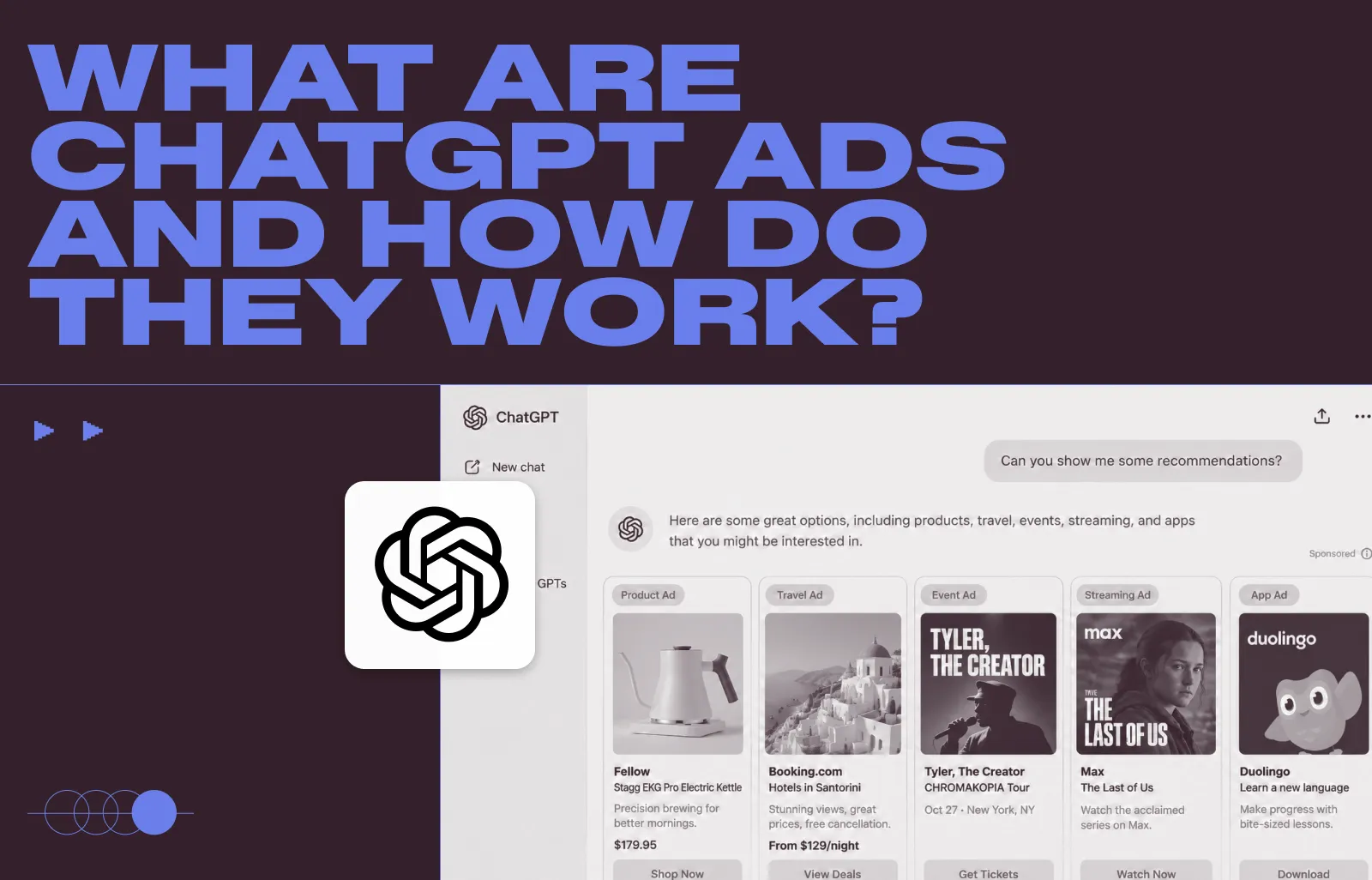
ChatGPT ads are sponsored placements that can appear separately from ChatGPT responses for eligible users. Unlike traditional search ads, advertisers don’t bid on exact-match keywords. Instead, ad relevance can be informed by the context and intent of a conversation, advertiser targeting, creative, context hints, and bids.
For advertisers, that creates a different kind of paid media environment. Instead of reaching someone scrolling through a feed or entering a short search query, an ad can appear while someone is actively researching a problem, comparing options, or deciding what to buy.
This guide explains how ChatGPT ads work, what they look like, who can see them, how targeting and bidding work, what advertisers pay, how performance is measured, and how product feeds fit into the process.
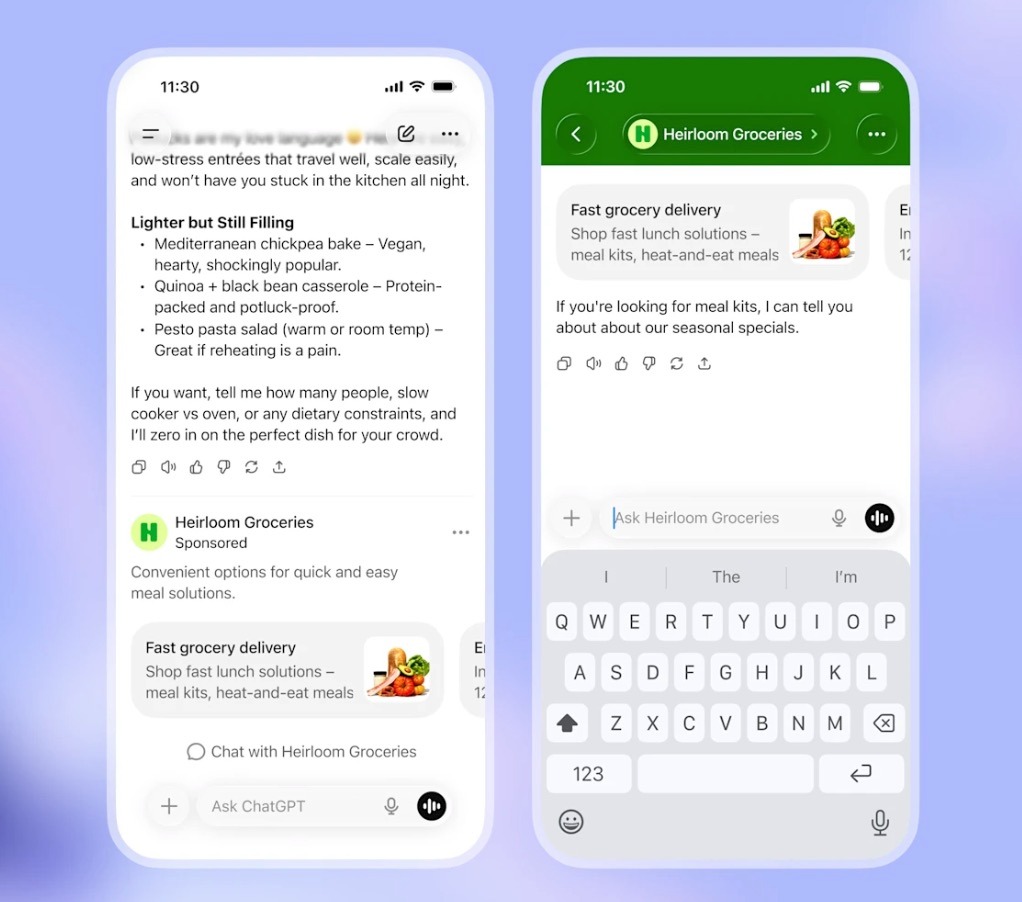
Source: https://openai.com/
What are ChatGPT ads?
ChatGPT ads give advertisers a way to reach people while they’re using ChatGPT. Campaigns are created and managed through OpenAI’s Ads Manager, currently in beta, and ads can appear below a response when there’s a relevant match.
Sponsored placements stay separate from ChatGPT’s answer. Paying for an ad does not influence what ChatGPT says or which brands it recommends organically.
What a ChatGPT ad looks like
A standard ChatGPT ad includes six core elements:
- Advertiser name
- Favicon, which is the advertiser’s logo
- Title, or headline
- Copy, or description
- Image asset, or creative
- Landing page URL
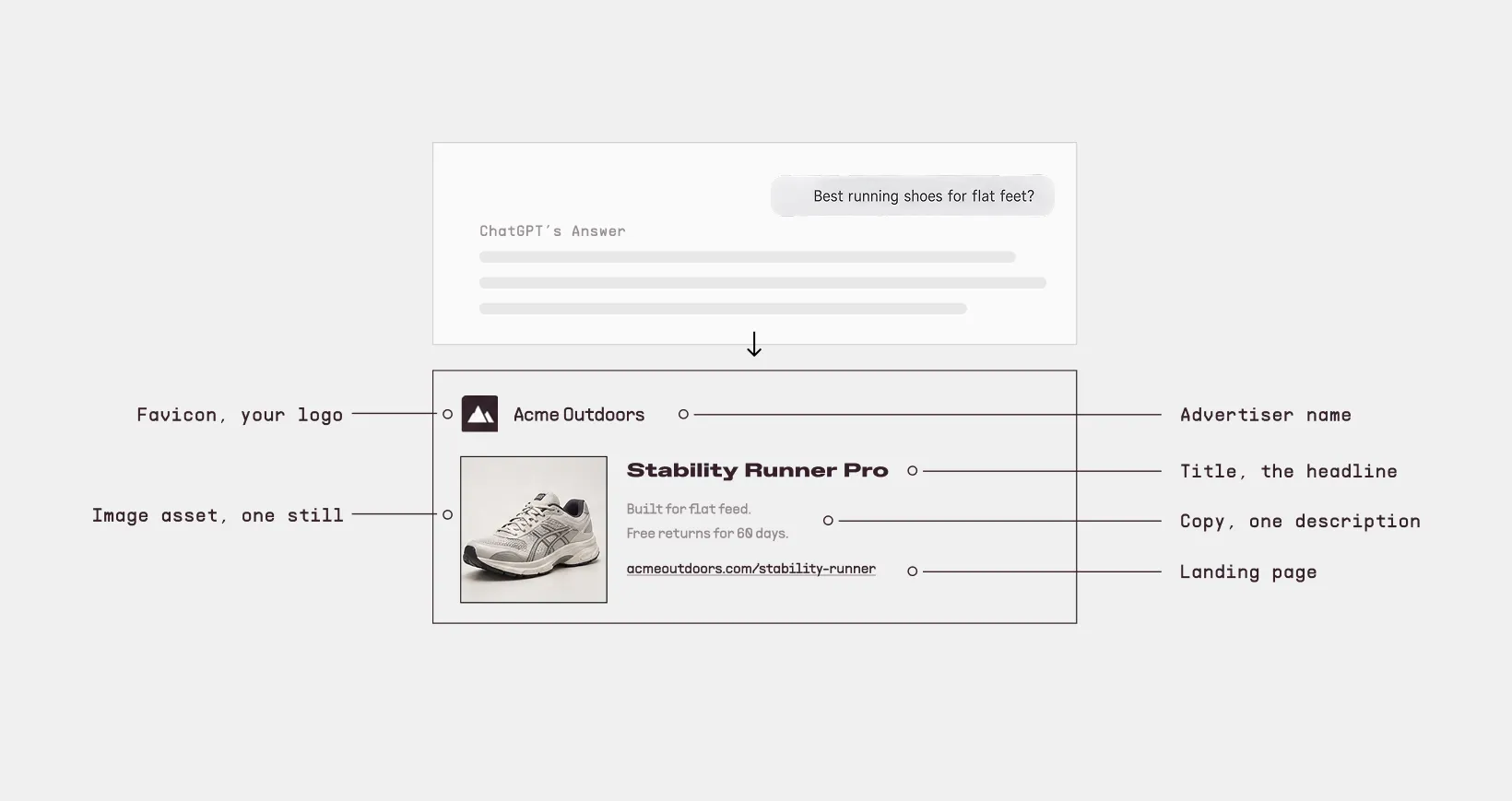
These elements are visually separate from ChatGPT’s answer and clearly labeled as sponsored.
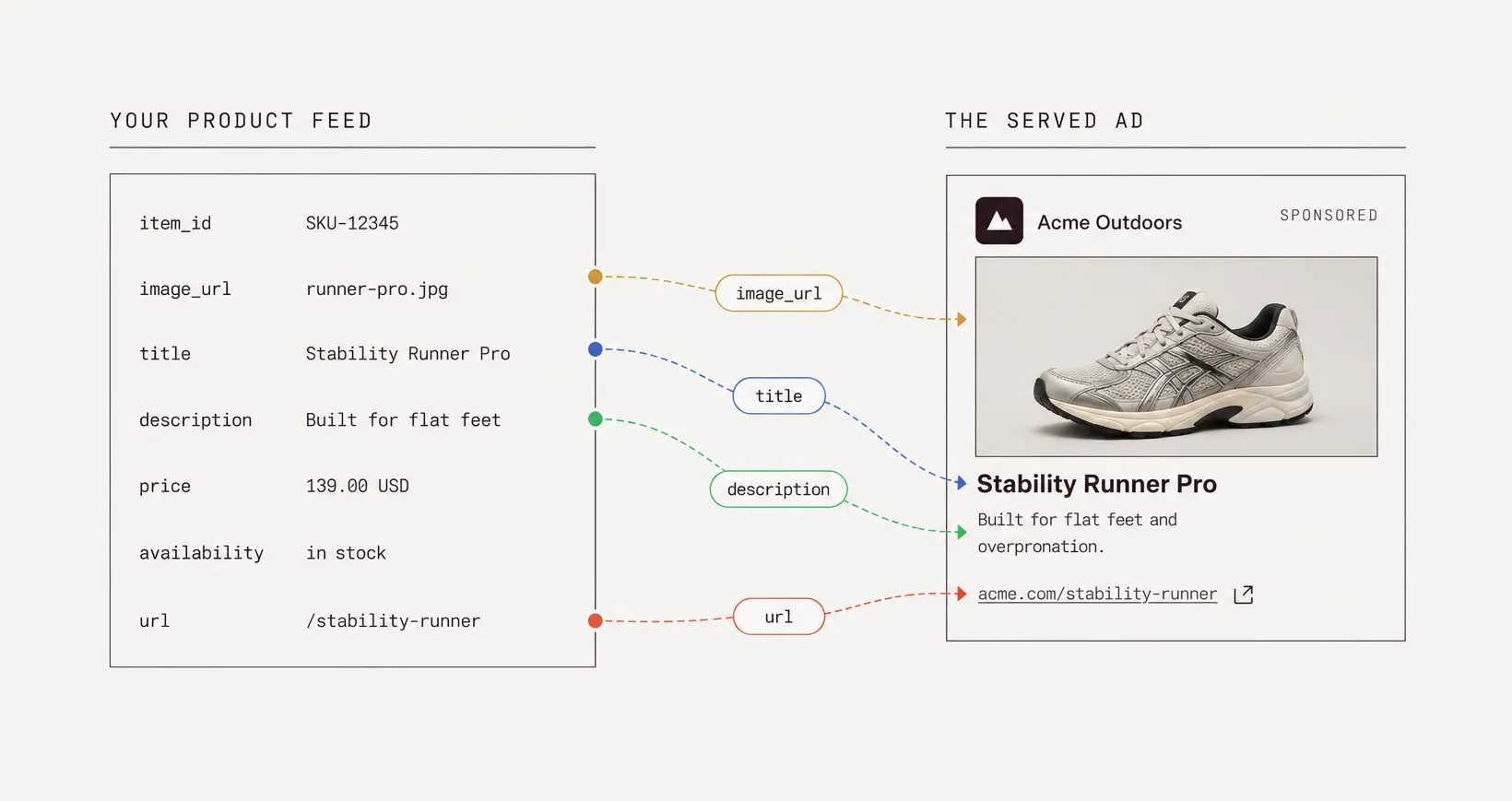
Product-feed campaigns use structured catalog data to create ads at scale. Product information such as titles, descriptions, images, prices, availability, and other attributes comes from the feed, making accurate product data especially important.
Where you can buy ads on ChatGPT right now
Ads Manager Beta is open to advertisers in 9 countries: Australia, Brazil, Canada, Japan, Korea, Mexico, New Zealand, the United Kingdom, and the United States.
Ad serving started in the US in February 2026 and has expanded since. Availability continues to change as the beta expands, so check OpenAI's current availability page before planning a launch.
Who actually sees ChatGPT ads
ChatGPT ads are not shown to every user.
- Eligible Free and Go users may see ads. Ads can appear as separately labeled sponsored placements below ChatGPT responses when they are relevant to the user or conversation.
- Plus, Pro, Business, Enterprise, and Edu are ad-free.
- Free users can also choose an ads-free experience with reduced usage limits through Ads Settings.
- Users under 18 do not see ads during the current test. OpenAI says it does not show ads in accounts where users tell OpenAI they are under 18 or where OpenAI predicts they are under 18.
- Ads remain separate from ChatGPT's answers. Advertisers do not influence ChatGPT's responses or organic recommendations by paying for ads.
Advertisers also do not receive access to users' private ChatGPT conversations. Conversations are kept private from advertisers, and user data is not sold to advertisers.
How ChatGPT ad targeting works
There are no exact-match search keywords to bid on. Ad selection can consider:
- The context and intent of the current conversation
- Your title, copy, landing page, and context hints
- Your targeting selections
- When ad personalization is enabled, signals from the user's broader ChatGPT experience
You do get targeting controls; they just aren't search keywords. You can target geographically, use custom audiences, and steer conversational relevance with context hints.
Context hints are set at the ad-group level and describe the conversations, topics, or keywords where your product may be relevant. They are broad thematic signals, not exact-match keywords.
For example, if you sell stability running shoes, you might use "running shoes for flat feet, marathon training, overpronation." That helps the system understand the conversations your ad fits, but it does not reserve those phrases or guarantee delivery for them.
Not every relevant conversation is eligible for ads. OpenAI restricts ad delivery in sensitive contexts, even when an advertiser would otherwise be relevant.
How ChatGPT ads differ from search and social ads
ChatGPT Ads use the context and intent of a conversation to help determine relevance. Unlike Google Search, advertisers do not bid on keywords or receive a search terms report. Unlike the feed-based placements common in social advertising, ChatGPT Ads can appear alongside an active conversation.
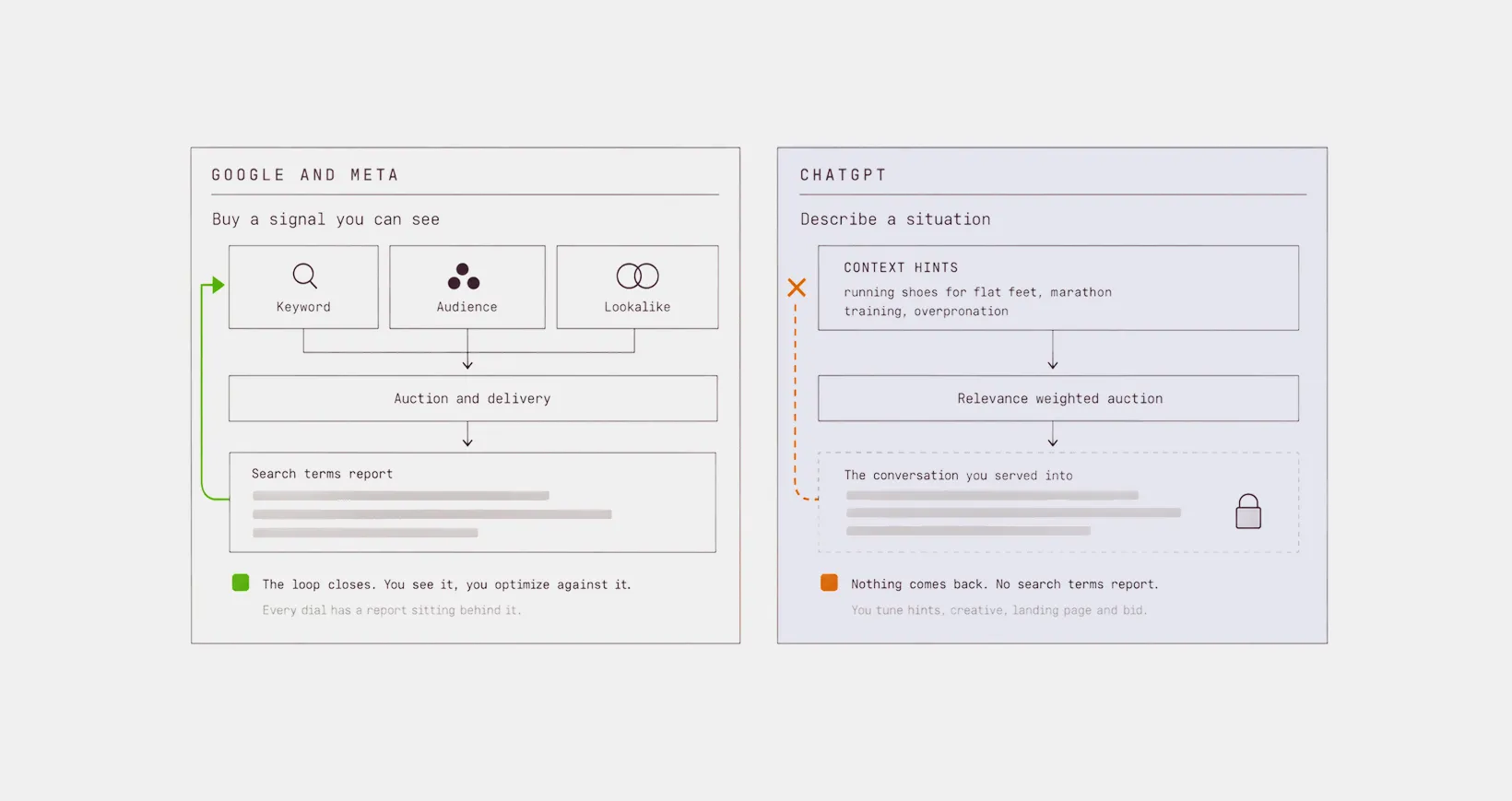
That creates a few practical differences:
- Less visibility into what triggered an ad. Advertisers cannot see the conversations or individual prompts where their ads appeared. Optimization happens through the controls OpenAI provides rather than prompt-level data.
- Context hints guide conversational relevance. They describe topics and situations where an ad may be relevant, but they are not exact-match keywords and do not guarantee delivery for a particular prompt.
- Relevance matters in the auction. ChatGPT Ads use a relevance-weighted, second-price auction, so the highest bid does not automatically win.
- The ad enters an existing conversation. It appears separately below a ChatGPT response that may already have explained options or compared products. The sponsored placement does not influence that response.
Campaign structure, budgets and bidding
Ads Manager follows a campaign → ad group → ad structure, with core settings such as objective, budget, schedule, and geographic targeting configured at the campaign level.
Objectives and pricing models
Three buying options are available, per OpenAI's campaign creation guidance:
- CPM, cost per 1,000 impressions, under the Reach objective
- CPC, cost per valid click, under the Clicks objective
- oCPC, conversion-optimized cost per click, for tracked actions
CPC campaigns optimize toward valid clicks, while oCPC campaigns optimize toward a tracked post-click conversion event.
Budgets and minimums
Two budget types exist.
1. A campaign-total budget is a hard ceiling across the full flight.
2. A daily budget is a delivery target that fluctuates day to day.
Minimum daily budgets vary by market. In the US, the current minimum is $25 USD per campaign.
How ChatGPT ad measurement works
Ads Manager reports impressions, clicks, spend, CTR, average CPC, average CPM, and conversions at the campaign, ad group, and ad levels. You can view results in tables and charts or export them as CSV files.
For conversion tracking, OpenAI supports the OpenAI Pixel and Conversions API. You can also add static UTM parameters to landing page URLs to track ChatGPT Ads traffic in your existing analytics tools.
One limitation remains: advertisers cannot see the individual conversations or prompts that generated ad impressions or clicks.
What to fix in your feed before you launch ChatGPT ads
In a ChatGPT feed campaign, your product data can become the ad content directly. That makes feed quality something to fix before launch, not after.
Before launch, check these five areas:
1. Write titles for shoppers
Your product title can become the ad headline. Replace internal names like “PEG40-BLK-10-MENS” with readable titles such as “Nike Pegasus 40 Men's Running Shoes, Black, Size 10.”
OpenAI allows up to 150 characters, but recommends concise titles. Include attributes that help identify and match the product without stuffing the field.
2. Tighten descriptions
Feed descriptions are often written for product pages or SEO, not ads. Lead with the main benefit, add information that complements the title, and remove unnecessary copy.
The field supports up to 5,000 plain-text characters, but that is a limit, not a target. Remove HTML as well, since the field expects plain text.
3. Use images that work at a small size
Choose clear product images where the item is easy to recognize without zooming. Avoid busy backgrounds, fine details, and excessive text that becomes unreadable in a small ad placement.
4. Keep price and availability current
Price and availability should match the landing page. Update the feed when products sell out, prices change, or promotions end so users do not click through to outdated information.
5. Check crawler access
Make sure your landing pages allow OAI-AdsBot. OpenAI also recommends allowing OAI-SearchBot. Check robots.txt and any bot-protection or firewall settings before launch.
Turn your product feed into ad creative at scale with Marpipe
Preparing your feed for ChatGPT Ads gives you cleaner titles, descriptions, images, prices, and product data. Marpipe takes that same catalog data further by turning it into scalable creative for your paid media channels.
Connect your product feed, build dynamic templates, and generate on-brand creative across hundreds or thousands of SKUs for channels including Meta, Google, TikTok, Pinterest, and Snapchat.
Here's what you get with Marpipe:
- Design control over every SKU: Build dynamic templates that pull text, images, prices, and other attributes directly from your feed.
- Conditional logic by segment: Change designs based on category, price, inventory status, or other product attributes.
- Ad-ready copy at scale: Generative Catalogs turns product-page copy into shorter ad-focused text and generates missing text assets.
- New imagery without a reshoot: Create lifestyle backgrounds, seasonal variations, and product-in-context imagery from existing catalog images.
- Video for every SKU: Product Level Video creates product-specific video from the images already in your feed.
- SKU-level optimization: Identify and filter products that consume ad spend without generating enough revenue.
Over 6,000 marketers use Marpipe, and the results library spans verticals: Twillory at +127% ROAS, Ashley Canada at +33% purchase ROAS on AI-generated catalog ads, and DermStreet cutting CPA by 30% with price overlays.
Book a demo and we’ll show you what your catalog looks like when your creative is optimized for conversion.
Frequently Asked Questions
Can I see which ChatGPT conversations triggered my ads?
No. Advertisers cannot see the conversations or individual prompts where their ads appeared, and there is no search-terms-style prompt report.
Can I bid on keywords in ChatGPT Ads?
No. Context hints describe topics and situations where an ad may be relevant, but they are not exact-match keywords and do not guarantee delivery for a specific prompt.
Will running ads make ChatGPT recommend my products organically?
No. Sponsored placements and ChatGPT's organic answers are separate. Paying for advertising does not make a product more likely to appear in ChatGPT's answer or organic recommendations.
How do I connect a product feed to ChatGPT Ads?
Create a feed under Tools in Ads Manager. OpenAI then provides SFTP connection details for uploading your product feed. Ads Manager processes and validates the feed before its products can be used in campaigns.
Each ad account is currently limited to one feed connection. Check OpenAI's current product-feed documentation before implementation, since Ads Manager is still in beta.
