


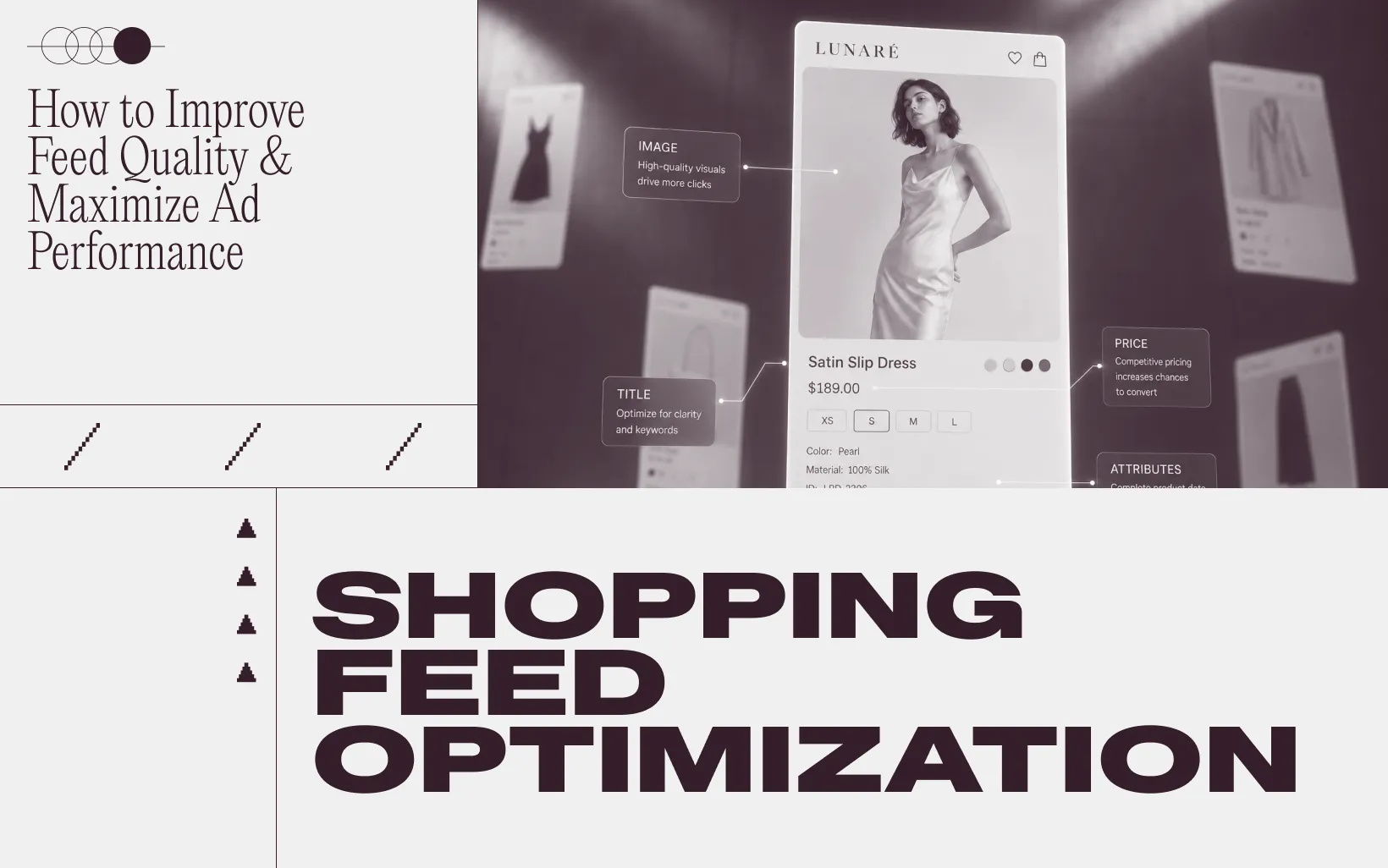
Your shopping feed is the most underrated lever in performance marketing. Teams spend months optimizing bid strategies, pay agencies six figures a year, and burn through creative budgets on fresh ad concepts, but if the feed underneath those campaigns is messy, every dollar of that work gets watered down. Ad platforms read your product feed to decide what to show, who to show it to, and how confidently to bid on each impression. So when titles read like internal SKU codes, required attributes are missing, or product images look like they were shot a decade ago, the entire account underperforms no matter how sharp the targeting is.
The good news is that every fix you make today keeps paying out across every campaign you run after it, on Google, Meta, TikTok, and every retail media network that pulls from the same catalog. This article walks through 10 specific things ecommerce teams can do To improve shopping feed quality and maximize ad performance.
1. Use All Three PMax Title Attributes
Most teams optimize one title and call it done. Performance Max actually gives you three title fields, and each one serves a different surface. If you only fill the main "title," you leave the other surfaces to default behavior, which usually means weaker copy on Discovery placements and dynamic remarketing.
The three title attributes are worth filling in:
- title, the long detailed product title that runs across Google Shopping and free listings, where keyword-led structure matters most
- short_title, a shorter version usually under 65 characters, used in browser contexts like Discovery feeds where it needs to identify the product clearly without the full attribute stack
- display_ads_title, which overrides the regular title in dynamic remarketing ads, so you can write something more brand-led or punchier here
For the main title, a structure like "Mens Running Shoes, Nike Pegasus 40, Black, Size 10" tends to read more clearly to both shoppers and the algorithm than something like "PEG40-BLK-10-MENS," which really only makes sense inside your warehouse system. The keyword goes first, the brand follows, then the defining attributes like color and size.
It also helps to test different title structures across categories. Search intent for fashion looks nothing like search intent for electronics or beauty, and your titles should reflect that.
2. Enrich the Attributes Algorithms Actually Care About
Ad platforms treat your feed like a structured data layer. Every required attribute you skip is a signal you withhold from them, which means less context for matching products to the right shoppers.
The fields that move the needle most describe product identity and variant detail.
- GTIN, brand, and MPN for product identity
- Color, size, material, and pattern for variants
- Age group and gender for demographic targeting
- Google product category and product type for taxonomy
- Availability, condition, and shipping for transaction signals
Beyond the standard fields, there are two underused attributes worth adding.
- product_detail, which lets you describe technical specs or features that do not fit anywhere else, like wattage, fabric blend, or compatibility info
- product_highlights, short bulleted callouts that surface key facts shoppers care about, like "Batteries not included" or "Machine washable," and that show up directly in some Shopping ad formats
Treating optional fields as truly optional is the most common mistake here. Optional means the listing will not get rejected if the field is blank, not that performance is unaffected. Filling them out tends to help most with long-tail queries, where competition is lighter and intent is higher.
Get specific with Google Product Category. Google Product Category is a taxonomy of more than 6,000 nodes. The most specific node that fits each product is almost always better than the broadest one. Mapping a running shoe to "Apparel & Accessories > Shoes" is technically correct but vague. Mapping it to "Apparel & Accessories > Shoes > Athletic Shoes > Running Shoes" gives the platform enough context to put your ad in narrower auctions where the product actually belongs.
3. Get Your Images to Earn Their Slot

The image is the single biggest CTR driver in any shopping ad. People scroll fast on phones, and the visual is what stops the thumb. Yet most ecommerce stores upload whatever the photographer sent over a year ago, with no thought to how that asset competes against twenty other thumbnails on the same results page.
Three things tend to matter most for shopping feed images.
- White backgrounds are still the safest default for Google Shopping, even though Meta is more flexible about lifestyle treatments
- The product should fill roughly 80 to 90% of the frame instead of floating in the middle with empty space around it
- Lifestyle shots showing someone wearing or using the product can be more engaging on social surfaces, while clean pack shots tend to read better on Google's basic feed
Image quality is also a hidden gate. Google down-ranks or rejects low-resolution images, blurry shots, and anything with overlay text or watermarks. If your feed has even a handful of these, the account-level quality signal can drag down every campaign you run, not just the SKUs with bad images.
4. Use GTINs and MPNs Without Shortcuts
GTINs are the identifier the entire ecommerce ad ecosystem runs on. When yours match the manufacturer's database, your products get matched against more searches and benefit from product-level performance data the platform has already gathered from other retailers selling the same item.
Some teams skip GTINs because they sell private label or custom products and assume the field does not apply. That is a mistake worth fixing. For private label, set the identifier_exists attribute to "false" instead of leaving the GTIN blank. Blank fields get treated as missing data and hurt your feed quality score. An explicit "no identifier" gets treated as a deliberate choice and bypasses the penalty.
For products that do have GTINs, audit them every quarter or so. Manufacturers update barcodes, products get rebranded, and old GTINs go stale. A wrong GTIN is actually worse than no GTIN, because it points the algorithm at the wrong product entirely.
5. Add Custom Labels for Bid Strategy
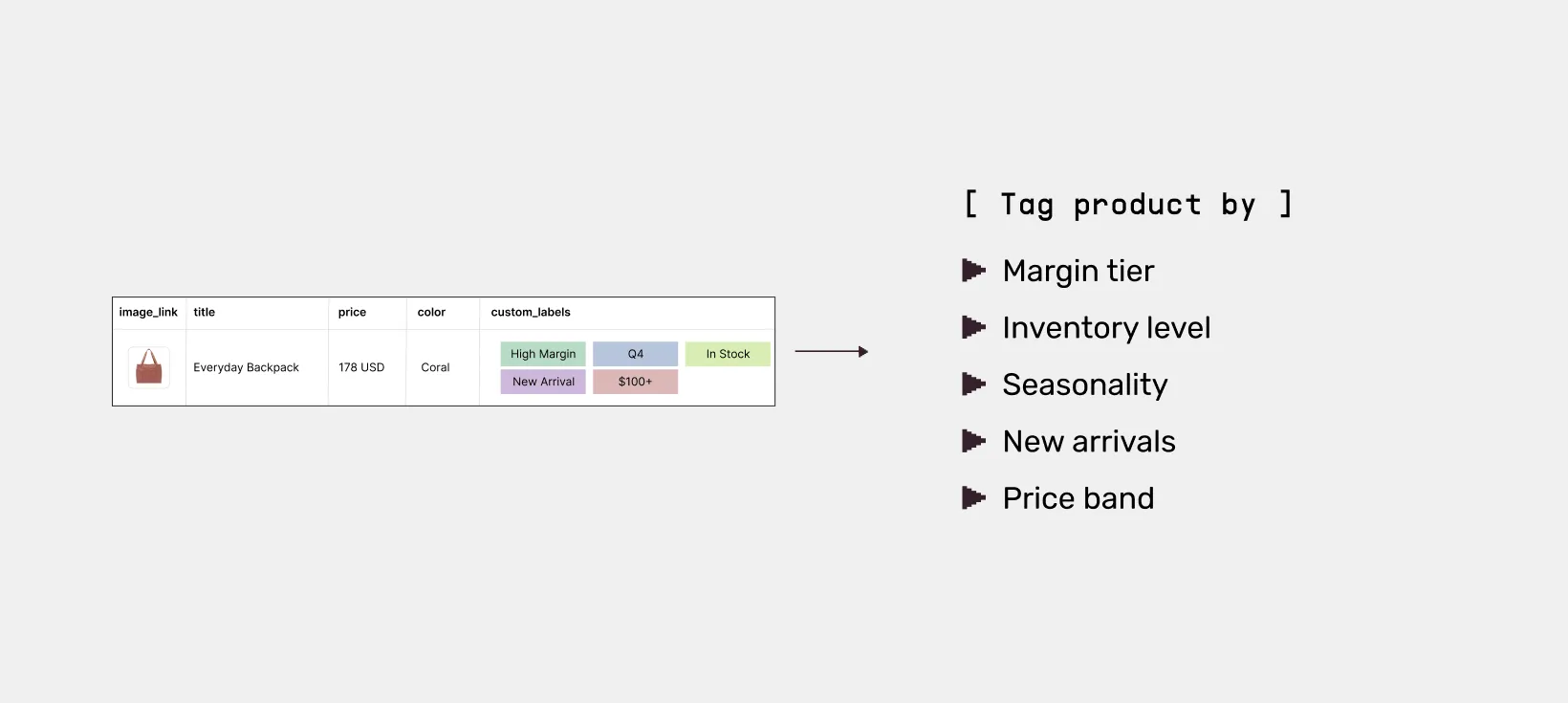
Custom labels are five free fields Google gives you to slice your catalog any way you want. They are also one of the most underused features in the entire shopping platform.
Useful ways to apply them.
- Tag products by margin tier so you can bid more aggressively on high-margin SKUs and pull back on thin-margin ones
- Tag by inventory level so slow movers can be paused before they go to clearance
- Tag by seasonality, like "Q4" or "Summer," to switch strategies around predictable demand spikes
- Tag new arrivals so you can boost discovery spend for the first 30 days a product is live
- Tag by price band so $50 SKUs and $500 SKUs can be managed against different ROAS targets
Custom labels cost nothing to add and immediately unlock bid segmentation in Performance Max, Standard Shopping, and most third-party tools. Without them, your team ends up bidding on the entire catalog like every SKU has the same value, which is rarely true.
6. Use Merchant Promotions to Stand Out
Promotions are a free way to add visual weight to your shopping ads. When you submit a promotion through Merchant Center, language like "Sale," "15% off," or "Free shipping over $50" shows up directly on the ad surface, which can make the listing feel more eye-catching than a plain price next to a competitor's plain price.
A few rules of thumb that help promotions land.
- Set up a separate feed specifically for promotions so they update independently of your main catalog
- Be specific about the offer, since "Free shipping over $50" reads differently from a vague "Free shipping"
- Use promotions to highlight time-sensitive offers, since urgency adds another reason for the shopper to click now instead of later
Promotions also pair well with custom labels. Tag the SKUs in a promotion run with a custom label so you can monitor their performance separately and roll the lessons forward into the next campaign.
7. Turn on Product Ratings
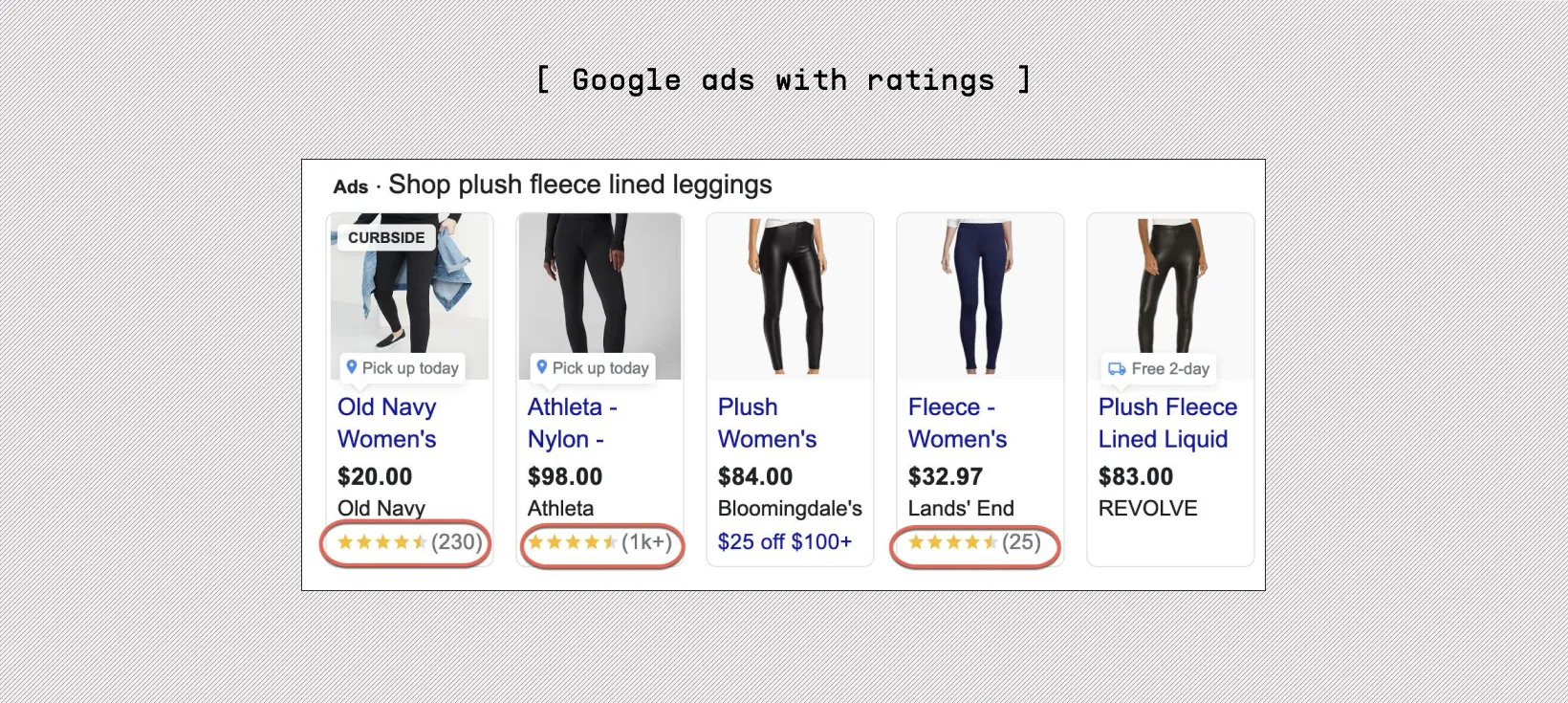
Star ratings show up at the bottom of shopping ads when Google has approved your store for them. They are not enabled by default, so the work is in applying for the program and connecting a review source the platform recognizes.
Why this is worth the setup effort.
- Stars give shoppers a quick trust signal before they click, which tends to help engagement on competitive product pages
- Highly rated products usually feel more credible than identical products without star treatment
- It is one of the few visible differentiators in a search results page where everyone is using the same product image and similar titles
If your store sells products that other retailers also carry, ratings are how you stop blending into the lineup.
8. Test Creative at the Catalog Level
Most ecommerce teams treat their shopping feed as static data. Engineering refreshes it on a schedule, the marketing team checks it once in a while, and that is the end of the conversation. The brands that grow faster see the feed differently. To them, every product image, title, and badge is a piece of creative that should be tested the same way ad creative gets tested.
The reason this matters for performance is volume. Your feed is multiplied across thousands of impressions per day. A title variant that lifts click-through by even a small amount on a category page can compound into meaningful revenue over a quarter. The same logic applies to image treatments, badge text, and price formatting. Each one is a small lever, but a catalog is thousands of levers stacked together.
The problem is that doing this kind of testing manually breaks down fast. Spreadsheets cannot handle creative combinations across thousands of SKUs without errors creeping in. Or designers cannot turn variants around fast enough to keep up with feed refresh cycles. There is no clean way to run a controlled test inside dynamic product ads without disrupting the campaign
This is where Marpipe fits into the stack. It was built specifically for catalog-level creative testing. You can:
- Bulk-edit thousands of images, titles, and attributes without touching a spreadsheet
- Branch a single SKU into multiple creative variants and run them through your dynamic product ads
- Use the multivariate testing layer to see which combinations actually drive purchases, not just clicks
- Push winning variants back into the live feed without going through an engineering or design queue
- Cut creative cycle time from quarters to days, which compounds across every campaign you run
Even outside the Marpipe stack, the principle holds. Your feed is not just inventory data. It is the visual identity of your ad account, repeated across every product you sell.
9. Refresh Stale Data Faster Than Your Competitors
Stock levels, prices, and shipping times change every day. Your feed should reflect that change every day too, not every week and certainly not whenever someone on the team remembers to push an update.
The cost of slow refresh is bigger than most teams realize.
- Out-of-stock items keep eating ad spend until the next refresh hits
- Price mismatches between the feed and the PDP trigger disapprovals, often across entire product groups at once
- Shipping promises that no longer hold true erode conversion rate and create customer service work
- Stale "new arrival" tags lose their freshness boost in the algorithm
Daily refresh is the practical floor for any serious ecommerce operation. Some platforms support real-time updates through content APIs or scheduled fetches every few hours. If your tech stack can handle it, go faster than daily, especially in hot categories where stock turns over quickly.
The other half of this work is monitoring. A refresh schedule does not help if a feed breaks silently between runs. Set up alerts on sudden row-count drops, disapproval spikes, missing images across a percentage of the catalog, or price changes that exceed a sanity threshold. These are the early warning signs that something in your data pipeline broke before it shows up as a revenue dip.
10. Exclude Unprofitable and Underperforming Products
Not every SKU deserves a spot in your shopping campaign. Some products carry margins too thin to justify ad spend. Others have racked up clicks for weeks without converting. Leaving them in the campaign means the platform spreads your budget across them anyway, which dilutes performance everywhere else.
A weekly review here usually pays for itself.
- Exclude low-priced items where the margin cannot absorb a click cost, especially anything under a clear profitability threshold
- Pull out SKUs with consistently weak ROAS or low conversion rate over a meaningful window
- Pause variants when key sizes or colors are out of stock, since irrelevant clicks on the remaining variants tend to waste spend
- Reintroduce excluded SKUs only after the underlying issue is fixed, not just because the catalog feels light
The point is not to run a smaller feed. It is to run a sharper one, where every product getting served has earned its slot.
Put Your Feed to Work with Marpipe
Most of the tips in this article are doable in theory and painful in practice once your catalog crosses a few thousand SKUs. Editing titles in bulk, testing image variants, keeping attributes fresh, and excluding bad performers all sound simple until your team is doing it across thousands of products every week. That is the gap Marpipe was built to close.
With Marpipe, your team can:
- Edit titles, images, and attributes across the entire catalog without spreadsheet gymnastics
- Run real multivariate creative tests inside dynamic product ads
- Push winning variants into the live feed without waiting on engineering or design queues
- See which feed changes actually move purchases, not just clicks
- Spot underperforming SKUs and weak titles before they cost you another month of spend
If your shopping feed is the lever you have not properly pulled yet, book a demo with Marpipe and we will walk you through how to turn your catalog into a creative testing surface your competitors cannot easily copy.
