


Imagine you move to a new apartment. You update your address with the bank, the post office, your subscriptions, your friends. You miss one, and weeks later a package shows up at your old place.
Now imagine you were expecting hundreds of deliveries a day, and your address changed every couple of weeks. One slip and a whole stack of mail goes to the wrong door. That's a small version of what product feed management handles, but for ecommerce.
This article covers what product feed management actually is, why it sits at the center of modern catalog advertising, and how the most efficient brands are running it in 2026.
What is Product Feed Management?
Your commerce platform (Shopify, BigCommerce, Salesforce Commerce Cloud, WooCommerce, Magento) is where your products live. It's your store's backend — your inventory, prices, product descriptions, images, variants. When you add a new SKU, change a price, or mark something out of stock, you do it here.
Ad and marketplace platforms (Meta, Google, TikTok, Pinterest, Snap, Amazon, eBay, Connected TV inventory systems) are where your products eventually get displayed to shoppers. They don't store your catalog. But they need to be told what you sell, what it costs, and whether it's in stock.
The product feed is the bridge between the two.
A product feed is a structured file (usually CSV, TSV, XML, or a Google Sheet) that lists every product you sell along with the data points each platform needs to display it: ID, title, description, price, availability, image URL, brand, category, GTIN, color, size, and so on.
What does a product feed actually contain?
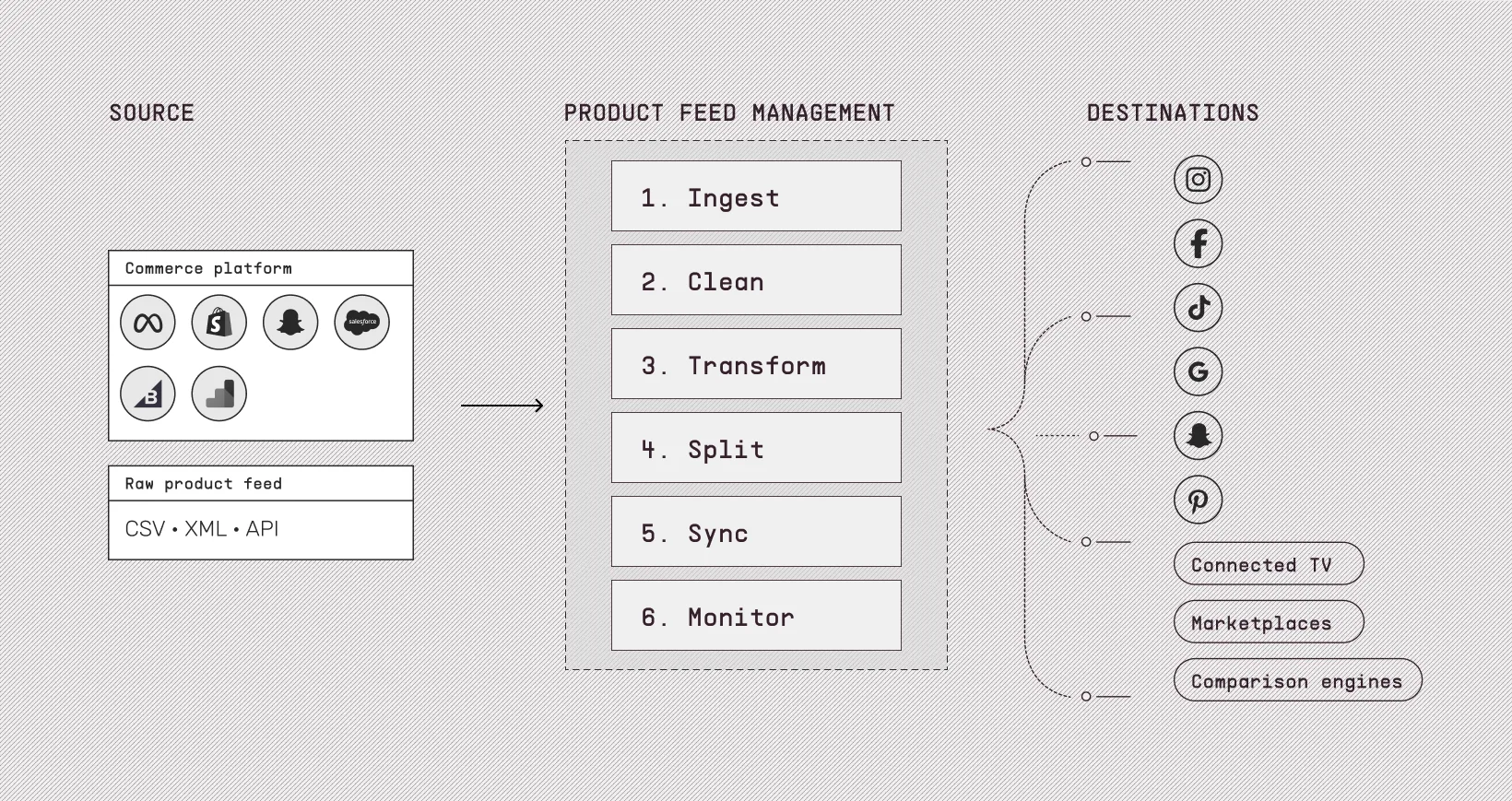
The exact fields differ by platform, but most feeds include some combination of:
- Core identifiers: Product ID, GTIN/MPN, brand, parent/child SKU relationships
- Commercial data: Price, sale price, currency, availability, shipping
- Descriptive copy: Title, description, product type, Google product category
- Media: Primary image URL, additional images, lifestyle imagery, video URLs
- Variants: Color, size, material, pattern, age group, gender
- Custom labels: Margin tiers, seasonality flags, bestseller tags, internal categories
A single SKU in a clothing brand's feed can easily carry 40–60 populated fields. Multiply that by 10,000 SKUs and six destination channels and the surface area gets real, fast.
Every ad you've ever seen on Facebook for a specific pair of shoes, every Google Shopping listing, or "you might also like" carousel, all of it started as a row in a spreadsheet. That spreadsheet is a product feed, and the discipline of keeping it accurate, complete, and fit for purpose across a dozen ad and commerce platforms is product feed management.
What does managing a product feed look like?
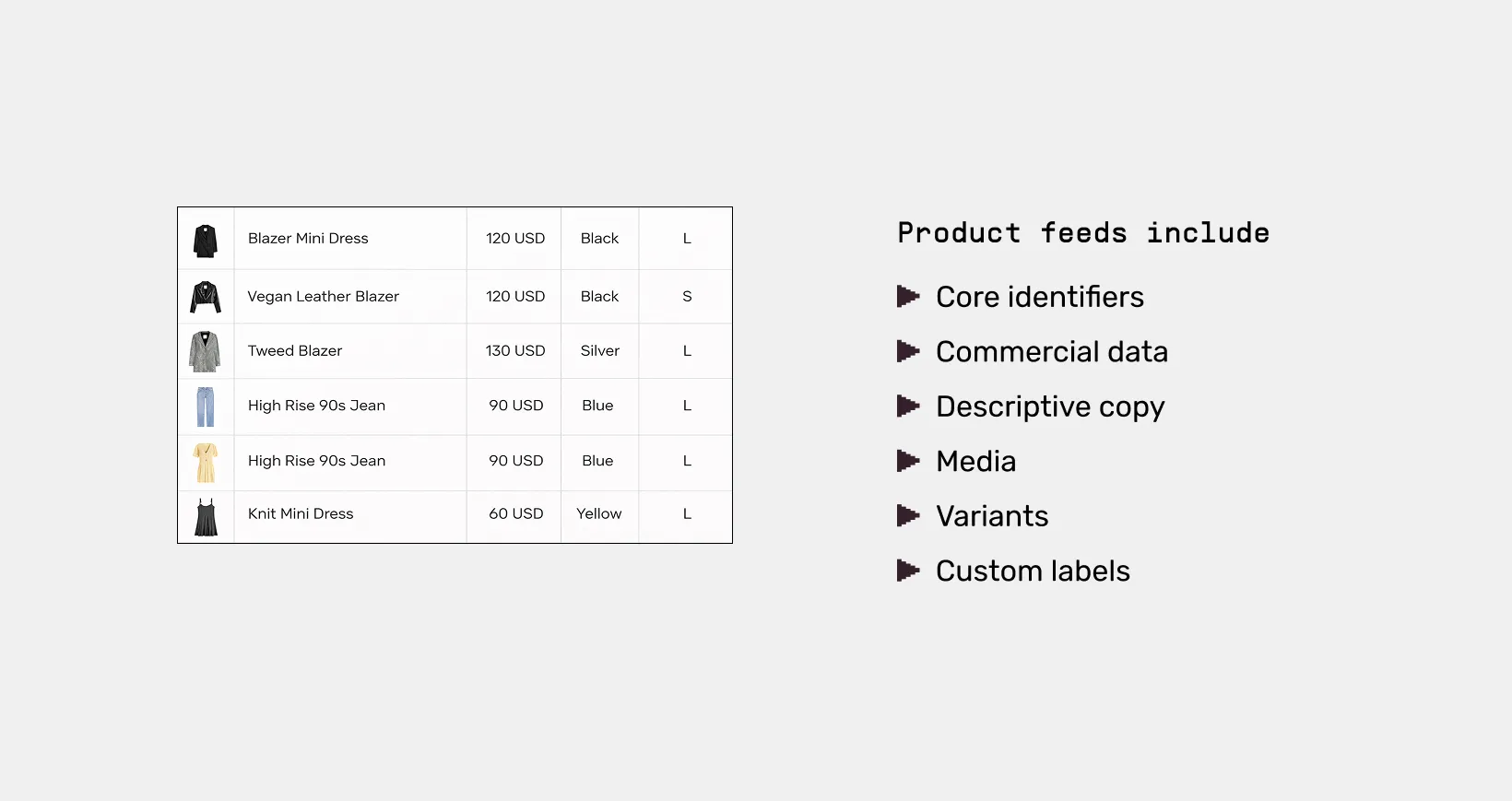
Feed management isn't a one time export. It's an ongoing operational layer that sits between your commerce platform and every place your products appear. It typically involves six jobs running on a loop.
- Ingest the raw feed from your source system, whether that's Shopify, Salesforce Commerce Cloud, BigCommerce, WooCommerce, Magento, or a custom database.
- Clean it by fixing missing fields, normalizing categories, removing junk SKUs, and deduplicating variants.
- Transform it so that titles read well on Google Shopping, the required attributes are present for TikTok, and your internal categories map cleanly to Meta's taxonomy.
- Split it into segmented feeds for sale items, top performers, different geographies, or seasonal collections.
- Sync it by pushing the right version of the right feed to the right destination on the right cadence.
- Monitor it so you catch disapprovals, broken images, price mismatches, and out of stock leakage well before the ad platforms do.
Ways to Prepare a Product Feed
The method you pick usually comes down to how many SKUs you sell, how many channels you run, and how much engineering help you have. The options sit on a spectrum from fully manual to fully automated:
1. The manual spreadsheet method
You export your product data into Excel or Google Sheets, clean it up by hand, save it as a CSV, and upload that file to each ad platform yourself.
This is how every brand starts. It works when you have 50 SKUs, one ad channel, and prices that don't change often. It stops working the moment any of those things change. The hidden cost is your time. Every price update, every new product, every out-of-stock change means opening the file and re-uploading.
2. Native exports from your commerce platform
Most major commerce platforms ship a built-in way to send your catalog to popular ad channels.
Shopify has channel apps for Meta, Google, TikTok, and Pinterest. BigCommerce, Salesforce Commerce Cloud, WooCommerce, and Magento all offer something similar. You install the app, give it permission to read your catalog, and it generates a feed automatically. The platform handles sync timing and basic field mapping.
It's free, it's easy, and it covers the basics. The trade-off is control. You don't get to rewrite titles for SEO, build conditional rules, or split the feed by segment. You get whatever the app's default settings produce.
3. Plugins and apps that sit on your store
A step up from native exports, third-party apps install on top of your commerce platform and add more flexibility than the built-in tools.
These apps run in the same admin you already use. They can transform fields, push to a wider range of destinations, and handle some level of automation. Many marketplaces, comparison engines, and smaller ad networks rely on these apps for integration.
Plugins are a reasonable middle ground when you've outgrown the defaults but don't yet need to manage many channels at once. But app quality varies a lot, and if you end up installing four or five of them, your feed data starts living in too many places.
4. A dedicated feed management platform
A dedicated platform sits between your commerce backend and every place your products appear. It pulls your catalog once and turns it into as many tailored feeds as you need, each formatted for its destination, each on its own schedule.
This is where most brands land once catalog ads become a serious channel. A few signs you've reached this stage.
- You run catalog ads on three or more platforms.
- You operate in more than one market or currency.
- You change prices or promotions often and need near real-time sync.
- You want to apply branded creative on top of the feed instead of shipping raw product images.
Marpipe is one example of a platform in this category. Feed Management handles ingestion, organization, segmentation, and routing. The creative layer runs on top of the same feed, so the same tool that manages your data also produces the branded ads it powers.
5. A custom engineering build
Some brands skip vendors entirely and build a feed pipeline in-house. The engineering team writes a job that pulls product data from the database, applies transformation logic, and pushes feeds to each destination through the ad platform's API.
This route makes sense for very large catalogs, complex business logic, or compliance reasons where you can't hand product data to a third party. It comes with a real ongoing cost. Every new ad platform, every taxonomy change, every disapproval rule update has to be handled by your own dev team. Most brands that try this route eventually move at least part of the work back to a dedicated platform.
Why Modern Brands Manage Feed and Creative Together With Marpipe
Historically, the product feed was treated as plumbing. The marketing team owned the brand and creatives. Engineering or ops owned the feed. The two worlds rarely collaborated.
That worked when catalog ads were a small piece of the media mix, mostly used to retarget people who had already visited your site. But it doesn't work now when catalog ads run as a primary acquisition channel for many ecommerce brands, showing up in Meta Advantage+ campaigns, Google Shopping listings, TikTok product cards, Pinterest pins, and Connected TV placements.
Your feed is no longer a backend file. It's your shelf, the shopper's first impression of your brand.
So the brands getting the most out of catalog advertising have stopped thinking about feed management and creative as two stages. They think of them as one continuous operation. The feed defines what gets shown. The creative layer defines how.
And it's efficient if both are managed in the same tool.
Marpipe was built on this exact model. Our Feed Management tool handles the data side. You can clean your product data & send it everywhere.
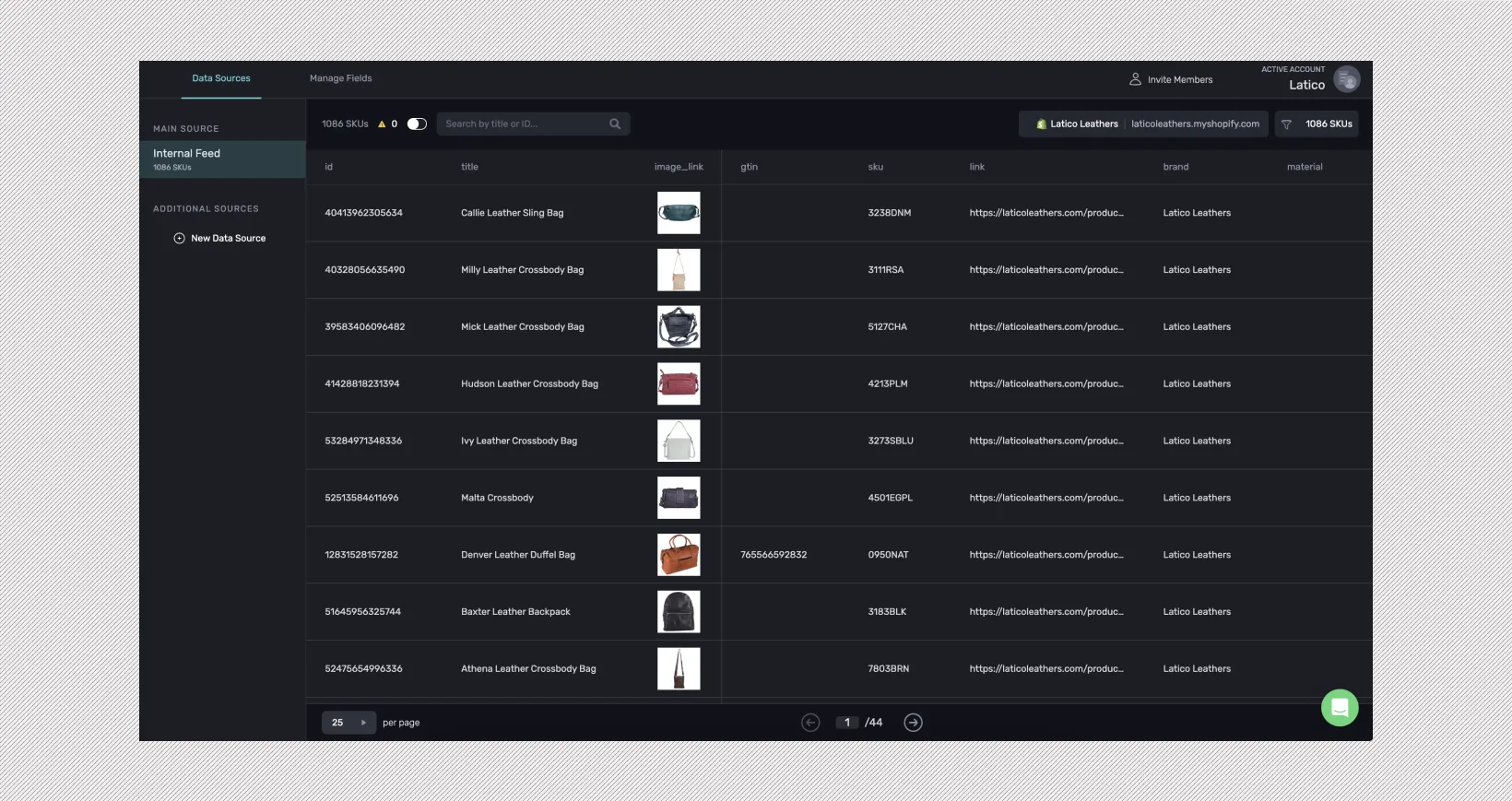
Then the Catalogue Management system adds a creative engine that runs directly on top of the same feed.
Watch this video to see how Marpipe's Generative Catalogs turns your existing product feed into styled, on-brand imagery for every SKU. You can push straight to Meta, Google Shopping, Pinterest, and TikTok.
Redesign your Product Feed and Catalog Ads with Generative AI
All of this is part of Marpipe:
- Manage the feed itself. Ingest from Shopify, Salesforce Commerce Cloud, BigCommerce, WooCommerce, or Magento. Clean fields, build product sets, and route to Meta, Google, TikTok, Pinterest, Snap, X, Reddit, and Connected TV through the Comcast Universal Ads partnership.
- Design templates that apply across every SKU. Drag-and-drop creative with your brand colors, fonts, and graphics. The same template renders against every product in the feed, so a 10,000-SKU catalog produces 10,000 on-brand ads without manual design work.
- Layer in merchandising signals dynamically. Live review counts and star ratings, price strikethroughs, percentage-off badges, BNPL price display, countdown clocks for sales, and inventory-based scarcity messaging.
- Optimize what gets served. SKU Optimization filters underperforming products out of the active set automatically, so spend follows the items that actually convert.
Start with Marpipe Feed Management, and add the creative layer when you're ready.
FAQs
How often should you update your product feed?
It depends on how fast your store changes. Most ad platforms accept a daily sync as the standard, which works fine for stable catalogs. If you run flash sales, change prices often, or watch inventory closely, hourly or near real-time sync starts to matter. Otherwise your ads end up showing the wrong price or pushing products that are out of stock, which the platforms can flag and shoppers will notice immediately.
What's the difference between a product feed and a product catalog?
A product catalog is the full collection of items you sell, stored inside your commerce platform like Shopify or BigCommerce. A product feed is an export of that catalog, formatted as a file that ad platforms can read. The catalog is your source of truth. The feed is a structured copy of it, shaped for each destination. Think of the catalog as your warehouse and the feed as the packing slip sent with each shipment.
Why do products get disapproved on Google Shopping or Meta?
Disapprovals almost always come down to missing or mismatched fields. The most common ones are missing GTINs, prices in the feed that don't match the price on your landing page, broken or low-quality images, restricted categories like supplements or alcohol, and shipping data that doesn't add up. Most of these can be prevented by validating your feed before each push, and a good feed management setup will flag the issues automatically before the platform does.
Do you need a separate product feed for each ad platform?
Technically you can use one feed across multiple platforms, but it rarely performs well. Each platform expects different field structures, different category mappings, and different title formats. Google rewards keyword-rich titles, TikTok prefers short and punchy, Meta cares about clean category mapping. The smarter approach is to keep one source feed and generate platform-specific versions from it, which is exactly what dedicated feed management tools do automatically.
Is product feed management worth it for small ecommerce brands?
For brands with a small catalog and one or two ad channels, the native exports from Shopify or BigCommerce are usually enough. The case for a dedicated platform gets stronger as you add SKUs, run on more channels, or expand into new markets. That said, most brands benefit from a dedicated feed management tool earlier than they think, because it consolidates feed work into one place well before scale forces the issue.
