


Think about the day you moved into your apartment. Everything was in boxes, shoved into whatever room they landed in first. Cooking utensils in the bedroom. Towels in the kitchen. You couldn't find a fork without a ten-minute hunt.
So you sorted it out.
Kitchen stuff in the kitchen. Pots in one cabinet, spices in another, cutlery in a drawer. Now everyone in the house knows exactly where everything is.
Your online store is no different. Without a system for organizing your products, your catalog is just moving-day boxes. Customers can't find what they came for, and ad platforms have no idea who to show your products to.
This guide covers how ecommerce product categorization actually works, the 4 major systems you'll encounter across platforms, a 5-step process to build and maintain your own taxonomy, and the mistakes to avoid.
What is Product Categorization in E-commerce?
Product categorization is how you organize every SKU in your catalog into a structured hierarchy so customers can find products, your team can manage inventory, and your systems (search, filters, analytics, recommendations) actually function.
It's the digital equivalent of aisles and shelves in a physical store. Except your aisles are category pages, navigation menus, and filters on your site.
Let's say you work at a home goods company with 40,000 SKUs in categories like kitchenware, furniture, décor, bedding, etc. Without categorization, that's one giant unsorted list no customer will ever browse through.
But if you build a taxonomy, a tree structure, a single SKU like a 12-inch Lodge Cast Iron Skillet can live at:
Kitchen → Cookware → Frying Pans → Cast Iron
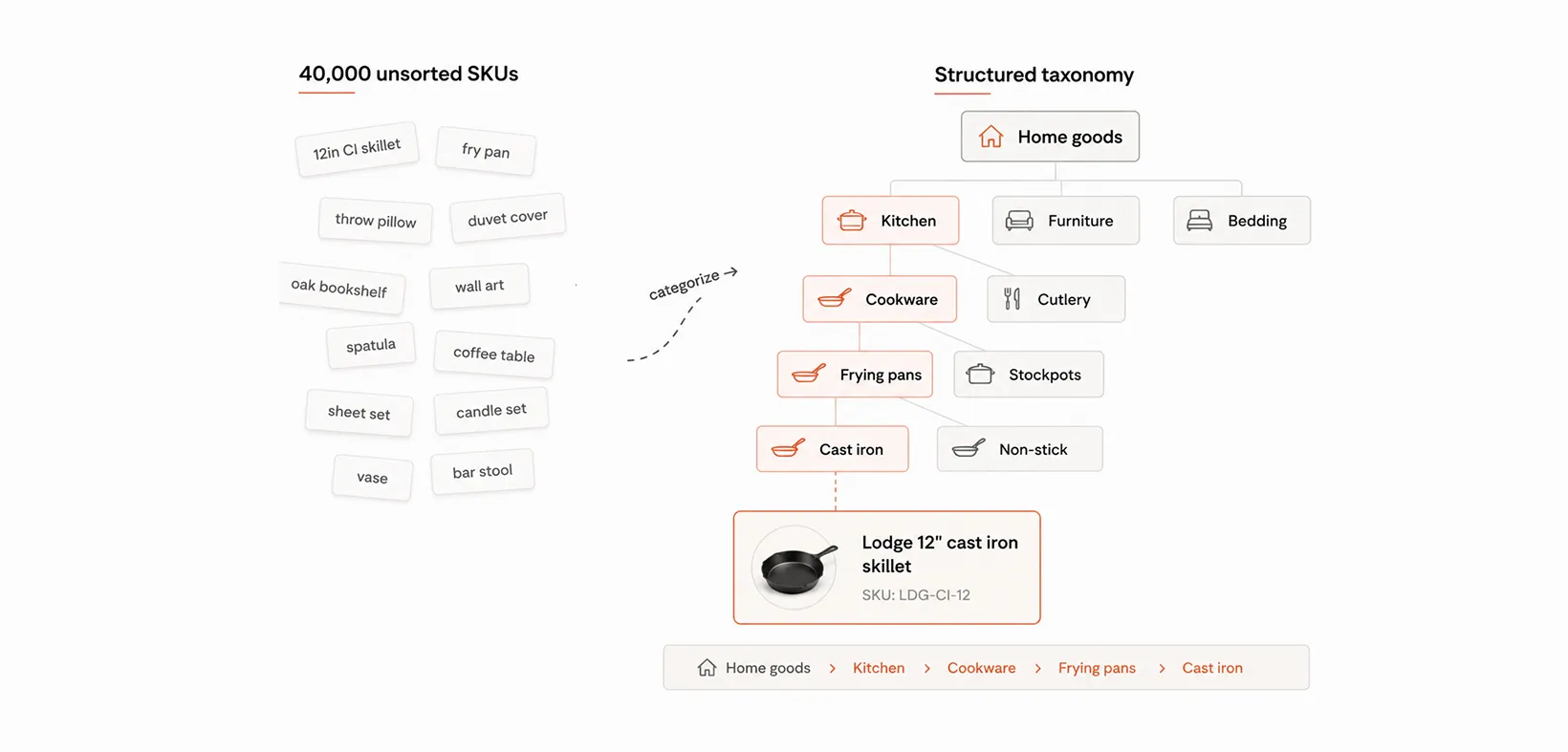
That path is its categorization.
For example, Macy's Beauty department uses a three-level taxonomy. The top nav is the department (Beauty), the bold headers are categories (Fragrance, Makeup, Skin Care), and the links beneath each are subcategories (Perfume, Cologne, Moisturizers).

Designing the taxonomy is the straightforward part. Maintaining it is where things get difficult. New products arrive from suppliers with messy, inconsistent data. One vendor might call it a "skillet," another might call it "fry pan," and a third may just write "12in CI." Every one of those needs to be mapped to the correct node in your taxonomy consistently, or you end up with misplaced products, duplicate categories, and orphan SKUs that customers never discover.
At scale, this is why companies invest in rules-based or ML-powered auto-categorization that reads product titles, descriptions, and attributes, assigns them to the right category automatically, and flags edge cases for human review.
Why product categorization matters
Good categorization is one of those foundational things that makes everything else in your e-commerce operation work better. It touches customer experience, marketing, merchandising, and operations. Here's how.
Makes Your Online Store Easier to Navigate
A customer looking for running shoes can go straight to Footwear → Athletic → Running Shoes and see exactly what's relevant, with filters for brand, size, and price ready to go. Clean categorization turns your site into a store that feels intuitive to browse, which means fewer drop-offs and more time spent looking at products.
Search and Filters Actually Work Well
When products are categorized correctly, your site search returns relevant results, and your filters make sense. Someone typing "wireless headphones" sees headphones, not phone cases, and can narrow down by brand, price, and features. Good categorization is what makes your search experience feel smart rather than frustrating.
Ad Spend Goes Further
Google Shopping, Meta ads, and Amazon Sponsored Products all use your product categories to match your listings with the right shoppers. Accurate categorization means your products get shown to people who are actually looking for them, which means higher click-through rates and better return on ad spend.
Recommendations and Cross-Sells Get Smarter
When your system knows that a product is a cast-iron skillet, it can suggest a care kit, a trivet, or a cookbook alongside it. Good categorization gives your recommendation engine the context it needs to make suggestions that feel helpful rather than random.
What are the 4 Product Categorization Systems You Should Know?
There are product categorization systems already in use across major platforms and industries. Some you'll be required to use if you sell on those channels. Others you might adopt internally because they solve a specific problem.
Here's what each one is, what it's for, and when you'd actually use it.
1. Google Product Taxonomy
Google maintains a standardized product category tree with over 6,000 nodes. If you run Google Shopping ads or list products on Google Merchant Center, you're required to assign a Google_product_category to every product.
The taxonomy follows a path structure like Apparel & Accessories > Clothing > Dresses. You don't get to modify or extend it. You pick the node that best fits your product, and Google uses that to determine which search queries surface your listing, what tax rules apply, and how your product gets filtered.
Even if you don't sell on Google Shopping, it's worth studying as a reference when building your own taxonomy. Google has already solved a lot of the "where does this product go?" questions across a massive range of categories.
2. Meta (Facebook/Instagram) Product Categories
Meta has its own category system for Facebook Shops, Instagram Shops, and dynamic product ads. Similar concept to Google: you assign a category in your product feed, and Meta uses it for ad targeting and relevance matching.
Two things to know:
- The structure is less granular than Google's. It covers broad categories well, but doesn't go as deep at the subcategory level.
- If you've already categorized for Google Shopping, mapping to Meta is a lighter lift since there's significant overlap at the top levels.
3. Amazon Browse Tree Guide (BTG)
Amazon's proprietary system for organizing every product on its marketplace. When you list a product, you assign it a "browse node," which determines where it appears in Amazon's navigation and what filter options customers see.
The browse tree goes much deeper than most taxonomies. You won't just file a product under "Kitchen Knives." You'll specify Chef's Knife vs. Santoku vs. Paring Knife, then define attributes like blade material and handle type.
Getting the browse node wrong means your product shows up in the wrong category, gets the wrong filters, and misses the customers actually looking for it. You only deal with the BTG if you sell on Amazon, but it matters a lot there.
4. UNSPSC
UNSPSC (United Nations Standard Products and Services Code) is a global classification system used primarily in B2B commerce, procurement, and supply chain operations. It assigns an eight-digit code to every product and service, organized into four levels: Segment, Family, Class, and Commodity.
A ballpoint pen, for instance, would be coded as:
44 (Office Equipment) → 44 12 (Office Supplies) → 44 12 18 (Writing Instruments) → 44 12 18 02 (Ballpoint Pens)
You'll encounter UNSPSC if you sell to governments, large enterprises, or any buyer whose procurement system requires standardized commodity codes. For pure B2C e-commerce, you'll rarely need it.
How to Build Product Categorization for Your E-commerce Catalog?
This is a practical, five-step process you can follow regardless of whether you have 5,000 or 500,000 SKUs. Each step builds on the previous one, so resist the temptation to jump ahead before you've done the groundwork.
Step 1: Audit What You're Actually Selling
Before you build any structure, you need to know what's in your catalog right now. Pull a full export of your SKUs with whatever data you have: product names, descriptions, attributes, supplier labels, and any existing tags or categories.
Open that export and start grouping products by what they obviously have in common. You're not building the final taxonomy yet. You're just looking for natural clusters.
In a catalog of 30,000 SKUs, you might notice that 40% are apparel, 25% are accessories, 20% are footwear, and 15% are home goods. That rough distribution tells you which departments need more subcategories and granular breakdowns, and which ones can get by with just two levels.
Step 2: Design Your Taxonomy Tree (Top Down, 3 to 4 Levels Deep)
Your taxonomy should have no more than 3 to 4 levels. Any deeper, and you create navigation that customers won't click through and internal teams won't maintain.
Here's what each level should represent:
- Level 1, Department, is the broadest grouping. These become your top navigation items. Examples: Men's, Women's, Kids, Home. Keep this to under 10 departments.
- Level 2, Category, breaks each department into product families. Under Women's, that might be Tops, Bottoms, Dresses, Outerwear, Activewear.
- Level 3, Subcategory, gets specific. Under Tops: T-Shirts, Blouses, Tank Tops, Sweaters.
- Level 4, Product Type, is optional and only worth adding where the volume justifies it. Under T-Shirts: Graphic Tees, Plain Tees, Cropped Tees.
Write this out as an actual tree in a spreadsheet. Column A is Level 1, Column B is Level 2, and so on. Every row is one "leaf" node, a path from the department to the most specific level.
Once you're done, count your leaf nodes and sanity-check against your catalog size. A catalog with 10,000 SKUs and 1,500 leaf nodes means you're averaging under 7 products per category, which is a sign you've over-segmented. On the other end, 10,000 SKUs spread across 30 leaf nodes means 300+ products per category, which is too broad for customers to browse meaningfully.
Step 3: Define the Rules for What Goes Where
Every subcategory in your taxonomy needs a one-sentence definition that answers: 'What qualifies a product to be placed here, and what disqualifies it?' Without these rules, different people will make different judgment calls, and your taxonomy will become inconsistent within months.
For example:
Women's → Tops → Blouses: Woven (not knit) upper-body garments with collars or structured necklines. Excludes casual knit tops (those go under T-Shirts) and formal button-downs (those go under Dress Shirts).
Store these definitions in a shared doc or spreadsheet that your catalog, merch, and content teams can all reference. When a new product arrives, and someone isn't sure whether it's a 'blouse' or a 'top,' this document is the tiebreaker.
Also, decide how you'll handle products that could legitimately live in two places.
You have three options: pick one primary category and stick with it, allow cross-listing where the product appears in both categories, or use tags and filters instead of a second category. There's no universally right answer, but you need to pick one approach and enforce it consistently.
Step 4: Map Every SKU to the Taxonomy
Now you assign each product in your catalog to its correct node. This is the most labor-intensive step, and how you approach it depends on your catalog size.
- Under 5,00 SKUs: You can do this manually in a spreadsheet. Add a column for each taxonomy level, go through the products, and assign them based on your rules from Step 3. Two people working through it can typically categorize a few thousand SKUs in a day or two.
- 500 to 5,000: Manual categorization alone will take too long and introduce too many inconsistencies. Use a semi-automated approach. Write keyword-based rules that auto-assign products based on titles and descriptions. For instance, any product with "skillet" or "frying pan" in the title gets mapped to Kitchen → Cookware → Frying Pans. Run these rules across your catalog, then manually review the ones that didn't match any rule or matched multiple rules.
- 5,000+ SKUs: This is where ML-based auto-categorization tools become worth the investment. You train a classifier on a manually categorized subset (typically 1,000 to 2,000 products), let it categorize the rest, and then review its low-confidence predictions by hand.
Regardless of method, do a quality check when you're done. Pull a random sample of 200 to 300 SKUs across different categories and verify they're in the right place. If your error rate is above 5%, go back and tighten your rules or retrain your model before launching.
Step 5: Build a Governance Process So It Doesn't Decay
A taxonomy is only as good as the day it was last maintained. Without a governance process, new products will get miscategorized, edge cases will pile up, and within a year, your carefully built structure will be unreliable.
Set up three things:
- An intake workflow for new products: Every new SKU that enters your catalog should go through categorization before it goes live on site. Whether that's a field in your PIM that must be filled before publishing, or an automated classification step in your product onboarding pipeline, new products should never hit the site uncategorized.
- A quarterly review cadence: Once a quarter, pull reports on categories with unusually low traffic, high bounce rates, or very few products. These are signals that something is miscategorized, that a category is too niche to justify its existence, or that products are landing in the wrong place. Merge, split, or reassign as needed.
- An owner: Assign one person (or a small team, depending on catalog size) as the taxonomy owner. This person has final say on structural changes, resolves disputes about where products belong, and is accountable for data quality. Without clear ownership, the taxonomy becomes everyone's problem and therefore nobody's priority.
3 Categorization Mistakes That Wreck Your Catalog
These aren't dramatic failures. They're slow, compounding problems that get harder to fix the longer they go unaddressed. Most teams don't realize they've made these mistakes until the catalog is already messy enough to cause real pain.
1. Building Categories Around How You Think, Not How Your Customer Shops
Internal teams tend to categorize products based on how the business is organized: by supplier, by department, by product line name. But your customer doesn't know or care that "SKU batch 4412" came from Vendor A and belongs to the "Heritage Collection."
A home goods company might create a category called "Premium Kitchen" because that's how their buying team thinks about it internally. But a customer searching for a frying pan doesn't browse by price tier first. They go to Kitchen, then Cookware, then Frying Pans, and then they filter by price or brand.
The fix is to watch how customers actually navigate your site (heatmaps, search queries, click paths) and build your taxonomy around their mental model, not yours.
2. Treating Categories and Attributes as the Same Thing
Teams often turn product traits into separate categories when they should be filters instead.
Color is a classic example. If you sell backpacks, you don't need separate subcategories for "Black Backpacks," "Navy Backpacks," and "Red Backpacks." Color is an attribute. It belongs in a filter, not in your category tree.
The same goes for size, material, brand, and pattern. The test is simple:
Does this trait define what the product is, or does it describe a version of the product?
- "Hiking Backpacks" vs. "Laptop Backpacks" → different product types → separate categories
- "Black" vs. "Navy" → different versions of the same product → attribute and filter
Every trait you incorrectly promote into a category multiplies your leaf nodes, fragments your product counts, and makes your navigation harder to browse. Keep your taxonomy lean and let product attributes do the filtering work.
3. Copying a Taxonomy Without Adapting It
A taxonomy built for someone else's catalog, customer base, and merchandising strategy won't work for yours. Replicating a competitor's category structure feels like a shortcut, but it almost always backfires.
If they sell 2,000 SKUs of activewear and you sell 200, you'll end up with near-empty categories that make your site look understocked. If their customers browse by sport and yours browse by occasion, the navigation will feel wrong from day one.
Use competitor taxonomies as inspiration, not blueprints. Study what they've done well, but build your own based on your actual catalog size, product mix, and customer behavior.
Put Your Categorized Feed to Work
But most brands stop at categorization and never connect that structure to their advertising. Their product feed sits in a spreadsheet, or a PIM (Product Information Management), and the catalog ads running on Meta or Google still pull raw, unbranded product images.
That's where Marpipe can help.
Marpipe's Feed Management tool (free to use) lets you connect your product feed, inspect it, organize fields, and create product sets based on the categories and attributes you've already built. You can connect that feed directly to Meta, Google, TikTok, Snapchat, and other ad platforms from one place.
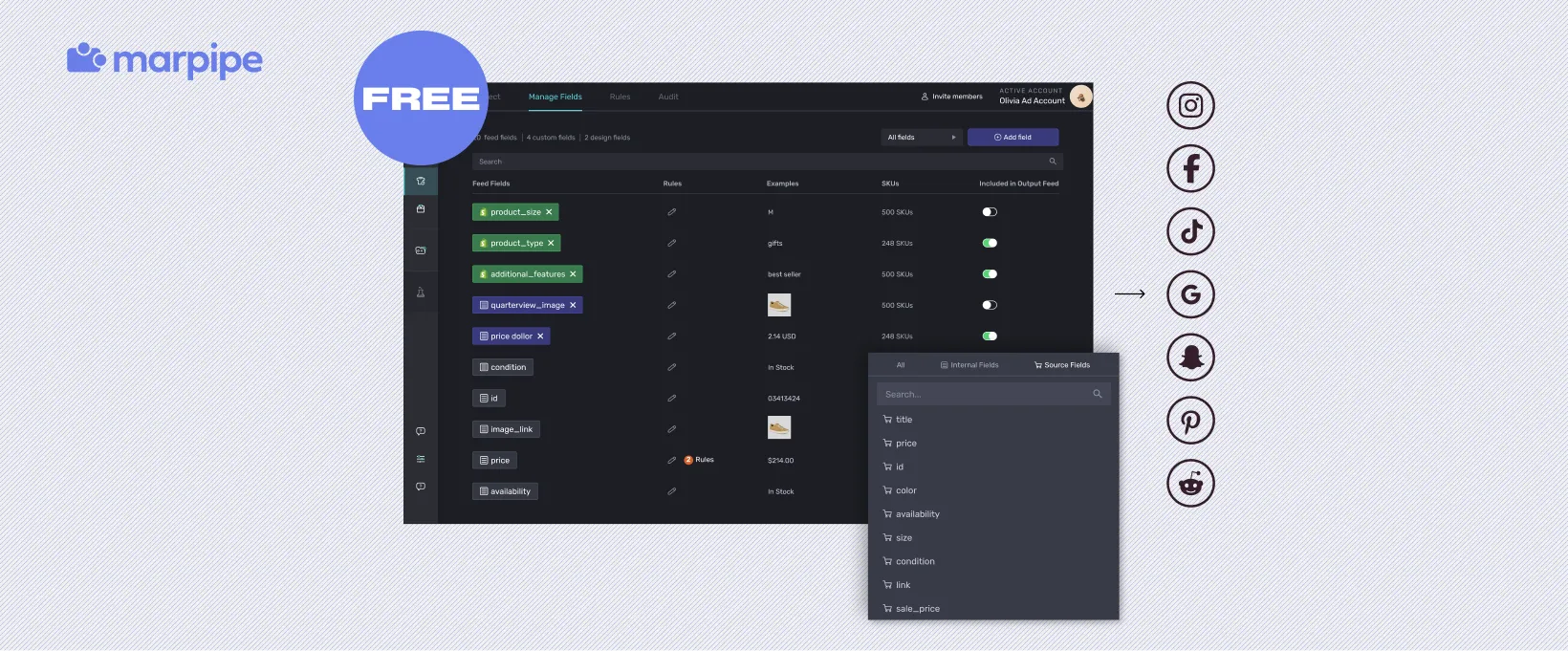
The real payoff comes with Enriched Catalogs. Because Marpipe reads the product segments in your feed, you can assign different ad designs to different product groups automatically across every SKU. Let's say you're running a sale on footwear but not accessories. You can apply a price strikethrough to one category and a completely different creative treatment to another, without designing anything per product.
Book a demo to know how you can use your categorization and turn it into ads that actually reflect your brand and perform better.
Frequently Asked Questions
What is product categorization in e-commerce?
Product categorization is how you organize every SKU in your catalog into a structured hierarchy. Think of it as the digital equivalent of aisles and shelves in a physical store. It's what allows customers to browse and find products, your internal teams to manage inventory, and your systems (search, filters, analytics, ad platforms) to function properly. Without it, your catalog is just one giant unsorted list.
Why does product categorization matter for ad performance?
Ad platforms like Google Shopping, Meta, and Amazon use your product categories to decide which shoppers see your listings. If your products are categorized accurately, they get shown to people who are actually searching for them. This means higher click-through rates and better return on ad spend. Poor categorization means your ads reach the wrong audience and waste budget.
What are the main product categorization systems used in e-commerce?
There are four major systems. Google Product Taxonomy is required for Google Shopping and has over 6,000 category nodes. Meta Product Categories are used for Facebook and Instagram shops and dynamic product ads. Amazon's Browse Tree Guide is Amazon's proprietary system that goes very deep into subcategories and product attributes. UNSPSC is a global classification standard used primarily in B2B procurement and government purchasing.
How many levels deep should my product taxonomy be?
Stick to three or four levels. Any deeper, and you create navigation customers won't click through and internal teams won't maintain. Level 1 is your department (e.g., Women's), Level 2 is the category (Tops), Level 3 is the subcategory (T-Shirts), and Level 4 is the product type (Graphic Tees). Only add that fourth level when the product volume in a subcategory justifies it.
