


Running ads for a catalog with thousands of products would normally mean thousands of pieces of creative. Pinterest catalog ads remove that bottleneck by using your product feed to match products with people already searching, saving, and planning what to buy.
That matters on a platform with 640 million monthly active users as of Q2 2026, where people are not just scrolling for entertainment. They are searching for ideas, saving products, and planning purchases they intend to make weeks later.
This guide covers what you need to get Pinterest catalog ads live, from the required feed fields and product groups to campaign setup and optimization. It also covers what to fix when products get rejected or your ads get no impressions.
What Pinterest catalog ads are
Pinterest catalog ads sit on top of your Pinterest product feed instead of individual creative uploads. You give Pinterest a data source, Pinterest ingests it into a catalog, and every eligible product becomes something the platform can serve as an ad. The ad unit is assembled from your feed data at the moment it is shown.
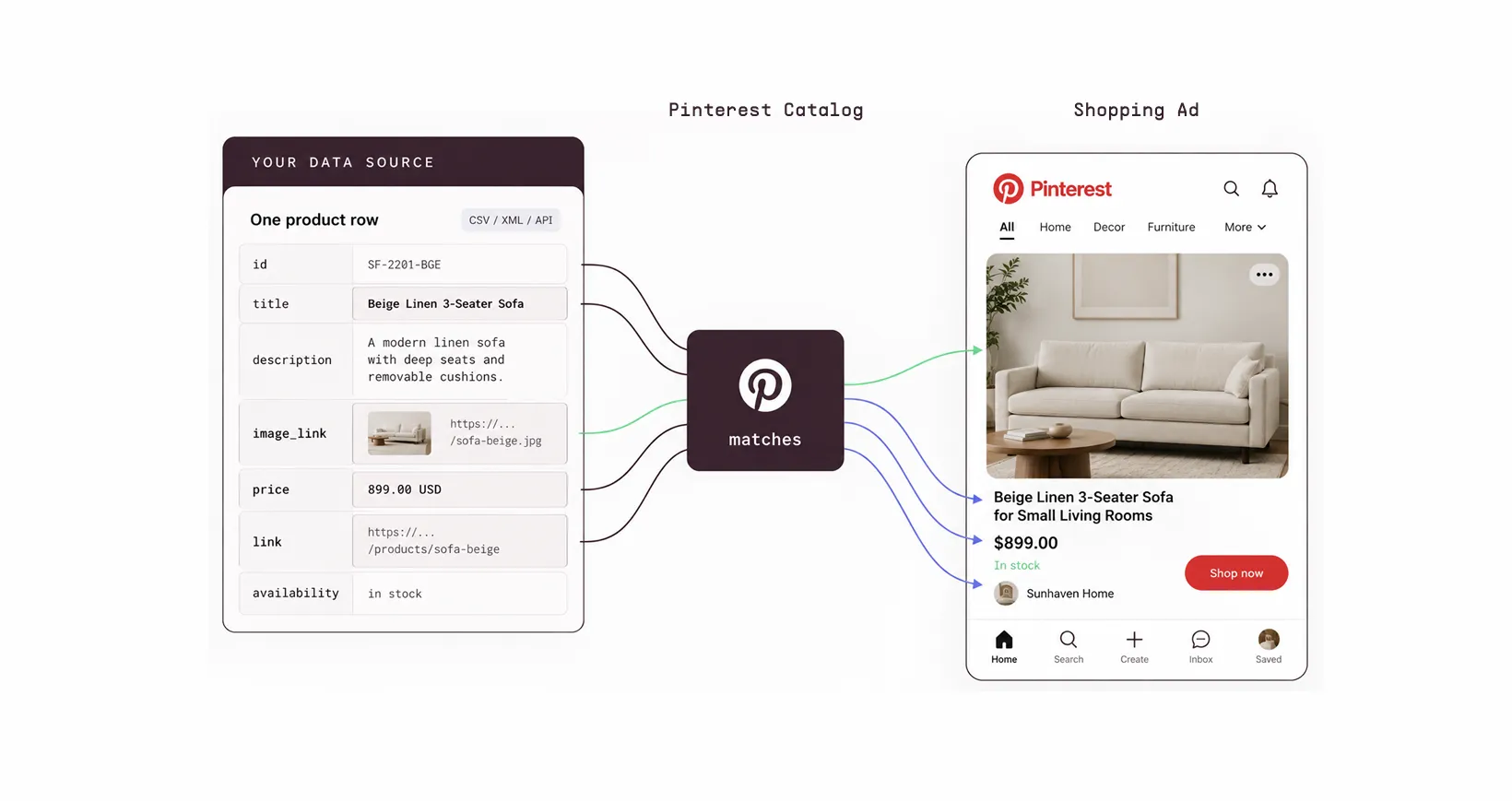
One row of your data source produces one ad. The image_link field becomes the product image, title becomes the headline text a shopper reads in the feed, price becomes the price, and link becomes the destination behind Shop now.
The difference between a catalog ad and a promoted Pin
A promoted Pin is one asset you made and uploaded. A catalog ad is a template Pinterest fills from your feed, so the image, title, price, and destination URL all come from your product data.
If a product title reads like an internal SKU name, that is what people see in the ad. If you are new to feeds in general, start with what a product feed is and then come back.
4 Pinterest shopping ad formats
Pinterest supports four shopping ad formats, and all four draw from the same Pinterest catalog. Pinterest officially calls these shopping ads. They are created from products in your catalog, which is why marketers often refer to them as Pinterest catalog ads.
- Standard shopping ads. A single product image pulled straight from your feed. The default, and the easiest to launch.
- Video shopping ads. A video clip promoting a product. You supply the video asset in your feed.
- Personalized collections ads. One large hero image or video followed by three smaller supporting assets. Tapping the ad opens a fullscreen view with up to 24 secondary creatives, and Pinterest can pull those secondary products dynamically from a product group. Two constraints: collections ads can only be created on desktop and only target people on the Pinterest mobile app, and secondary creatives must be .jpg or .png. No video, no GIFs, and all of them have to share the same aspect ratio.
- Carousel shopping ads. Multiple images or videos in a single swipeable ad.
Where Pinterest catalog ads appear
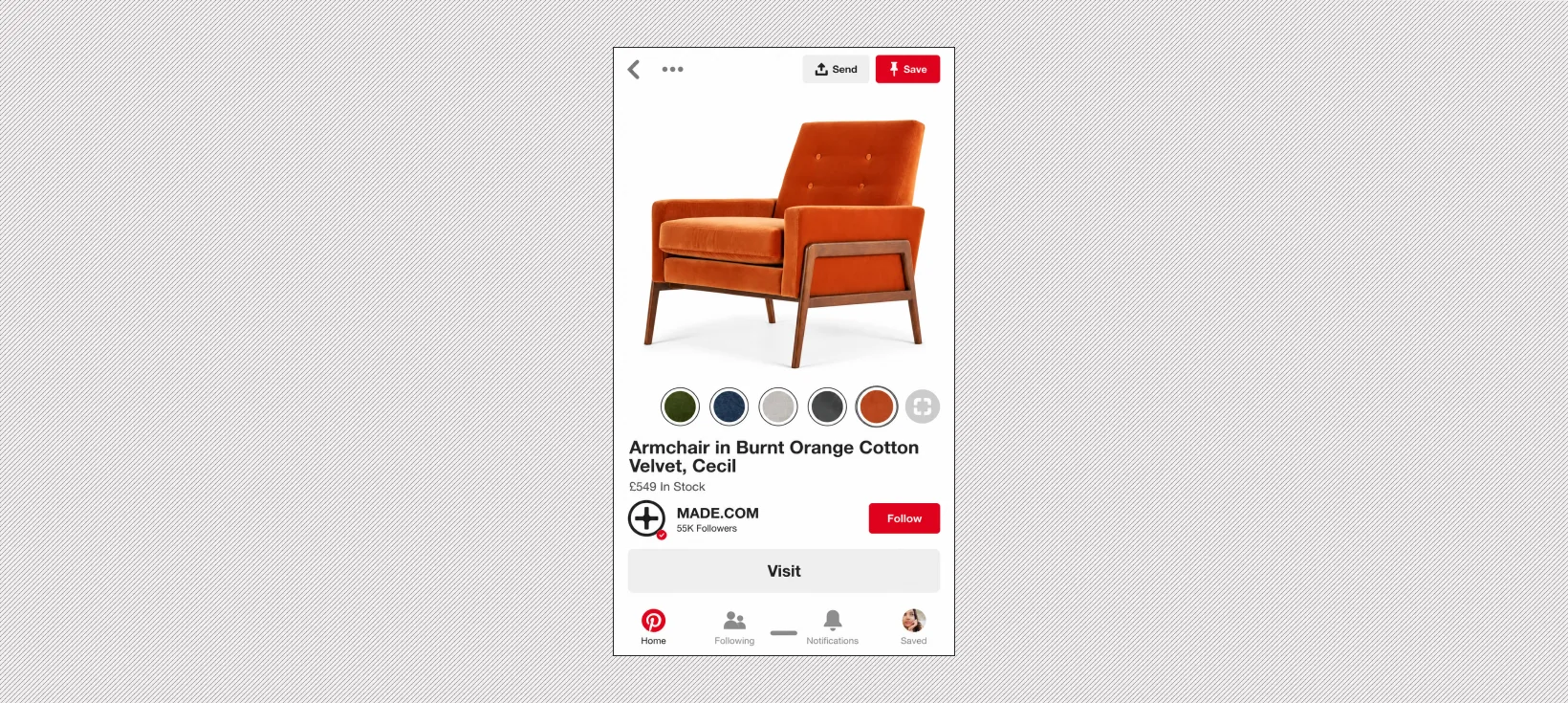
Catalog ads appear in the home feed, in search results, and in related Pins under an organic Pin. That last placement is the one people underrate. Somebody who just saved a photo of a bathroom renovation gets your vanity unit shown underneath it, which is closer to a search result than to an interruption.
There is also a format you cannot self-serve. Top of Search ads place your products in the first slot of search results and related Pins, and when you promote a catalog Pinterest auto-groups multiple relevant products into a brand-exclusive gallery. Pinterest reports 41% higher CTR versus control for brands using it. Activation runs through a Pinterest rep, so it is not something you will find in Ads Manager.
What you need before you can launch Pinterest catalog ads
Pinterest gates catalogs behind a short list of account, site, and feed requirements. All of them are one-time setup, and skipping any single one blocks ingestion entirely. Work through them before you open Ads Manager, because a campaign built on a catalog that never ingested will look like a targeting problem and waste a week of diagnosis.
Account and site requirements
Per Pinterest's catalog requirements, you need:
- A Pinterest business account (free to create)
- A claimed website
- The Pinterest tag installed. Pinterest lists this as a requirement for catalogs, not a recommendation.
- A site that meets merchant guidelines
The merchant guidelines check is the one that surprises people. Pinterest wants a clear return policy that states whether you accept returns, the process and timeline, and contact information. It also wants a high-quality site with no broken links or incomplete pages, and it does not allow sites that force people to register before they can see products.
The required Pinterest catalog fields
Every product needs seven core fields. Products with multiple variants also need item_group_id. Missing or incorrectly formatted required fields can prevent your catalog from ingesting correctly.
Accepted file formats are CSV, TSV, XML (RSS 2.0 or ATOM 1.0), Google Sheets, and compressed versions of those. Files must be UTF-8 encoded, and password-protected archives are rejected. A single catalog holds up to 20 million products.
Beyond the required fields, Pinterest accepts optional fields for identifiers, product characteristics, shipping data, custom labels, and AI disclosure. Custom labels are worth filling in even if they look pointless now, because they become your product group filters later. For a field-by-field walkthrough, see our Pinterest product feed setup guide.
Tracking
Install the Pinterest tag, and add the Conversions API if you can. Pinterest's own guidance for automated campaigns names accurate conversion tracking through the tag or the Conversions API as a prerequisite, not a nice-to-have. Without it, retargeting has nothing to work from and the platform's optimization is guessing.
Marpipe's Feed Management is free with no limits and no expiration, and it handles the unglamorous part of this step.
- Clean up messy product data, standardize formats, and remove duplicates
- Rename, merge, split, or transform any field so it matches Pinterest's spec
- Push the same cleaned feed to Pinterest, Meta, Google, TikTok, and Snapchat from one place
How to set up Pinterest catalog ads
Steps 1 through 3 are catalog work and steps 4 and 5 are campaign work. Most of the outcome is decided in the first three, which is the opposite of how most people spend their setup time. Budget an afternoon for the campaign and however long your feed needs.
Step 1. Upload your data source
Go to the Catalogs tool in your Pinterest business account and add your data source. You have two options:
- Hosted URL: Give Pinterest a link to your feed over HTTP, HTTPS, FTP, or SFTP. Pinterest normally ingests feeds every 24 hours, and you can schedule the ingestion time and timezone. Pinterest also documents a Trigger ingestion option for time-sensitive updates.
- Manual upload: Drag and drop the file. Pinterest processes it when you upload it, and manual feeds must be refreshed every seven days to keep products organically distributed.
Hosted is the right default. If you upload manually, you have to refresh the file every seven days or organic distribution stops, and after 90 days ad distribution stops too.
Step 2. Clear your diagnostics before you build anything
After the first ingestion, open the catalog diagnostics page and work the error list down. Do this before you build product groups, because a product with an ingestion error is invisible to everything downstream.
The errors that account for most rejections are predictable:
- Broken or non-direct image_link URLs
- Prices with mismatched or missing currency
- availability set to a value Pinterest does not recognize
- HTML tags left inside description
- Duplicate id values across variants that should have used item_group_id
Step 3. Build product groups that mean something
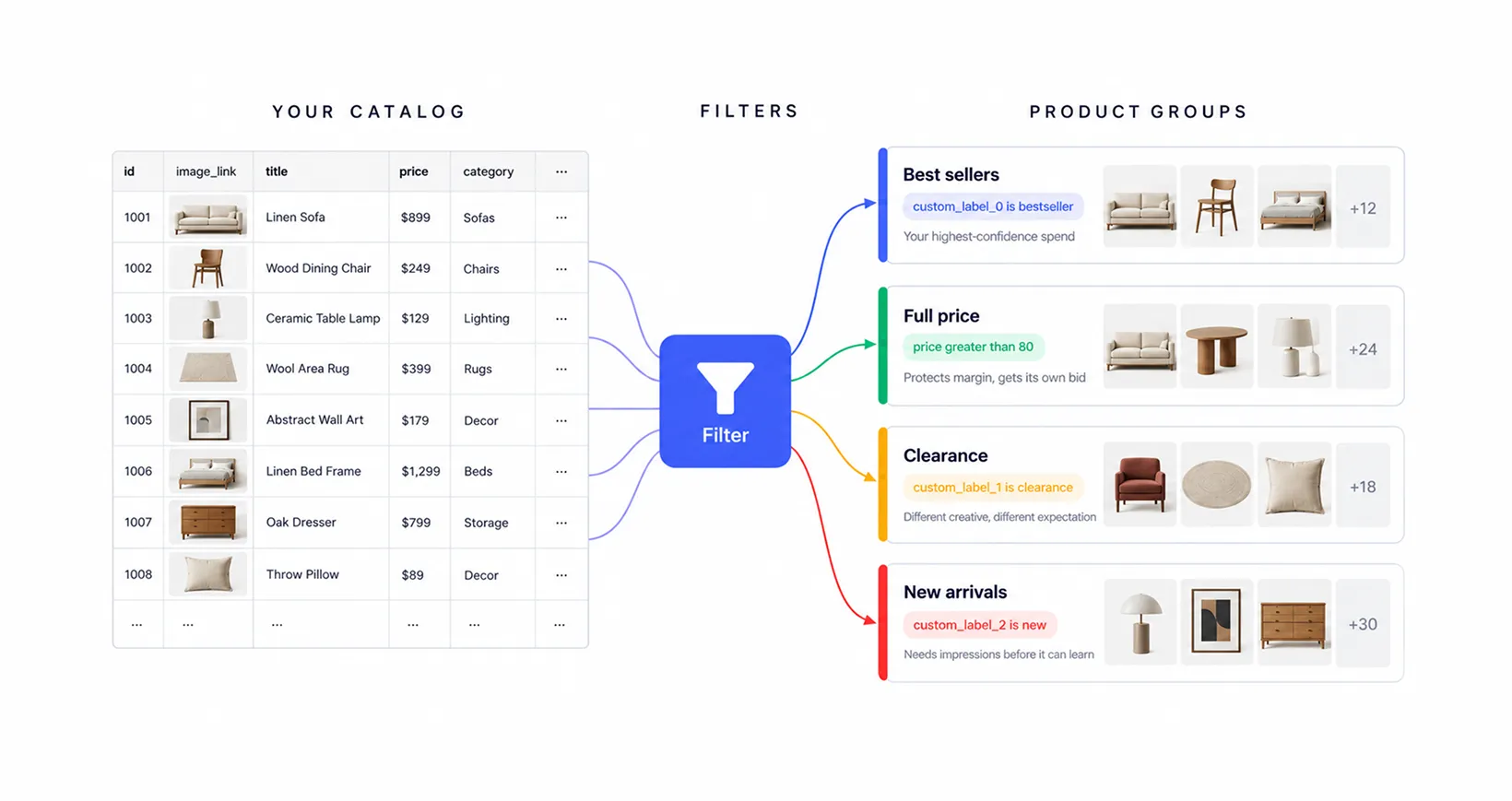
Product groups are how you control budget. Pinterest gives you 5 ways to create them:
- Filters
- Pinterest's suggested product groups
- Product group trends powered by Pinterest Trends
- Manual selection
- Syncing Shopify collections if your store is connected.
You can filter on item ID, product type, brand, category, price, availability, product title, custom labels 0 through 4, custom numbers 0 through 4, and membership in another product group.
The operators are not all available on every attribute, which can confuse people:
- is and is not work as exact matches across attributes
- contains and does not contain are limited to custom labels 0 through 4 and product title
- less than, greater than, and their or equal to variants are limited to custom numbers 0 through 4 and price
Here's a workable starting structure for a mid-size catalog:
Two rules from Pinterest worth taking care of:
- Do not let products overlap across promoted groups: Pinterest states that overlapping products in promoted product groups cause bidding issues, and recommends using the Product Group filter to exclude items already promoted elsewhere.
- Watch the caps: Pinterest's auto-created groups (Top Sellers, Back In Stock, Best Deals, New Arrivals, Most Popular) are limited to 1,000 products each. All Products has no limit. Synced Shopify collections cap at 100 collections and 1,000 products per collection.
Step 4. Build the campaign
Create a campaign with the Sales objective and select Product Catalog as your ad source. The Consideration objective also accepts a product catalog if you are optimizing for clicks rather than purchases, but Sales is the standard choice for Pinterest shopping ads. There is no separate catalog sales objective to look for.
At the ad group level:
- Select the product group you want to promote
- Set a daily or lifetime budget
- Choose your bidding approach. Pinterest recommends Performance+ bidding to spend the full budget at the lowest cost per result.
- Skip keyword and interest targeting. Pinterest states outright that keyword or interest targeting is not necessary for Sales campaigns, because it uses your product data to match items to people already browsing product Pins. Layering manual targeting on top mostly restricts delivery.
Add dynamic retargeting as a separate ad group or campaign once you have tag data flowing. Site visitors and cart abandoners are a different audience with a different expected return, and mixing them into the same budget as prospecting hides both.
Step 5. Launch, then leave it alone for a bit
Publish, and then resist the urge to rebuild it in the first week. Pinterest's own guidance on automated campaigns puts it like this: "Think of these first two weeks as your AI's training period." Expect fluctuation, and watch spend pacing and conversion volume rather than daily ROAS.
Watch for impression volume by product group (are all your groups actually delivering?), click-through rate against your account average, and how many products are getting any impressions at all. Conversions come later on Pinterest than they do on Meta, so judging a catalog campaign on day three purchase volume tells you almost nothing.
How to optimize Pinterest catalog ads
Optimization of Pinterest shopping ads splits into 2 jobs:
- Making your feed match how people search
- making your creative match how people browse.
Most accounts do neither, then blame the channel. The order matters, because relevance decides whether you get impressions and creative decides what happens to them.
Write titles the way people search, not the way your PIM stores them
Pinterest behaves like a search engine. Your product title is the strongest relevance signal you control, and internal naming conventions are dead weight.
Don't write like this: SF-2201-BGE-3ST
Write like this : Beige Linen 3-Seater Sofa for Small Living Rooms
The second version contains the color, material, size, category, and use case. Every one of those is something a person types into Pinterest search. Fix titles across the catalog before you touch bids, because no bid strategy compensates for a product Pinterest cannot categorize.
Segment product groups instead of running All Products
Running your whole catalog as one group hands all budget allocation to the platform and gives you nothing to read afterward. Segmentation gives you both control and diagnosis.
Make the creative look like Pinterest
Pinterest is an inspiration surface. A product photographed on a white background, cropped square, with a price stamped on it, reads as a catalog listing in a feed full of styled rooms and outfits. It gets scrolled past.
Three things to change first:
- Use lifestyle context. Show the product in the setting the person is planning. A rug in a room beats a rug on white.
- Go vertical. Collections and standard shopping ads support 2:3, and the mobile feed rewards it.
- Put the value proposition in the image. Price, discount, shipping, or a social proof number in the creative itself, not only in the description.
This is the part that does not scale by hand. Nobody is art-directing 4,000 SKUs individually, which is why most catalogs ship the raw feed image and accept the result. Tools like Marpipe's catalog creative exist because one designed template applied across the feed is the only version of this that finishes.
Use Performance+ where it earns its place
Pinterest Performance+ is Pinterest's automated campaign setup, available for the Consideration, Lead, and Sales objectives. What it takes over:
- Bidding. Performance+ bidding, aimed at the most outcomes for the lowest cost.
- Budget. Lifetime and flexible daily budgets only.
- Targeting. Simplified to a country picker, simplified age targeting, and customer lists.
- Creative. Automatically turns product Pins into collections and shopping ads, applies generative AI backgrounds to product images, and crops and resizes eligible Pins.
Pinterest publishes conditions for it to work, and they are specific:
“Your daily budget should be at least 5x your cost per result goal. At least 10 ads per ad group, but more is better. Performance+ Leads and Sales campaigns perform best with 50+ conversion events per week. Integrate the Pinterest Conversions API and/or the Pinterest Tag for accurate conversion tracking.”
If you are under those thresholds, Performance+ has too little signal to optimize against and manual structure will serve you better.
In 2026, Pinterest announced a new Performance+ Creative model that evaluates multiple creative variants and picks the one most likely to perform for each individual ad impression. Pinterest reports a 7.5% increase in click volume in testing. That only helps if you give it variants to choose between, which brings the whole thing back to creative supply.
Cut the SKUs that are wasting the budget
Catalog campaigns report at the campaign level while waste happens at the SKU level, which is why it goes unnoticed. Marpipe's SKU Optimization product uses a two-axis rule that is worth stealing even if you never buy the tool:
→ Filter out products in the bottom 25% of revenue that are also in the highest 25% of ad spend.
Filtering on either axis alone catches a lot of innocent products. A low-revenue product might be cheap to advertise. An expensive-to-advertise product might be your best seller. The intersection is the actual waste. Other cuts worth making on the same logic: products in the bottom 30% of monthly sales, products in the bottom 40% of CTR, and anything with a return rate high enough to make its ROAS a lie.
Give conversions a longer window before you judge them
Pinterest users are planning, not buying on impulse. Someone can save your product in August and buy it in October. If you evaluate a Pinterest catalog campaign on a 7-day click window and compare it against a Meta retargeting campaign, Pinterest will lose that comparison every time, and the comparison will be wrong. Check your attribution settings before you draw conclusions.
Common problems with Pinterest catalog ads and how to fix them
Most Pinterest catalog ad failures trace back to the catalog rather than the campaign. That is good news, because feed problems are fixable and auction problems mostly are not. Here is the fast path from symptom to cause so you can fix the right thing.
Pinterest states that products marked out of stock are not distributed at all, organically or through shopping ads. Combine that with the merchant requirement for price and stock accuracy within 7 days, and a stale feed does not just degrade your ads. It shrinks the set of products eligible to run at all, and it does so without anything in Ads Manager telling you.
Make your Pinterest catalog ads look like real creative
Pinterest rewards ads that look like they belong to the feed. The default catalog ad often does not look like that. It is usually a product photo on white background with a price, dropped into a feed of styled, designed, aspirational images. Your creative decides whether anyone acts on them.
Marpipe turns your existing product feed into enriched catalogs, so every SKU gets a designed ad instead of a bare product shot. Here is what that gives you on your Pinterest catalog ads:
- Design control over every SKU: Build one dynamic template that pulls text, images, prices, and descriptions from your feed, and generate a brand-perfect ad for every product in your catalog.
- Conditional logic per product segment: Apply design rules based on category, price tier, inventory status, or any attribute in your feed. A clearance SKU and a full-price hero SKU can get genuinely different layouts from the same template.
- Smart image handling: Automatic cropping, fitting, and background removal so inconsistent product photography still produces ads that look intentional across every placement.
- Creative elements that carry the offer: Price strikethrough, percentage off, countdown clocks, inventory scarcity, and realtime social proof, applied dynamically across the catalog.
- Push to Pinterest and everywhere else: The same enriched catalog goes to Pinterest, Meta, Google, TikTok, and Snapchat from one place.
Marpipe reports an average performance lift of roughly 20% on enriched catalog ads across the platform. Published case studies include Twillory at +127% ROAS, Cozy Earth at +60% ROAS, and DermStreet cutting CPA 30% using price overlays. Note that these results come from catalog campaigns generally rather than Pinterest specifically.
Book a demo and see your own SKUs as designed ads, ready to push to Pinterest, Meta, Google, TikTok, and Snapchat from the same feed.
Frequently Asked Questions
How long does it take to get Pinterest catalog ads live?
Timing varies. A clean account and feed can move quickly, while catalog errors or merchant-review issues can extend setup. Plan time for the first ingestion, diagnostics, and any required fixes before launching ads.
How often does Pinterest update my product feed?
Hosted feeds are normally ingested every 24 hours, and you can schedule the ingestion time and timezone. Pinterest also documents a Trigger ingestion option for time-sensitive updates. Manual uploads process when uploaded and must be refreshed every seven days to keep organic distribution.
Do I need the Pinterest tag to run catalog ads?
Yes. The Pinterest tag is listed as a requirement for catalogs, and without it you cannot run dynamic retargeting or measure conversions. Add the Conversions API alongside it if you can. Pinterest's automated campaign guidance treats accurate tracking as a precondition for performance.
What is the difference between Pinterest catalog ads and Meta catalog ads?
The mechanics are similar, the intent is not. Meta serves catalog ads largely off behavioral and retargeting signals. Pinterest serves them off search and planning behavior, so titles and descriptions carry more weight and conversion windows run longer. Feed quality matters on both.
Can I run video in a Pinterest catalog ad?
Yes. Video shopping ads pull a video asset referenced in your Pinterest product feed, and collections ads accept a video as the hero asset with static secondary products. Producing video per SKU is the hard part, which is why most catalogs stay static. Product Level Video generates a video for every SKU from the product images you already have.
Why are my Pinterest catalog ads getting no impressions?
Usually relevance rather than budget. If your titles and descriptions use internal product names, Pinterest cannot match them to searches. Rewrite titles with color, material, category, and use case, remove narrow manual targeting, and confirm your products are in stock. Out-of-stock items are not distributed at all.
How many product groups should I create?
Create enough product groups to make budget decisions, and in a way that keeps them distinct. 4-8 is a reasonable start for most catalogs, split by performance tier, price band, or category. Do not let products overlap across promoted groups, because they will compete against each other in the auction.
What products perform best on Pinterest?
Visual, planning-driven categories: home decor, furniture, fashion, beauty, and wellness. Products that can be shown in context outperform standalone product shots. Seasonal items also do well, because Pinterest users plan for holidays and events weeks ahead.
