


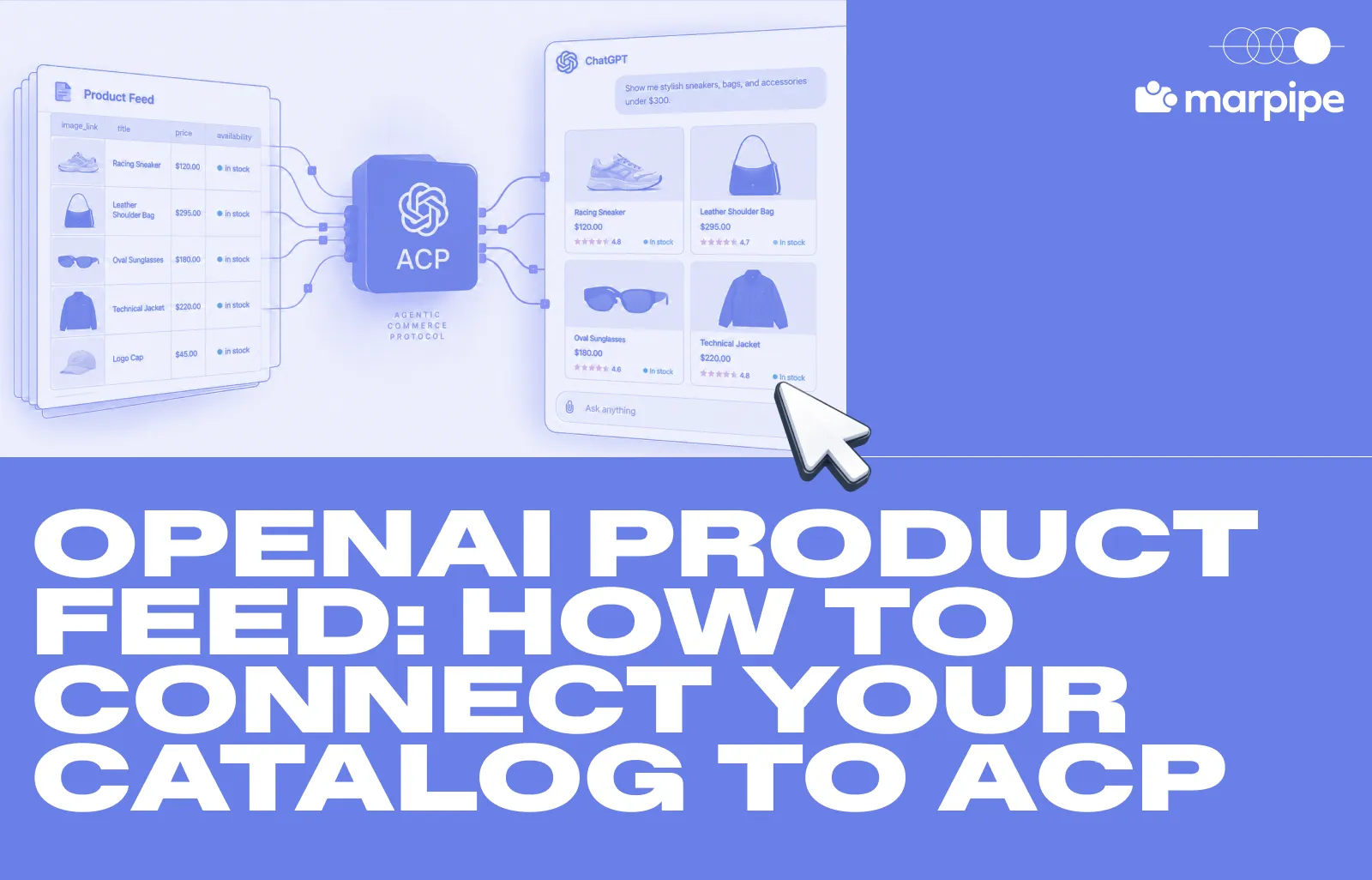
There is a new sales channel opening up. Just like SEO made you optimize for Google and marketplaces made you optimize for Amazon, AI shopping is creating a new reason to keep your product catalog structured, accurate, and up to date.
An OpenAI product feed gives ChatGPT structured product data such as titles, descriptions, prices, availability, images, and seller information so your catalog can be represented more accurately in shopping results.
OpenAI uses the Agentic Commerce Protocol (ACP) as one of the connective layers between merchants, commerce systems, and AI agents. Product feeds support product discovery, while ACP can support checkout and transaction workflows where available. This post breaks down how the OpenAI product feed fits into ACP, how the buying flow works, and the six steps needed to get your catalog ready.
What Is an OpenAI product feed, and how does ACP fit in?
An OpenAI product feed is a structured version of your product catalog that gives ChatGPT accurate information about the products you sell. It can include product identifiers, titles, descriptions, prices, availability, images, seller information, and additional attributes ChatGPT can use for product discovery.
The Agentic Commerce Protocol (ACP) is an open standard developed by OpenAI and Stripe that defines how AI agents and merchants can coordinate commerce workflows such as checkout, payment, and order confirmation without every merchant having to build a bespoke integration for every assistant.
Without protocols like ACP, every AI assistant could need a custom integration with each merchant and payment provider to complete a purchase. ACP provides a shared framework for validating payment credentials, confirming orders, and approving or rejecting purchases.
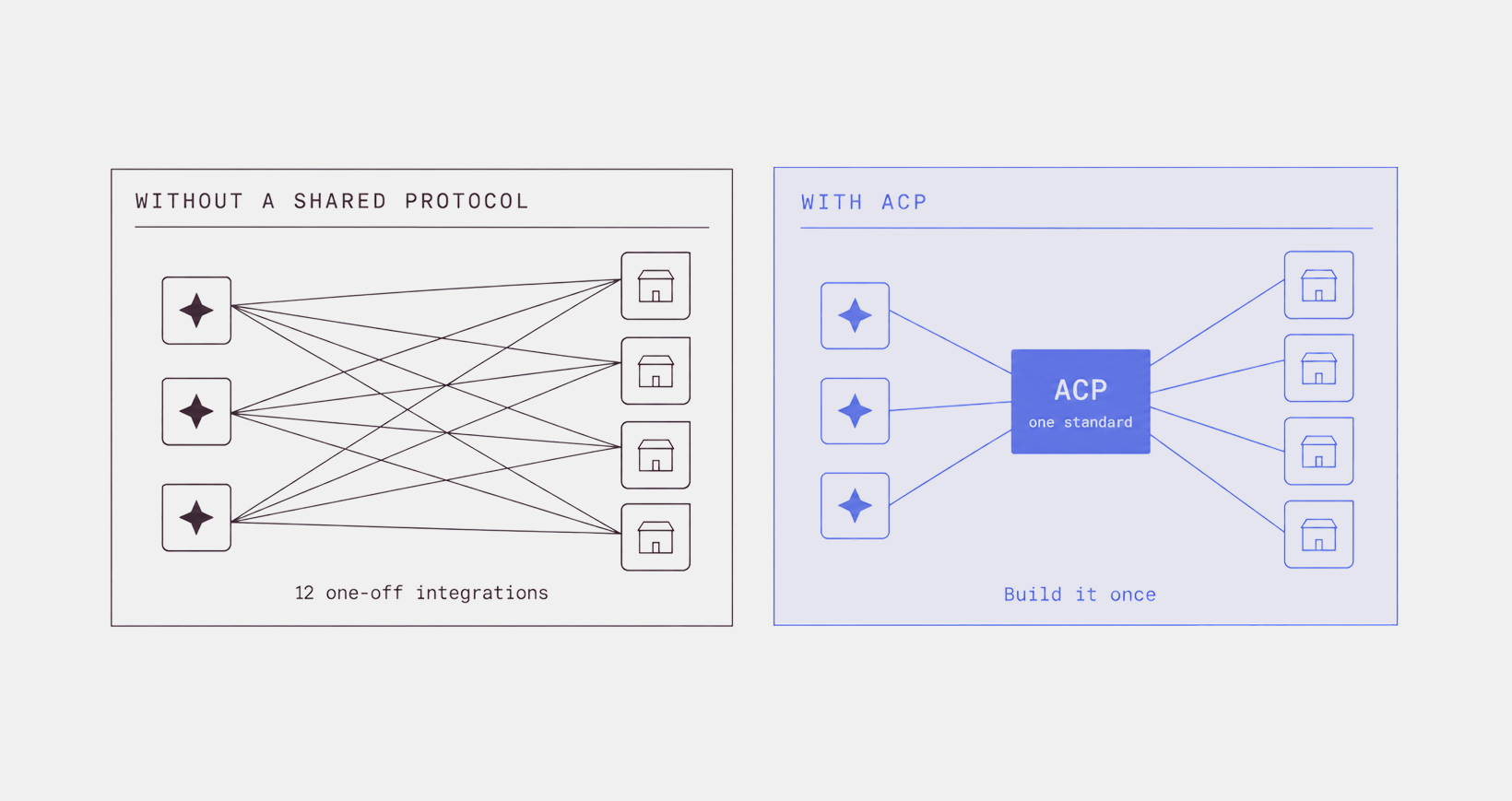
You can implement ACP once and make that commerce interface available to compatible agents, rather than building a separate checkout integration for every assistant.
ACP can support checkout experiences initiated by AI agents, including Instant Checkout experiences where available. ChatGPT’s shopping experience also supports merchant-owned checkout flows, so product discovery through ChatGPT does not always mean the purchase is completed inside the conversation.
Who maintains it
OpenAI and Stripe are the founding maintainers. The spec is published under Apache 2.0, with a public repo and a community contribution process. Stripe's Shared Payment Token was the first compatible payment implementation, with ACP designed to support other compatible payment service providers as well.
It is a real open standard, not a proprietary OpenAI format. Other agents can adopt it. That means implementing ACP does not necessarily tie your commerce infrastructure to a single AI vendor.
How agentic commerce protocol actually works
Picture a customer telling ChatGPT, "I need a large t-shirt under $40." In an ACP-enabled checkout flow, here's roughly what can happen behind the scenes:
- Discovery: The AI uses structured catalog data, including submitted product-feed data where available, to surface a matching product in the conversation.
- Intent: The shopper says "yes, buy that one."
- Checkout: If the product and merchant support an agentic checkout flow, the agent opens a checkout session directly with you, the merchant.
- Payment: ACP supports secure payment-token flows that let payment credentials be passed without exposing raw card details to the AI.
- Fulfillment & updates: You process and ship the order, and send status updates back through the protocol.
6 steps to get your OpenAI product feed ready for ACP
The first here is just about submission, and making decisions. The middle four are catalog hygiene you can start today. The last step is the one that needs engineering help.
Step 1: Apply, and pick your integration path
Direct feed onboarding is limited to approved partners. You apply at chatgpt.com/merchants.
Through Shopify's feature called Agentic Storefronts, eligible merchant products are automatically made discoverable to AI platforms like ChatGPT via the Shopify Catalog with no custom app installation or manual data feed setup required. Your store must sell to customers in the United States.
Then pick your path, because this determines your entire field mapping. OpenAI documents two primary product-feed integration patterns, and they are structurally different:
- File upload is a flat schema. One row per item, columns like item_id, title, price, availability. It looks and behaves a lot like a Google Merchant Center feed.
- The API is a nested JSON schema. A product feed has an id and optional target_country, while product payloads contain product objects with a variants array and nested Price, Media, Category, Seller, and Link objects. This is where the product-and-variants model lives — a t-shirt is 1 product holding its sizes and colors as variants, rather than representing each variant as its own row.
Prices in the API schema are integers in ISO 4217 minor units, so $19.99 is 1999, not 19.99 USD. Even the availability enums diverge: the flat schema uses pre_order, the nested one uses preorder and adds discontinued.
Step 2: Get the required fields right before anything else
Required fields exist so ChatGPT can understand, display, and determine the eligibility of your product. In the native file-upload schema, the non-negotiables include:
A few fields are conditionally required. The exact requirement for availability_date depends on the ingestion schema you use, so follow the requirements for your specific OpenAI feed path rather than assuming the same rule applies everywhere. Checkout-eligible products also require additional merchant-policy information.
Step 3: Write for an agent, not a banner ad
Your title has up to 150 characters. Use the space when the detail helps an assistant match the product to a query. Not with keyword soup but with specifications an assistant can match against a query.
Weak: Coffee Beans
Strong: Mountain Peak Organic Ethiopian Single-Origin Arabica Coffee Beans, Medium Roast, 500g
The second one can answer the query "organic single-origin medium roast, around half a kilo, under $30." The first cannot.
Descriptions get 5,000 characters. OpenAI's own guidance asks for "concise, factual copy," and says plain text and bullets are both fine. But do include the things a shopper asks about such as materials, dimensions, fit, use case, what it does not do. A description written to hit an SEO word count and a description written to answer questions look nothing alike, and only one of them works here.
Then there is the optional layer, which is where the OpenAI product feed stops resembling Merchant Center entirely:
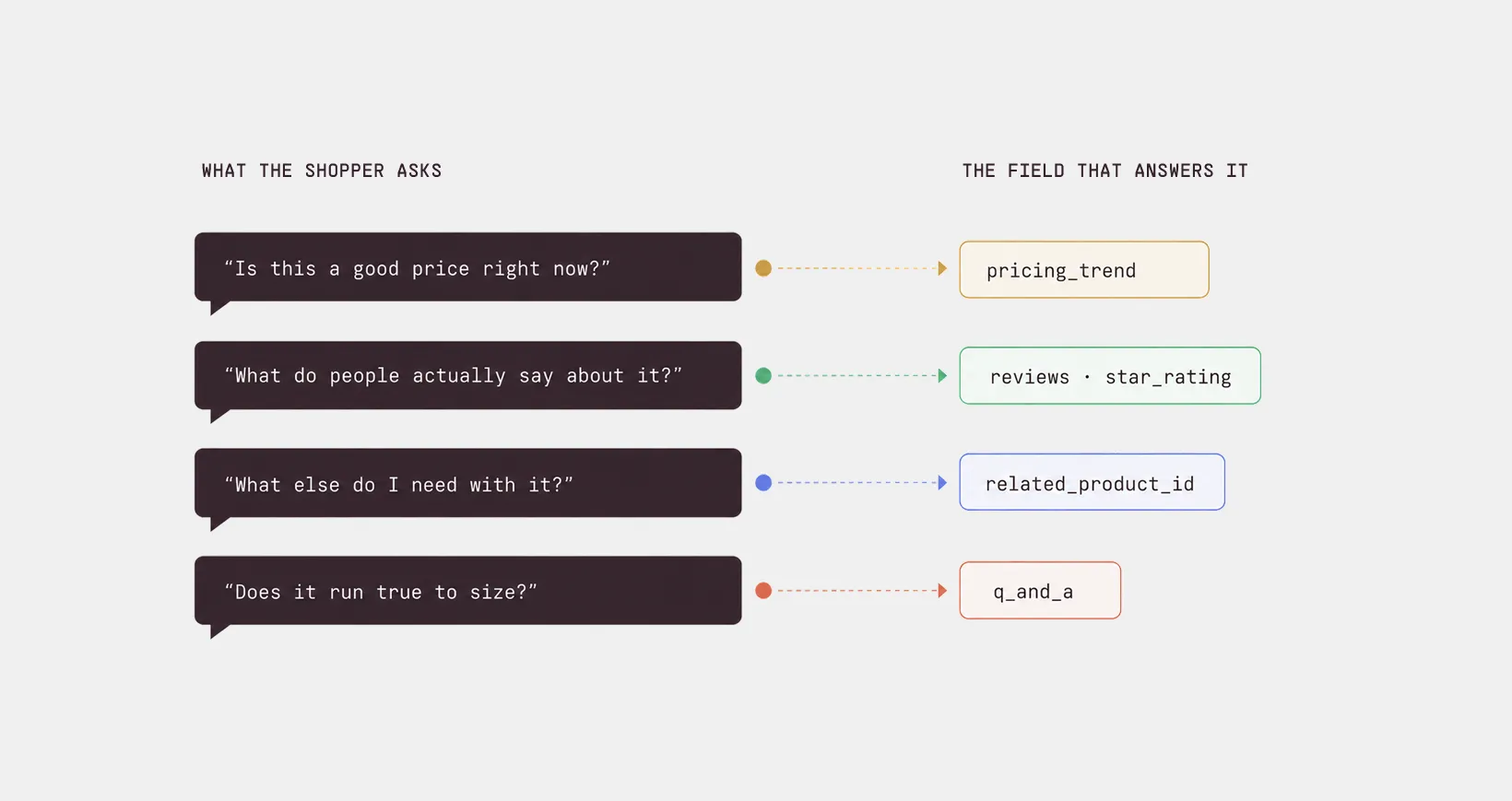
- q_and_a: Question and answer objects
- reviews: Structured review objects with title, content, and rating
- star_rating, review_count, store_star_rating, store_review_count
- pricing_trend: max 80 characters, e.g. "Lowest price in 6 months"
- return_rate and popularity_score
- related_product_id with a relationship_type from part_of_set, required_part, often_bought_with, substitute, different_brand, accessory
- warning, warning_url, age_restriction
- model_3d_url for GLB or GLTF assets
Read that as a list of the questions people ask a chatbot. Is this a good price right now? What do people say about it? What goes with it?
Step 4: Meet the image bar
The spec's actual requirement is modest: image_url is required, JPEG or PNG, HTTPS preferred. You can also supply additional_image_urls as a comma-separated list, video_url, and model_3d_url.
Other image rules you may have read about — 800×800 minimums, WebP support, pure white backgrounds — are Merchant Center conventions, not OpenAI product-feed requirements.
It's good practice, and worth doing because a clean product shot is easier for any system to use, but do not let a spreadsheet of made-up constraints hold up your launch.
Step 5: Keep it fresh
If a shopper is told something is in stock and then gets declined at checkout, that is the exact problem the freshness rules are built to prevent.
Publish a full copy of your product catalog on a regular schedule, at least once a day. That file is the source of truth as it is the complete, current picture of everything you sell.
If you need fresher price, stock, or product updates than the daily file provides, that is where the API comes in.
The API lets you update individual products by their id, and anything you do not touch stays exactly as it was. So a price drop at 11am is a quick update to a handful of products, not a re-upload of your entire 400,000-row catalog.
Step 6: Deliver it correctly
OpenAI does not reach into your site and grab a file on a schedule. You push the file to them over SFTP.
Here is what that push has to follow:
- How you send it: over SFTP.
- Text encoding: UTF-8.
- File format: parquet is best, ideally with zstd compression. jsonl.gz, csv.gz, and tsv.gz also work. XML does not.
- Filename: keep it the same every time. One stable name, overwritten with your latest snapshot on each update. If you split the catalog across several files, keep that same set and replace them each run instead of making new names.
How is an OpenAI product feed different from a catalog ad feed on Meta or TikTok?
If you already run product catalogs on Meta or TikTok, the good news is that an OpenAI product feed will feel familiar. They have the same basic fields: product IDs, titles, descriptions, prices, availability, images, GTINs.
The difference is the job the feed does.
A Meta or TikTok catalog feed is fuel for an ad. The feed ends its job at the click. Everything that matters commercially, the cart, the checkout, the payment, happens on your site after the platform is done.
An OpenAI product feed is fuel for AI product discovery and, where supported, agentic commerce. The feed gives ChatGPT structured data it can use to understand and recommend products, while checkout may happen either through an agent-enabled experience or through the merchant’s own checkout.
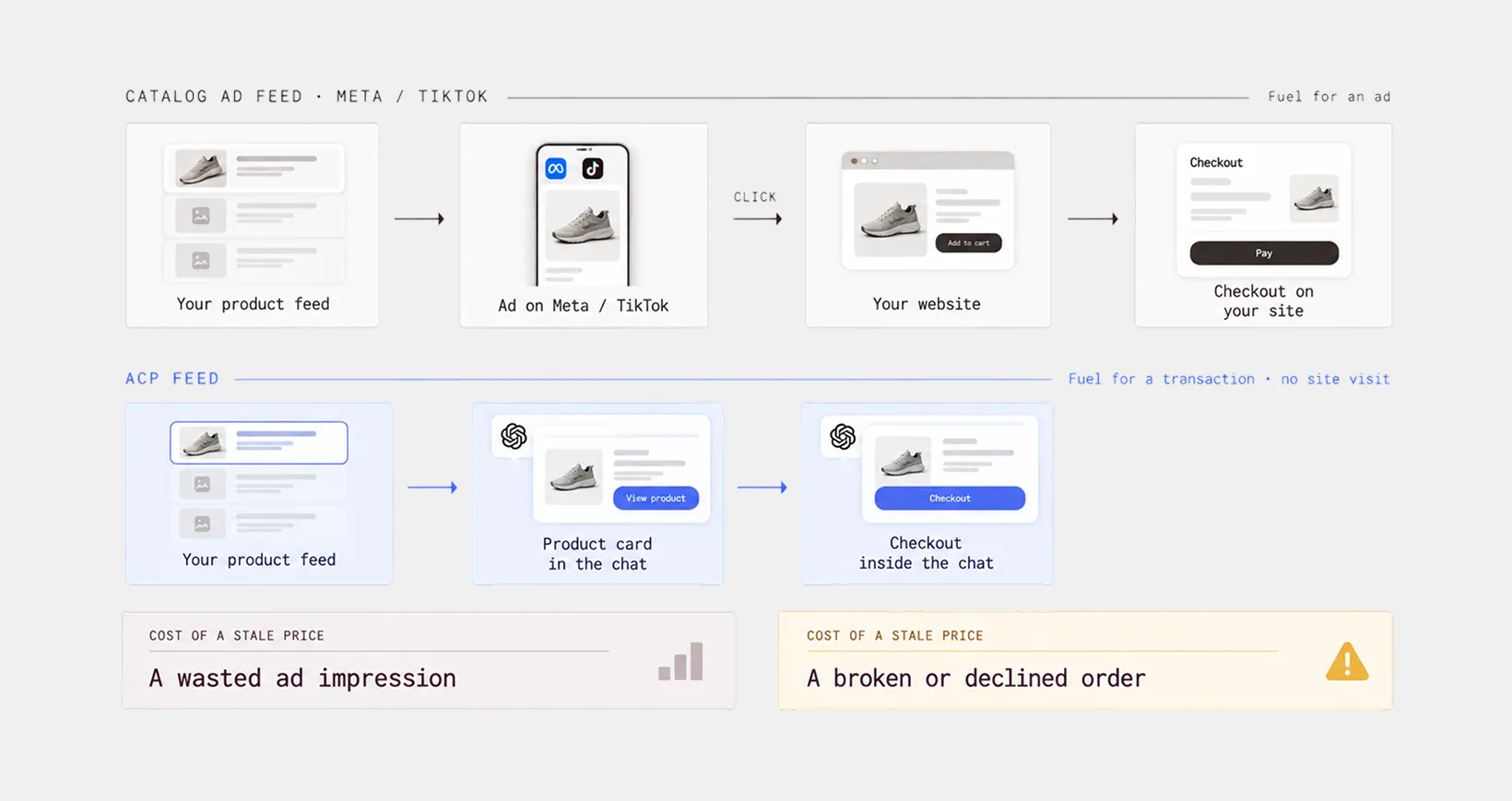
That is why price and stock accuracy matter so much, and why the API supports individual product updates between full catalog snapshots. A stale price in an ACP checkout is a failed or declined order, which is a poor experience for the shopper.
Here is the difference between an OpenAI product feed and a catalog feed on Meta or TikTok:
On Meta and TikTok, budget and bidding can influence distribution. In ChatGPT, organic product results depend more on relevance and product quality signals. That makes accurate, structured data especially important because the feed helps the AI understand, compare, and recommend what you sell.
Fix the feed you're about to copy
If you're running catalog ads, you already maintain a product feed for Meta, Google, or TikTok — and that's what step 2 is going to map from. It's the fast path, and the required fields overlap almost entirely.
What you need is a better way to maintain your feed. Which is why the feed you already have is worth maintaining properly. Don't treat it as a file someone regenerates when something breaks, but as the source every channel copies from.
You can use Marpipe's feed management to do that. It is free, with no SKU limits. You can:
- Clean messy product data, standardize formats, remove duplicates
- Rename, merge, split, or transform any field
- Build product sets, categories, and tags for segmentation
- Push the same catalog to Meta, Google, TikTok, Pinterest, Reddit, and Snapchat
Marpipe does not submit feeds to OpenAI. It keeps the source catalog clean and structured, which is the prerequisite regardless of who delivers the ACP file. If your data is right in one place, adding a destination is a mapping exercise. If it isn't, adding a destination is a project.
Connect your catalog and see which products would fail ACP's required fields. Setup takes about 5 minutes, and it will tell you whether you have a mapping problem or a data problem before anyone writes a line of integration code.
–
Frequently asked questions
Does OpenAI take a cut of sales that come from ChatGPT?
Currently, OpenAI has not stated that merchants pay a commission simply for having their products appear in ChatGPT product results. OpenAI’s latest shopping update says merchants can use their own checkout experiences while ChatGPT focuses on product discovery.
How do I know a sale came from ChatGPT?
Attribution works differently from a traditional ad platform. Add tracking parameters to your product URLs so you can segment traffic coming from the feed in analytics.
Your analytics credits organic search. Watch branded search volume as a lagging indicator, isolate AI referrer domains, feed-specific tracking parameters in a segment, and where you can, use channel-specific landing pages or codes. Treat the number you get as a floor, not a measurement.
Do I still own the customer if the agent made the sale?
Yes. Under ACP you remain the merchant of record. Pricing, inventory, the customer relationship, and retention all stay yours, and returns, refunds and support run through your existing backend exactly as they do for a direct order — the protocol triggers fulfillment, it doesn't manage it.
My products already appear in ChatGPT and I never submitted a feed. Why bother?
Because you don't control any of it. Without a submitted feed, ChatGPT is working from crawled pages and third-party sources, which means it can show a price you changed last month or recommend something you stopped stocking. A submitted feed gives you a direct, structured mechanism for stating what's true in terms of current price, real availability, and the specs an agent can match a query against. Showing up by accident isn't a channel. Showing up with accurate data is.
