



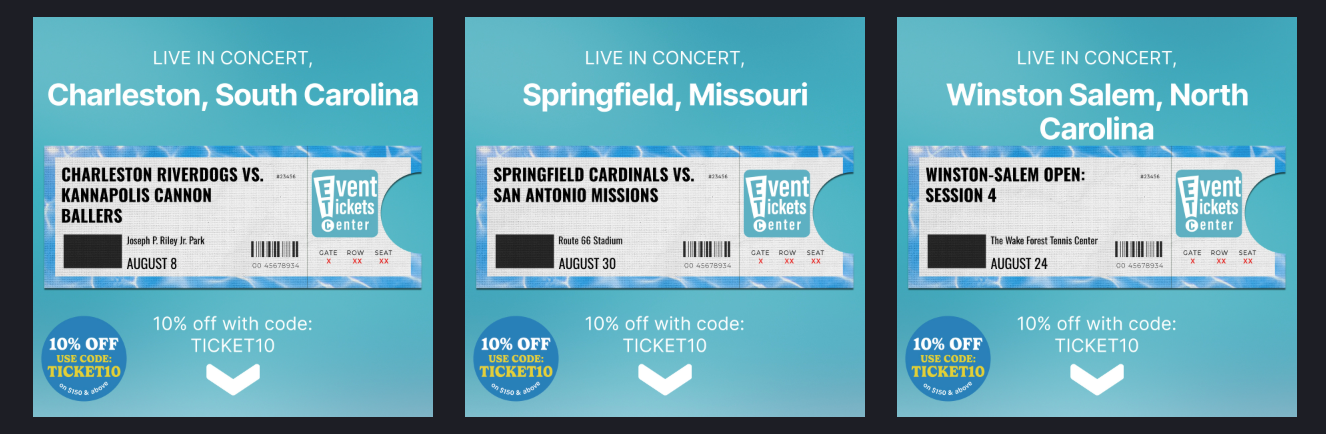
A ticket seller has an inventory of thousands of events — and often not a single image to advertise them. If you're a reseller or a marketplace, you usually don't have the rights to use an artist's photo, a team's logo, or official event artwork. That leaves you with a name, a date, a venue, and a price — and nothing to put in an ad.
This is where catalog ads and a tool like Marpipe matter more than almost anywhere else. You turn event data — performer, venue, date, "tickets from $X" — into designed, on-brand image and video creative for every event in your inventory, at the scale and freshness live events demand (dates sell out and get added constantly). Without that, you have no creative at all. This guide covers the two halves of getting there: what fields your feed should contain, and how to upload it to Meta.
Which Meta catalog type do ticket sellers use?
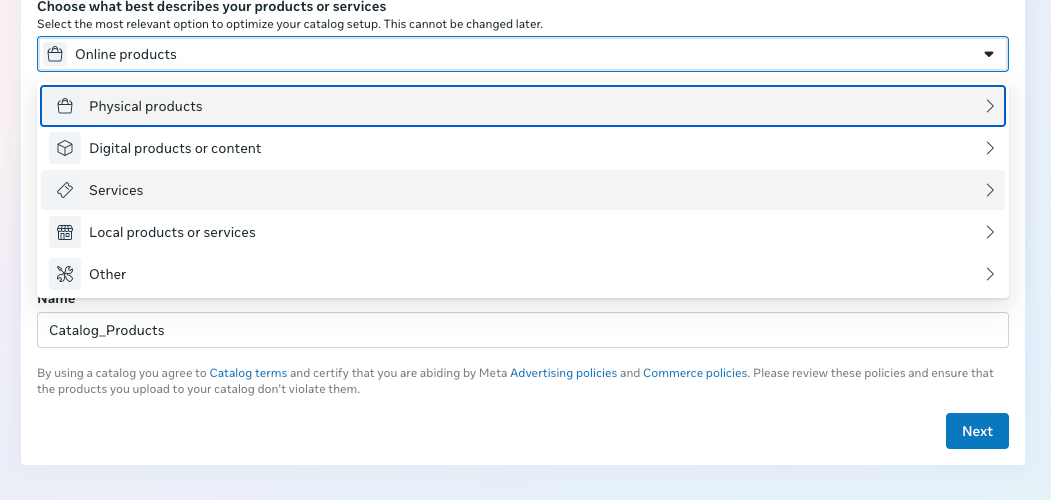
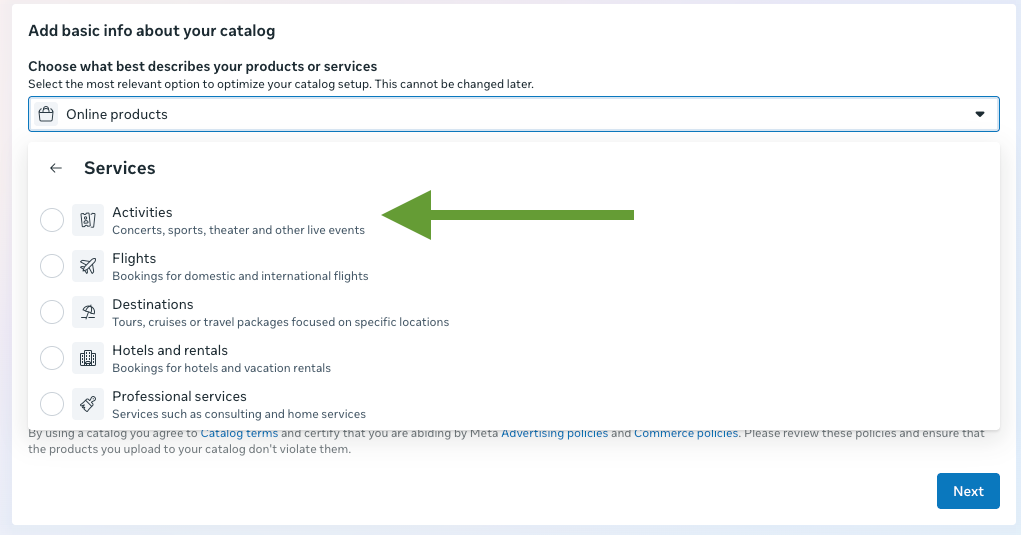
Tickets and live events use Meta's Activities catalog type. Each row in your feed is an event you're selling tickets to — a concert, a game, a show. When you create the catalog, you'll choose it under Services → Activities, which Meta describes as "Concerts, sports, theater and other live events." This choice cannot be changed after the catalog is created, so select it deliberately.
The creative problem — and why it's the whole point
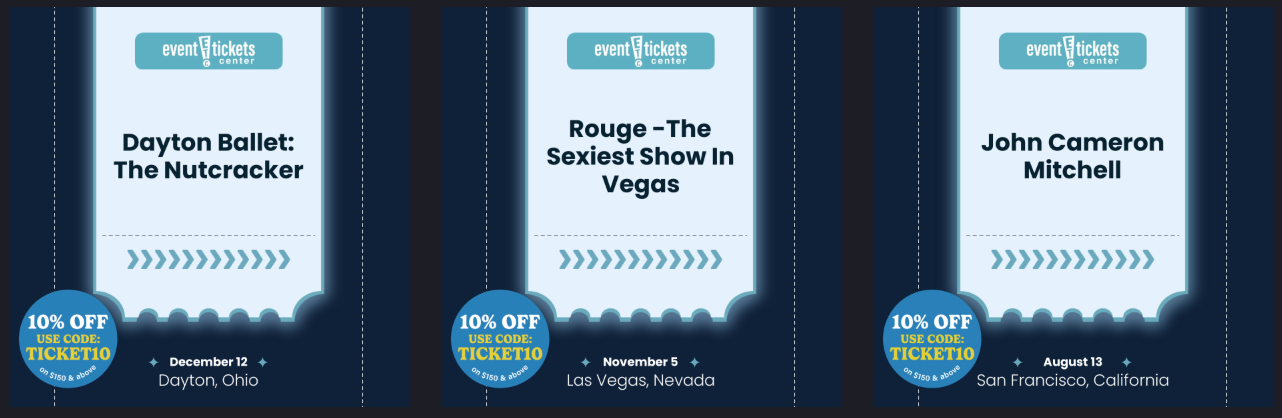
Most catalog advertisers start with product photos. Ticket sellers usually can't. Official imagery is licensed to the act, the team, or the promoter, and a reseller rarely has permission to use it. So the ad has to be built — a designed card that leads with the event name, the date and venue, a "from" price, and your marketplace branding.
That's exactly what Marpipe produces from your feed: a template that turns each event's data into a finished, on-brand creative — typographic and graphic, no licensed photo required — rendered across your entire inventory and refreshed as events are added or sell out.
The two field layers you need
Two different sets of fields are in play:
- Meta feed fields — what you send to Meta so the catalog is valid and performs well (required + recommended).
- Marpipe creative fields — extra columns that live in your Marpipe source feed and power your ad templates. Most never go to Meta; they exist so your designs can render the performer, venue, date, and price into the image.
Layer 1 — Required Meta fields
Activities requires five fields — note that description is required here (it isn't for most other catalog types):
Naming gotcha: Meta's developer docs list these as name, url, and image_url because those docs describe the API object. An actual feed upload expects the Google-style column names title, link, and image_link. Marpipe outputs the correct feed column names for you.
Layer 2 — Recommended Meta fields (rich data = better performance)
Activities has an events-specific field set. The more you populate, the better Meta can match events to the right people.
activity_category allowed values (enum): Comedy, Concert, Conference, Sports, Theater, Tour, Transfer, Other. It's a fixed list — map anything else to Other, and use activity_sub_categories for specifics.
Geo-availability: because events are tied to a physical venue, Activities supports advertising your listing to a circle, polygon, or set of postal codes around that market. If you sell nationally, this keeps each event in front of the right local audience.
Layer 3 — Marpipe creative fields (what builds the ad)
Since you have no licensed photo, these fields are your creative — they're what the template renders into a designed card. They live in your Marpipe source feed and don't need to be sent to Meta (though you can surface a few via custom_label to filter ad sets — e.g. by city or genre).
The workflow: these fields feed your Marpipe design and treatment, Marpipe renders each event into a finished image (and/or video) — event name, date, venue, price, your branding — and that rendered asset becomes the image_link you send to Meta. Your entire event inventory becomes ad-ready without a single licensed photo, and when dates sell out or new ones drop, you regenerate instead of redesigning.
How to create the catalog and upload your feed to Meta
The upload process is the same across catalog types — only the type selection differs. For tickets and events:
1. Prepare your feed in Marpipe. Bring in your events with the required fields, as many recommended fields as you can populate, and the creative fields above. Build a design/treatment that renders each event into a branded image, then generate an output feed.
2. Create the catalog in Meta. In Commerce Manager, create a new catalog. On "Add basic info about your catalog," open the type selector and choose Services → Activities. Confirm — this is permanent — then name the catalog.
3. Connect your Marpipe feed as a data source. Add a data source and choose a scheduled feed using your Marpipe output feed URL (Marpipe hosts it and keeps it fresh). The Meta Catalog Batch API is also supported for higher-frequency updates.
4. Publish and use in ads. Once your events ingest, use the catalog in your catalog ad campaigns, including retargeting people with events they viewed. Refresh the feed on a schedule that keeps up with new on-sales and sell-outs.
A note on policy
Ticketing — and especially resale — is regulated differently across regions, with rules on price transparency, fees, and where resale is permitted. Keep your pricing and fee disclosures accurate, follow local ticketing law, and comply with Meta's advertising policies. (This is general guidance, not legal advice.)
FAQ
What Meta catalog type should a ticket seller use?
Activities, found under "Services → Activities." Each event you sell tickets to is a catalog item.
Can I change the catalog type after creating it?
No. The type is set at creation and is permanent.
What are the items in a ticketing catalog?
Individual events — concerts, games, and shows.
I don't have rights to artist or team images. What goes in image_link?
The image you generate in Marpipe. You build a template that presents the event with type and design — name, date, venue, "from" price, your branding — so you never need a licensed photo.
What are the allowed activity_category values?
Comedy, Concert, Conference, Sports, Theater, Tour, Transfer, Other. Use activity_sub_categories for anything more specific.
Is description really required?
Yes — unlike most catalog types, Activities requires description in addition to id, title, link, and image_link.
How does "Selling Fast" get onto the ad?
As a custom field in your Marpipe source feed (like status_badge). Your design references it, and Marpipe renders it onto the creative for every event that has it.
Selling tickets without the images to advertise them? Marpipe turns your event data into designed, on-brand image and video creative at scale. See how designs and treatments work →
