



Sports betting and iGaming brands face a problem no other advertiser has: there are no product images. A retailer has photos of shoes. A sportsbook has a moneyline on tonight's game — a number, two team names, and a kickoff time. None of that is a picture.
That's exactly why catalog ads and a tool like Marpipe matter more here than anywhere else. You turn feed data — odds, matchups, players, promos — into scroll-stopping image and video creative, at the scale and freshness betting requires (odds change by the minute). This guide covers the two halves of getting there: what fields your feed should contain, and how to upload it to Meta.

Which Meta catalog type do gaming and betting companies use?
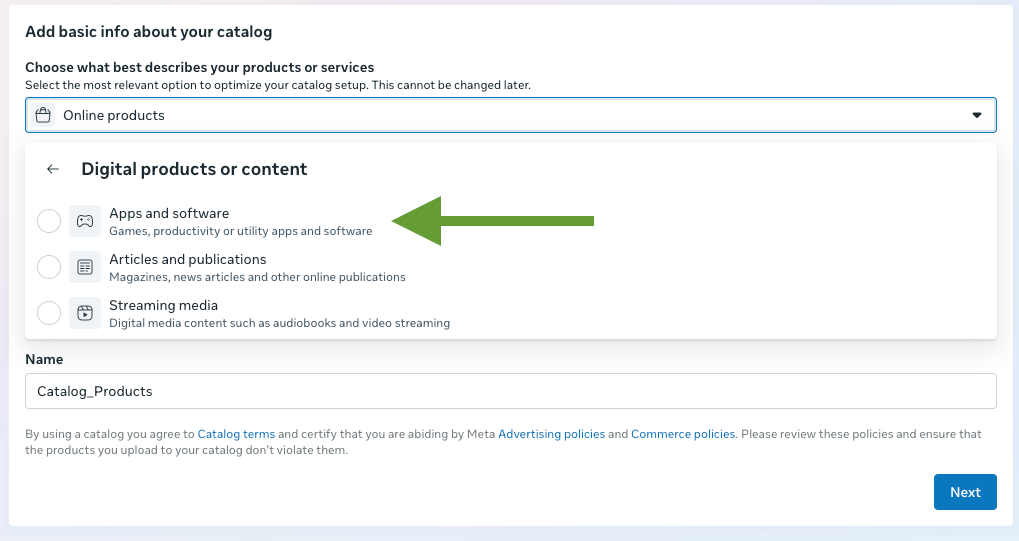
Betting and gaming businesses live inside an app, so their catalog uses Meta's Apps and software catalog type. The key mental shift: your in-app purchases are your catalog items. For a sportsbook, each individual bet or market is effectively an in-app purchase — so each row in your feed is a bet, a market, or an offer. For a casino or iGaming brand, each row can be a game, a jackpot, or a bonus.
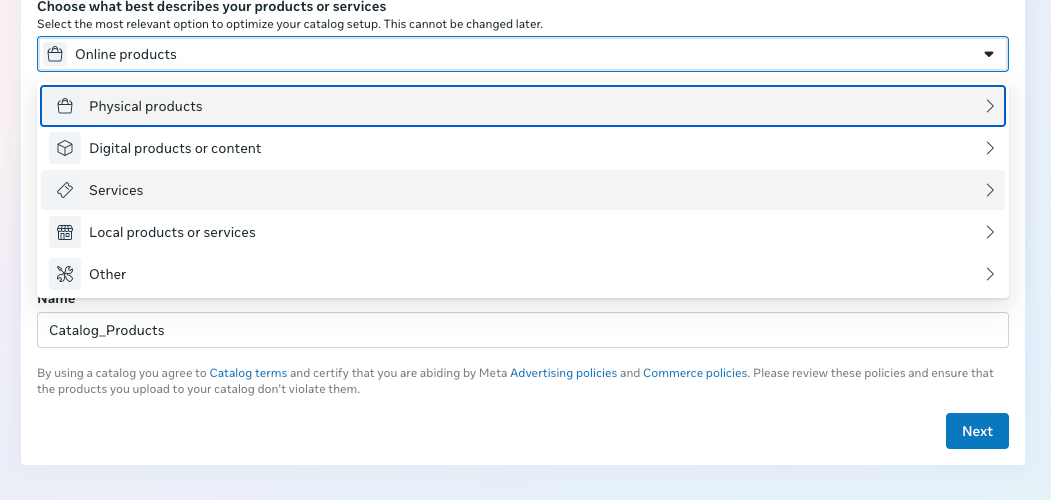
When you create the catalog in Meta, you'll choose this under Digital products or content → Apps and software. Meta describes it as "Games, productivity or utility apps and software." This selection cannot be changed after the catalog is created, so choose it deliberately.
The two field layers you need
There are two very different sets of fields in play, and keeping them straight is the whole game:
- Meta feed fields — what you send to Meta so the catalog is valid and performs well (required + recommended).
- Marpipe creative fields — extra columns that live in your Marpipe source feed and power your ad templates. Most of these never go to Meta at all; they exist so your designs can render odds, logos, and matchups into the image.
Layer 1 — Required Meta fields
These four are the minimum for a valid Apps and software item:
Naming gotcha: Meta's developer docs list these as name, url, and image_url because those docs describe the API object. An actual feed upload expects the Google-style column names title, link, and image_link. Marpipe outputs the correct feed column names for you.
Layer 2 — Recommended Meta fields (rich data = better performance)
You aren't required to send these, but each one adds signal Meta can use to match your items to the right people, unlock more ad formats, and improve delivery. For a category with no native imagery, richer data is one of your biggest levers.
Layer 3 — Marpipe creative fields (outside Meta's spec)
This is the part unique to gaming and betting. Because there's no product photo, you build a template in Marpipe that graphically visualizes the bet — and the template needs the underlying data as fields. These columns live in your Marpipe source feed and get referenced by your designs; they do not need to be sent to Meta as standard fields (though you can surface a few via custom_label if you want to filter ad sets by them).
Sports betting:
Casino / iGaming:
The workflow: these fields feed your Marpipe design and treatment, Marpipe renders each feed row into a finished image (and/or video), and that rendered asset becomes the image_link you send to Meta. That's how a spreadsheet of odds becomes thousands of on-brand, always-current betting creatives.
How to create the catalog and upload your feed to Meta
The upload process is the same across catalog types — only the type selection and a few field dependencies differ. Here's the full path for gaming and betting:
1. Prepare your feed in Marpipe. Bring in your source data (bets, games, offers) with the required fields, the recommended fields you can populate, and the creative fields above. Build a design/treatment that renders each row into an image, then generate an output feed.

2. Create the catalog in Meta. In Commerce Manager, create a new catalog. On "Add basic info about your catalog," open the type selector and choose Digital products or content → Apps and software. Confirm — remember this is permanent — then name the catalog.
3. Connect your Marpipe feed as a data source. Add a data source and choose a scheduled feed, using your Marpipe output feed URL (Marpipe hosts it and keeps it fresh). For higher-frequency updates, the Meta Catalog Batch API is also supported. Marpipe writes the correct feed columns (title, link, image_link), so no manual renaming is required.
4. Publish and use in ads. Once items ingest cleanly, use the catalog in Advantage+ catalog ads. Refresh the feed on a schedule that matches how fast your odds move.
A note on compliance
Gambling and betting ads are a restricted category on Meta. You generally need prior written permission from Meta to run them, and your targeting must respect local laws, licensed regions, and minimum-age requirements. Confirm your authorization and current eligibility against Meta's gambling and gaming advertising policies before you launch. (This is general guidance, not legal advice.)
FAQ
What Meta catalog type should a sportsbook or casino use?
Apps and software, found under "Digital products or content." Your individual bets, markets, games, or offers are the catalog items.
Can I change the catalog type after creating it?
No. The type is set at creation and is permanent, so pick "Apps and software" deliberately.
What are the items in a betting catalog?
Individual in-app purchases — for a sportsbook that's each bet or market; for a casino it's each game, jackpot, or bonus.
I don't have any product images. What goes in image_link?
The image you generate in Marpipe. You build a template that visualizes the odds, teams, and matchup, and the rendered image becomes your image_link.
Which fields are required?
Just four: id, title, link, and image_link. Everything beyond that is recommended for performance or used to power your creative.
How do the odds actually get into the ad?
As custom fields in your Marpipe source feed. Your design references them, and Marpipe renders them into the creative image — automatically, for every row.
Building betting or gaming creative from a feed? Marpipe turns your odds, matchups, and offers into on-brand image and video ads at scale. See how designs and treatments work →
