



Catalog ads are usually the highest-spend, lowest-effort creative in an e-commerce account. Teams iterate obsessively on prospecting video, then ship the catalog ad as whatever the platform generates by default. The feed behind it gets built once during integration and rarely opened again.
A catalog ad pulls straight from that feed, so those two inputs decide almost everything about how it performs. The 12 practices below work on them in order — feed, then creative, then campaign structure.
They're ordered deliberately.
- Feed work comes first because a product with missing attributes may never serve at all, which makes any creative test on it meaningless.
- Creative comes second because it decides whether the people who do see your ad tap it.
- Campaign structure comes last because moving the budget around only pays off once there's something worth moving it toward.
The order matters because bidding optimizes whatever it's handed, and it can't fix a missing GTIN or a template nobody has opened since launch.
Product feed best practices
Your feed is the raw material for every catalog ad you run. These four practices make more of your catalog eligible to serve, match it against the right searches, and keep what shoppers see accurate.
1. Write titles the way shoppers search
A useful starting structure is brand, product type, then the attributes shoppers care about most. The exact order should reflect the category and how people search for the product.
Instead of: SKU-NKE270-W-GP
Write: Nike Air Max 270 Women's Running Shoes, Grey/Pink
Three simple rules you can follow:
- Reorder titles to brand, product type, attribute. Drop your internal SKU convention entirely.
- Keep titles under 150 characters so platforms don't truncate mid-word.
- Push size and color to the end, not the front.
Titles carry more weight in query matching than almost any other field. A batch rewrite here tends to move matching and impression volume faster than a bid change, and you can do it before touching a single other attribute.
2. Fill in every required field
Most of Google's attributes are conditionally required rather than universal.
GTIN applies when the manufacturer assigned one. Gender and age group are required for apparel targeted at shoppers in a few countries like the US, UK, Brazil, France, plus any gender- or age-specific product. Condition is only required when a product is used or refurbished. Material and pattern become required when they're what distinguishes one variant from another.
Run a feed audit monthly, not just after launches. New SKUs often drift: a product added without full attributes goes live but never gets matched, with no error flagging it.
3. Keep inventory and pricing fresh
Refresh price and availability as often as your catalog requires. For fast-moving inventory, flash sales, or frequent price changes, hourly or API-based updates can reduce mismatches. That usually means connecting through an API rather than uploading a scheduled file, which most feed tools support as a setting rather than a build. Titles and descriptions can stay on a daily refresh since they rarely change.
Push promotional prices through the sale_price field rather than overwriting your regular price, so the ad can show a strikethrough and revert cleanly when the sale ends.
Set availability to "out of stock" automatically at zero inventory instead of dropping the product from the feed. The product keeps its performance history for when it's back in stock.
4. Exclude products that can't pay for a new customer
Some products don't make enough per sale to cover the cost of acquiring a first-time buyer. Advertising them to cold audiences loses money on every conversion, no matter how efficient the campaign looks. Build a feed-level rule that keeps them out of prospecting.
Three groups worth reviewing closely for prospecting:
- Accessories and add-ons. People buy them alongside a main product, so a prospecting campaign built around them rarely returns anything.
- Very low-priced items. If the profit on a sale is smaller than your target CPA, the math never works.
- Clearance products. These belong in retargeting, where the audience already knows the brand.
A hand-built spreadsheet of exclusions works until your catalog passes a few hundred SKUs. After that it goes stale within a week, which is why most teams move to performance-based filtering instead. More on that later.
Clean your feed before you rebuild it
Instead of fixing feed problems by hand, use our free tool to clean and organize feeds without a rebuild.
- Fix messy data, standardize formats, remove duplicates
- Rename, merge, split, or transform fields to backfill missing attributes
- Push cleaned feeds to Meta, Google, TikTok, Pinterest, and Snapchat from one place
Try Feed Management free. There are no SKU limits.
Creative best practices
The default catalog ad is a bare product photo on white with a price underneath, because that's what platforms generate when nobody touches the template. These four practices replace that default.
5. Move off the plain white background
A white background isn't a bad design. It's the cleanest way to show a product, which is exactly why every other advertiser uses it. Your ad ends up looking like every other ad in the feed.
Add a branded tint, or a color that contrasts with the product, and keep the product itself center-stage. Beyond standing out, a consistent branded color is the fastest way for a shopper to recognize your ad on the second or third view. That matters more in catalog ads than in prospecting creative, because the same shopper often sees several of your SKUs in one session.
6. Put price and discounts on the image
Add the current price, a strikethrough on the original, and a percent-off badge directly onto the creative.
Price in the creative gives shoppers the information they need before the click, which shortens the path to purchase. DermStreet cut CPA by 30% doing exactly this, by moving price and discount treatments out of the caption and into the ad itself.

7. Add ratings as social proof
Pull star rating and review count from your review platform and overlay them on the creative. "4.5 stars (128 reviews)" converts better than no rating at all, especially with shoppers who've never bought from you.
- Review counts above roughly 50 add credibility beyond the star rating alone.
- Refresh the overlay monthly so it reflects current sentiment, not a launch-week snapshot.
This matters most with cold audiences, who have nothing to go on besides your photo, your price, and social proof you show them.

8. Test lifestyle against packshot
For every product category, build one template with lifestyle context and one clean packshot template. Compare them at the category level rather than per SKU, so you have enough volume to read a result.
That split isn't universal, which is why it's worth testing per category instead of assuming it across the whole catalog. Someone searching for a replacement part already knows what it does and doesn't need a scene. An apparel shopper benefits from seeing how the product fits into a life they want.
Once static templates work, test video. Product Level Video turns product images already in your feed into short, template-based clips without new photography—crucial for video-first placements like Reels and TikTok's For You feed.
Campaign structure best practices
Feed and creative determine how good your catalog ads can be. Campaign structure determines where your money goes, and whether it lands on the products capable of earning it back. These four practices group, prioritize, and measure your catalog by the things that actually affect profit.
9. Segment by margin tier
Group products into three tiers by margin, then set budget and bid targets per tier instead of spreading spend evenly.
- High margin (50%+) can support higher CPM and CPC bids without hurting profitability.
- Mid margin (30–50%) runs on standard targets.
- Low margin (under 30%) runs under strict ROAS targets only, never open-ended prospecting.
Refresh the tiers quarterly, since margins move with cost changes and promotions.
The reason this matters is easiest to see in the math. Take two products with the same flat $12 CPA target.
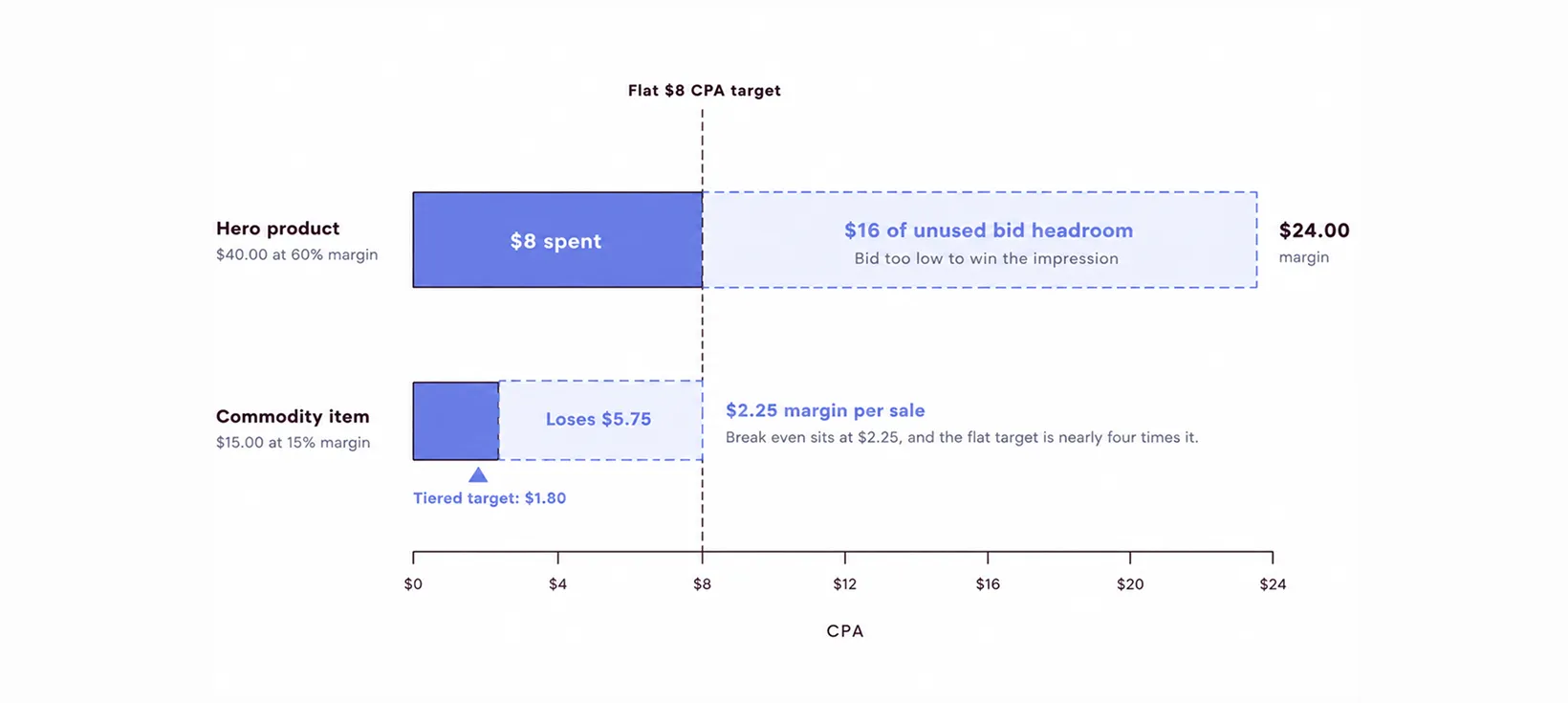
A flat target gets both products wrong at once. It holds the hero product's bid below what it could profitably pay, and keeps funding the commodity item past the point it stops paying back.
10. Separate prospecting and retargeting creative
Cold and warm audiences need different creative, not just different bids.
Run one creative across both audiences and one of them always gets the wrong message. Either a cold shopper sees a discount-led ad for a product they don't recognize, or a warm shopper gets a value-prop pitch for something they already decided they want.
11. Start with a 60/30/10 budget split
A reasonable starting point is 60% of catalog ad budget to your top 20% of best sellers, 30% to mid-performers, and 10% to new-product discovery.
On a $50,000 monthly budget, that works out to:
- $30,000 protected for products already proven to convert
- $15,000 kept flexible for solid mid-tier performers, with room to grow on spend
- $5,000 set aside specifically to find your next best seller
A flat per-SKU split spreads the same $50,000 evenly, which starves your top 20% and keeps funding products that were never going to earn it back.
Re-rank monthly, and adjust based on what's actually converting rather than treating the split as a fixed rule. Where your platform supports it, ROAS-based automated rules can handle the reallocation for you.
12. Measure ROAS at the product level
Campaign-level ROAS can look healthy while individual SKUs lose money underneath it. A campaign averaging a solid 4x can be carrying a handful of products running under 1x, and the campaign report will never tell you which ones.
Pull a product-level report at least monthly. Meta's product-level reporting in Events Manager works for this, as does any feed-backed analytics tool.
- Rank every SKU by revenue per impression.
- Cut the bottom 25% from cold prospecting, keeping them available for retargeting.
- Re-rank monthly. A product that looks like dead weight this month can be a rising star next month if it just launched or went on promotion.
Marpipe's SKU Optimization automates the cut. One built-in filter removes products sitting in the bottom 25% of revenue that are also in the top 25% of ad spend, which isolates the SKUs that are both expensive to advertise and not selling. That two-axis rule matters, because filtering on either measure alone catches a lot of products that are doing nothing wrong.
Platform-specific considerations
These 12 practices apply everywhere, but each platform has mechanics worth knowing before you set up a campaign.
Meta Advantage+ catalog ads
Meta's Advantage+ automation reduces the amount of manual audience and campaign segmentation advertisers need, so feed quality and creative consistency become even more important.
TikTok catalog ads
TikTok's catalog format is vertical-first and sound-on by default, built for the For You feed rather than a static grid. Video-first creative consistently outperforms statics here, which makes video tests more valuable on TikTok than anywhere else.
Pinterest and Snapchat catalog ads
Pinterest's discovery-driven feed rewards lifestyle imagery over packshots, since shoppers there browse for ideas as much as products. Snapchat's younger audience responds better to playful, interactive creative than a straightforward product-and-price layout. Both run through the same feed connection as Meta, Google, and TikTok, so extending your catalog ads to either one doesn't require a separate feed setup.
How to run all of this across a full catalog
Every creative practice above is easy to describe for one product and hard to execute for five thousand. Take a catalog of 4,000 SKUs across 12 categories. Hand-designing a branded background, a price overlay, and a ratings badge per product means thousands of individual design files, and every price change or new arrival means re-touching the ones affected.
The alternative is to build at the template layer instead of the product layer.
One design template holds the layout, and each SKU's title, price, image, and attributes populate it automatically from the feed. The same 4,000-SKU catalog becomes 12 templates, one per category, plus a handful of rules for clearance, low stock, and new arrivals.
That's what Marpipe's Catalog Ad Creative does.
- Build one branded template on a drag-and-drop canvas, and every SKU in the feed generates its own version automatically
- Apply conditional logic so a clearance product and a full-price product render differently from the same template
- Let smart image handling crop and fit inconsistent product photos, so the template doesn't break when one source image is a different shape than the rest
Here are real results from brands using Marpipe:
- Twillory: 127% ROAS lift using Marpipe's creative automation
- PopSockets: 7x catalog ad spend scaling with template-based generation
- DermStreet: 30% CPA reduction through price-overlay treatments
Book a demo and we'll show you how to build a template on your own catalog and see what your SKUs look like as designed ads.
Catalog ads best practices FAQs
Can I use the same creative template across Meta, TikTok, and Google?
The underlying design system, yes. The exact export, no. Each platform has its own image specs and ad unit requirements, so a template built for multi-platform export adapts automatically. Don't assume one flat file works everywhere without checking specs first.
What's the minimum image resolution for catalog ads?
Image requirements vary by platform. Google, for example, is moving to a 500×500 minimum for product images, while other platforms have their own size and aspect-ratio rules. Use higher-resolution source images where possible and check each platform's current specifications.
How do I know if my feed is the actual problem?
Check disapproval rates, attribute-completeness scores, and eligibility warnings in each platform's catalog manager. If those are climbing while your creative hasn't changed, the feed is the more likely cause, not the bid strategy.
Should I exclude seasonal products after the season ends?
Yes. Tag seasonal SKUs and exclude them from prospecting once the season closes, but keep them available for retargeting to shoppers who already viewed them. Make them prospecting-eligible again when the season returns.
How is a carousel ad different from a catalog ad?
A carousel ad is a fixed set of cards you build by hand, usually 2 to 10 images, for one specific ad. A catalog ad pulls dynamically from your feed and shows a different, personalized selection to each shopper based on what they've viewed or are likely to buy.
Do I need a separate feed for each ad platform?
No. Most feed management tools push the same underlying product data to Meta, Google, TikTok, Pinterest, and Snapchat from one connection, adjusting the format each platform requires automatically instead of you maintaining separate files.
What causes a catalog ad to get rejected?
The most common causes are missing required attributes like GTIN, brand, and availability, pricing that doesn't match your storefront, and images that don't meet a platform's size or content rules. Run a feed audit before a launch rather than after a disapproval notice. One root cause usually explains a whole batch of rejected SKUs, rather than each product failing for a different reason.
