


Meta isn't the only place your product catalog can sell. Snapchat Dynamic Product Ads (DPA) take the same product feed you already run on Meta and turn it into personalized, shoppable ads served to a younger, high-intent audience. They automatically match each viewer to the products they're most likely to buy, pulling the image, title, and price straight from your catalog.
This guide walks through the whole picture: what Snapchat dynamic ads actually are, the four ad formats and when to use each, and the step-by-step setup inside Ads Manager, from catalog and pixel to a live campaign.
What Are Snapchat Dynamic Ads?
Snapchat dynamic ads are product ads that Snapchat builds automatically from your product catalog. You set up a template once, and Snapchat creates a separate ad for every product in your feed. Snapchat's official name is Dynamic Ads, but most advertisers call them dynamic product ads or DPAs, the same term used on Meta.
What "dynamic" actually means
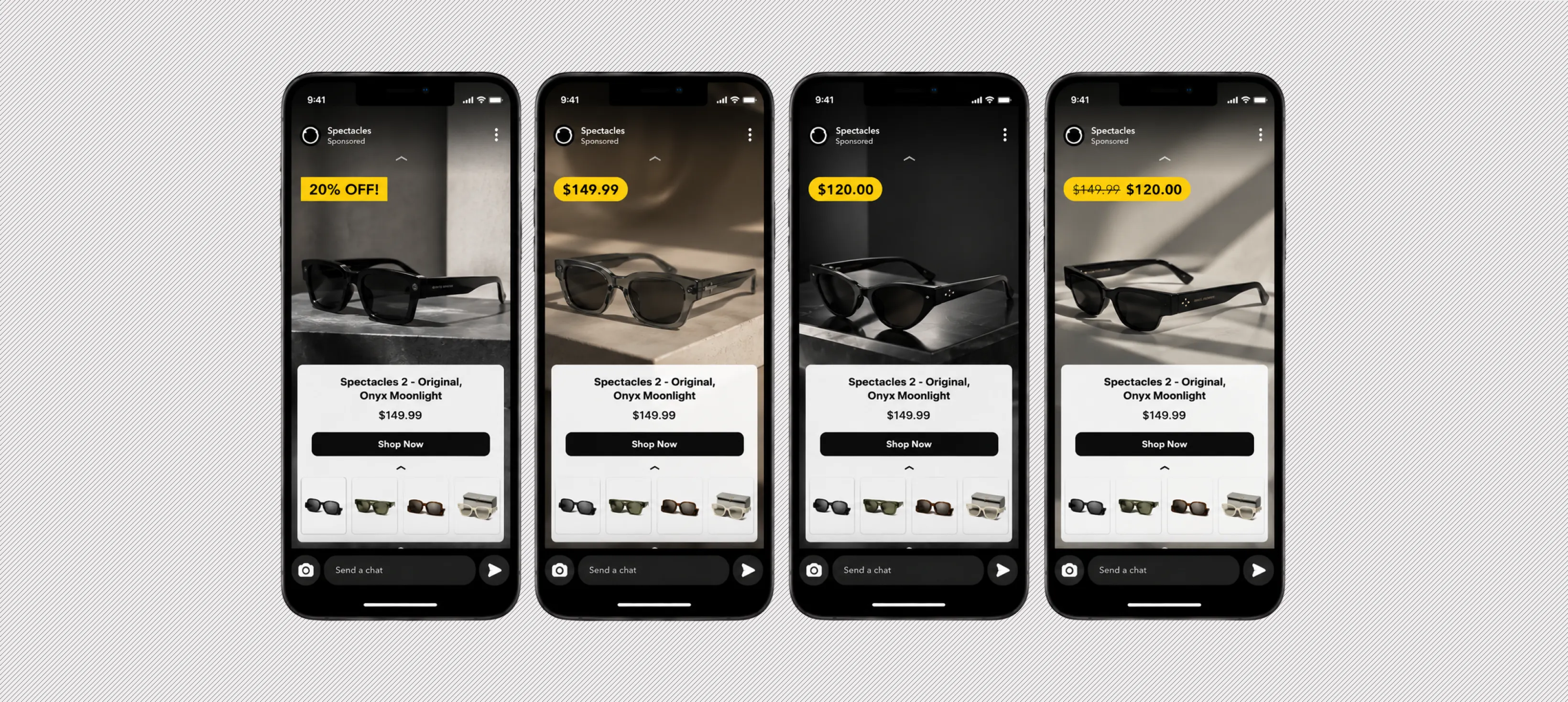
Dynamic means that these two things update on their own:
- The ad content: When a price or stock level changes in your feed, the live ad updates with it. Change the price in Shopify, and the ad shows the new price.
- The product match: Someone who viewed running shoes on your site sees those exact shoes in the app. Someone who never visited sees products picked from their interests.
A regular Snap ad is one creative that everyone sees. A dynamic ad is a template that Snapchat fills with product data.
One template + 2,000 products = 2,000 ads.
So instead of making ads, you spend your time keeping the product feed accurate, because every image, title, and price in the ad comes from the feed.
Types of Snapchat Dynamic Product Ads
Once your feed is connected, Snapchat treats it as a library of assets and builds image or video ads on top of it automatically, each one wired to a WebView, an app install, or a deep link. You can build templates by hand, or hand the job to Automatic Templates and let Snapchat rotate through formats and lean into the ones that perform.
There are 4 formats worth knowing:
Dynamic Single Image Ads
The simplest of the bunch. One product pulled from your catalog, with text fields and creative elements layered on top.
- Shows a single product per ad
- Add overlays for price, copy, or branding
- Sends Snapchatters to a website, the app store, or a deep link into your app
Reach for this when you want a clean, fast-to-produce ad built straight from catalog products.
Dynamic Collection Ads
A single image or video with four tappable tiles underneath to feature more products.
- Automate some or all of the ad directly from the catalog
- The four tiles are always generated dynamically from the catalog, based on the product set you choose and who you are targeting
- Tiles adapt to whether the audience is retargeting or prospecting
This is the workhorse format when you want multiple products tappable inside one ad.
Dynamic Story Ads
A branded tile that lives in Snapchat's Discover section and opens into a collection of 3 to 10 product images with details.
- Creates a polished, browsable experience pulled straight from your catalog
- The Discover tile can be built manually or dynamically
- You can customize the first story with a branded image or video, then let the remaining 3 to 10 product snaps generate automatically from the catalog so users can browse and tap whatever catches their eye
Use it when you want a Discover-based browsing experience rather than a single ad unit.
Multi-Segment DPA
An upgraded Collection Ad that pairs storytelling with performance in one shopping experience. The first segment is a hero image or video, and the second is a set of 3 or 4 product tiles generated from your catalog.
- First segment: A hero image or video that grabs attention and sets up the brand or offer
- Second segment: Dynamic product tiles that drive discovery and conversion
- Product tiles support dynamic details like title, price, and sale price
The point of this format is room to tell a story before the products appear, which makes the shopping experience feel less like a product feed ad and more like a mini browse session.
Picking a format
A quick way to decide:
- Single Image or Video if you want the simplest ad built from catalog products
- Collection Ads if you want tappable product tiles inside one ad
- Multi-Segment DPA if you want a hero creative first, then product tiles
- Story Ads if you want a Discover-based browsing experience
Whichever you pick, the format only decides the frame. The catalog feed and the creatives you layer on top are what decide whether the right product reaches the right Snapchatter, and whether they tap.
How to Create Snapchat Dynamic Ads
Everything happens inside Snapchat Ads Manager. Most of the work is one-time setup: the catalog and the pixel. Once those two are in place, building the actual campaign doesn't take long.
Start with the two requirements
You cannot run dynamic ads without these:
- A product catalog. You can upload it manually or sync it from a feed.
- The Snap Pixel. Install it on your site and pass your item IDs on four events: Page View, View Content, Add to Cart, and Purchase.

Then connect the pixel to your catalog as its event source. This is how Snapchat knows which product a visitor looked at.
Split your catalog into product sets
A product set is a smaller group of products pulled from your catalog. You build them inside the catalog tab using filters like title, brand, or condition, and you pick one when setting up your ad set.
Example: bestsellers only, one product category, or everything priced above $50. Smaller sets give you control. A campaign pointed at your full catalog will spend money on products that do not sell.
Build the campaign
Follow these steps in order:
- Open Ads Manager, click Create Ads, then select Advanced Create.
- Pick the Catalog Sales objective.
- Choose your catalog and product set.
- At the ad set level, pick a mode: retargeting shows people the products they viewed or added to cart, prospecting shows your products to people who have not visited your site.
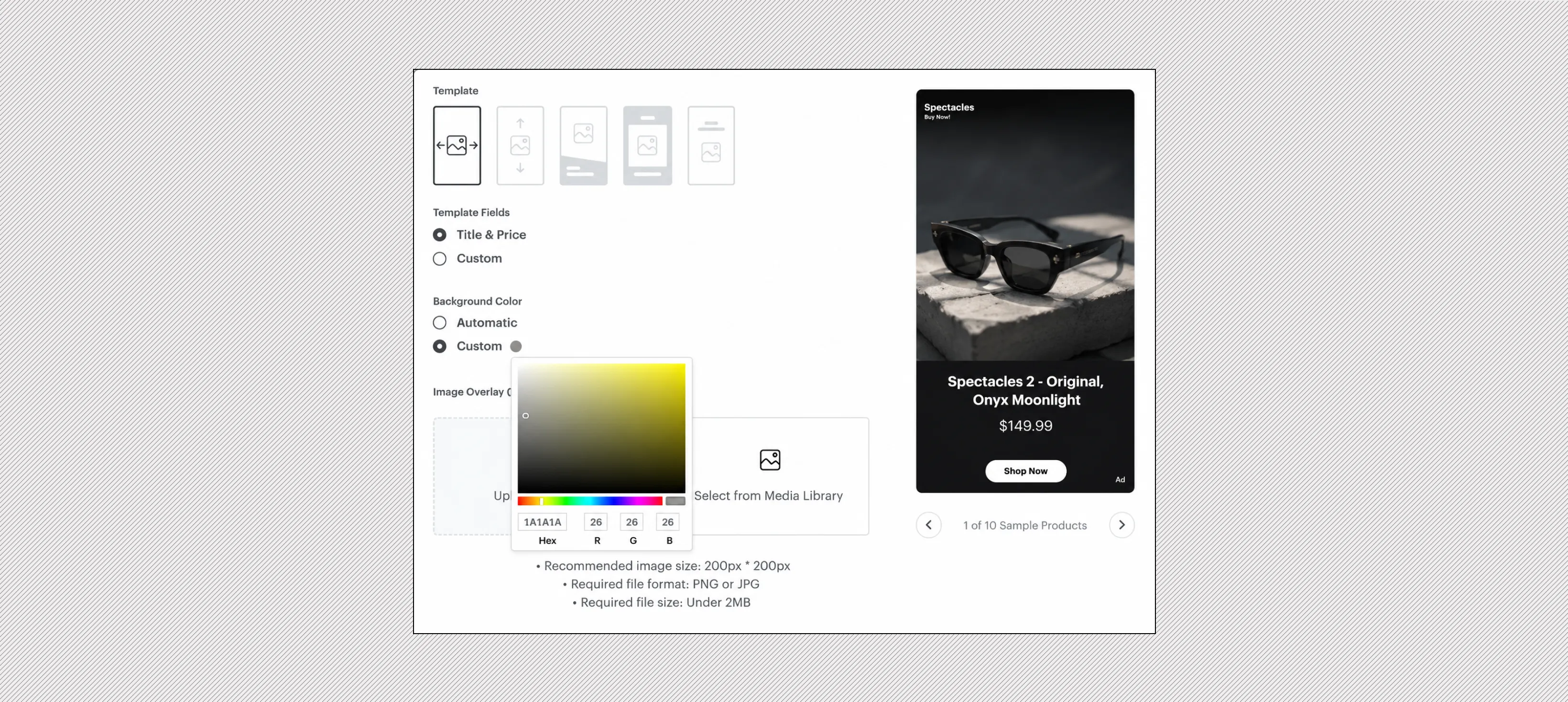
- Pick a template and choose which catalog fields appear on the ad. Title and price show by default, and you can swap in any two fields from your catalog. Add a logo or background color if you want one.
- Publish.
Use Marpipe to Turn Your Snapchat Catalog Into Branded Ads
Snapchat's template decides where your title and price sit. The product image is the only part you actually control, and that image comes straight from your feed. Marpipe's Catalog is built around that one lever.
You design one template with your brand's colors, fonts, and graphics. Marpipe applies it to every product in your catalog automatically. Depending on your offer, you can add:
- Star ratings and live review counts pulled from your store
- Price strikethroughs and percentage-off badges for sales
- Countdown clocks for launches and limited-time drops
The enriched feed syncs straight to Snapchat. So when Snapchat's template pulls your product image, it pulls a finished, branded ad instead of a plain photo on a white background.
Book a demo and the Marpipe team will show you what your products look like as enriched Snapchat ads, and the boost in ad conversion you can expect.
Frequently asked questions
What are Snapchat Dynamic Product Ads?
Snapchat Dynamic Product Ads are product ads built automatically from your product catalog. You set up a template once, and Snapchat creates a separate ad for every product in your feed. Each ad pulls the image, title, and price directly from your catalog and matches individual viewers to the products they're most likely to buy.
How are dynamic ads different from regular Snap ads?
A regular Snap ad is one piece of creative that everyone sees. A dynamic ad is a template that Snapchat fills with product data for each viewer automatically. The ad content updates when your feed changes (new prices, stock levels), and the product shown changes based on each viewer's browsing behavior or interests.
What are the four Snapchat DPA formats?
Single Image Ads show one product per ad and are the simplest to produce. Collection Ads feature a main image or video with four tappable product tiles underneath. Story Ads create a browsable experience inside Snapchat's Discover section. Multi-Segment DPAs pair a hero creative with dynamic product tiles for a storytelling-first shopping experience.
What do I need before I can run Snapchat dynamic ads?
You need two things: a product catalog uploaded or synced from a feed, and the Snap Pixel installed on your site. The pixel must pass item IDs on four events: Page View, View Content, Add to Cart, and Purchase. You then connect the pixel to your catalog so Snapchat knows which products each visitor interacted with.
What are product sets and why should I use them?
Product sets are smaller groups of products filtered from your full catalog using rules like title, brand, or price. They give you control over which products a campaign promotes. Pointing a campaign at your entire catalog means spending money on products that don't sell. Narrowing to bestsellers, a specific category, or a price range focuses your budget where it performs.
Why does feed quality matter so much for Snapchat DPAs?
Every image, title, and price in a Snapchat dynamic ad comes directly from your product feed. You don't build individual ads. You maintain the feed, and Snapchat assembles the ads from it. If your feed has low quality images, wrong prices, or missing data, that's exactly what shows up in the ad. Clean feed data is the single biggest lever you control.
