



If you’re running ecommerce at any real scale, your product feed is just as important as your website. It decides what shows up on shopping engines, marketplaces, retail media networks, and paid social. As AI-driven shopping gets better at reading your catalog, clean data and solid structure are what actually move the needle.
ShoppingFeed is often where teams start. It plugs your store into channels like Google Shopping, Meta, Amazon, eBay, Walmart, and a long list of marketplaces, then helps you sync listings, inventory, and orders from one place. It takes a lot of manual work out of multi-channel selling.
What we’re seeing now, though, is that teams want more: better coverage, more control over complex data, less back-and-forth around creative, and clearer insight into how catalog changes impact performance. When a big chunk of your media budget depends on catalog ads, even small issues in your feed or creative show up in your results.
So it’s worth looking at the broader landscape of ShoppingFeed alternatives and complements to figure out what setup fits where your business is right now.

What are the best alternatives to ShoppingFeed?
Some of the best alternatives and complements to ShoppingFeed include:
- Marpipe
- Feedonomics
- DataFeedWatch
- Channable
- Lengow
- Productsup
- Webgility
- Smartly.io
Marpipe
When a team is tired of treating their product feed, catalog creative, and campaigns like separate problems, that’s usually when Marpipe comes into the conversation.
Anyone who has managed catalog ads knows how this goes: messy data eventually becomes messy creative. A missing attribute, a bad variant, or an outdated price doesn’t just stay hidden in a feed—it shows up in your Shopping cards, Performance Max units, or Meta catalog ads.
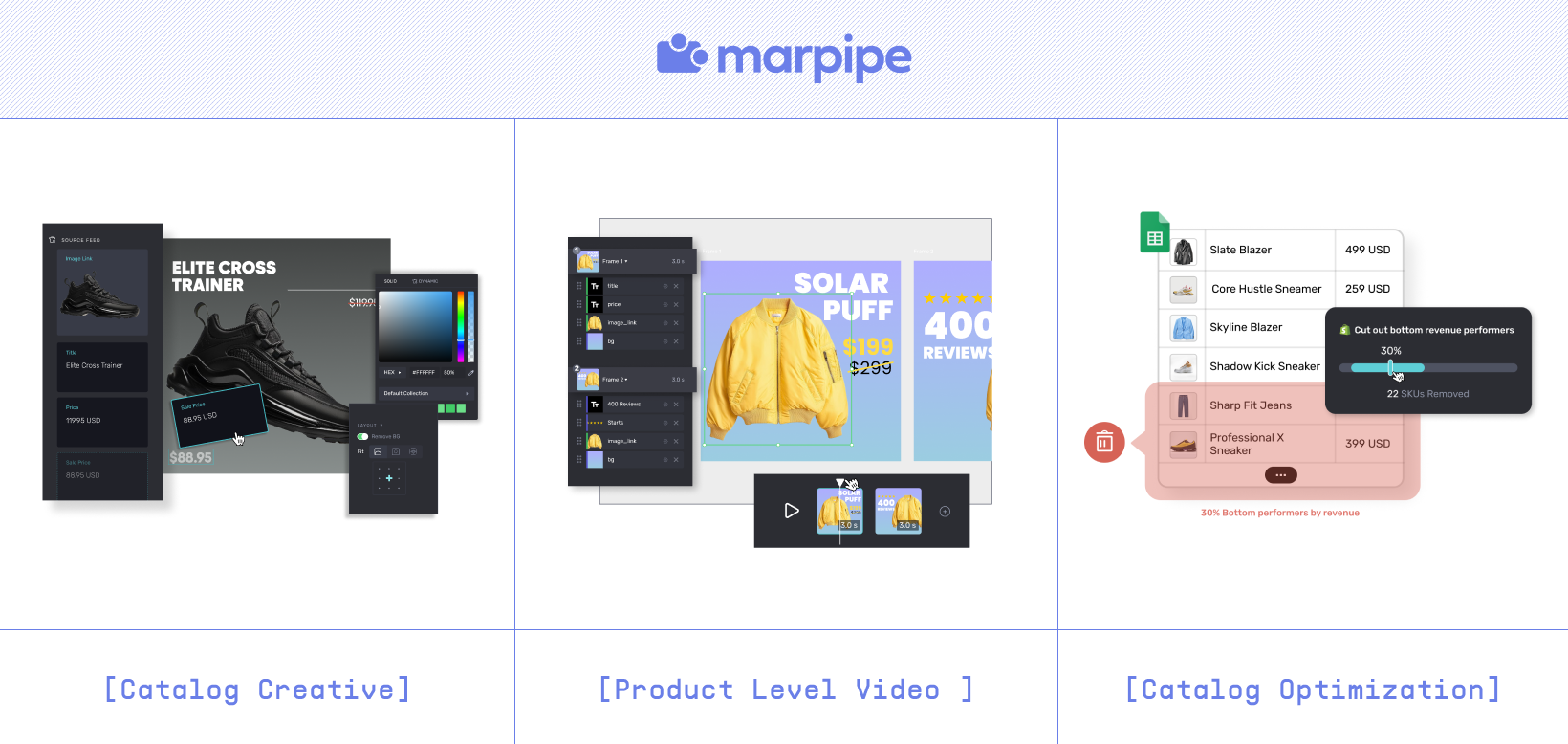
Marpipe is built around that reality. It helps you clean up catalog data and then immediately apply those changes to templates and product-level videos across channels like Meta and TikTok. Instead of asking, “Why did this ad say that?” you can trace it back to the catalog and fix it at the source.
For most teams, Marpipe doesn’t replace every feed or marketplace tool you use. It usually sits alongside them:
- ShoppingFeed (or a similar platform) handles multi-channel listing and order sync.
- Marpipe takes over catalog creative, templates, product-level video, and catalog optimization for performance channels.
If your performance depends heavily on Meta Advantage+, TikTok Shop, or other automated placements, that “data → creative → performance” feedback loop is where Marpipe does the most work.
Feedonomics
Feedonomics is the tool people bring in once things get big and messy: multiple stores, multiple regions, complicated rules, and a lot of internal stakeholders.
Where ShoppingFeed focuses on helping you sell in more places from one interface, Feedonomics leans hard into scale and service. It centralizes your product data, lets you apply complex transformation logic, and helps you meet the attribute and policy rules of Google, Meta, Amazon, and dozens of marketplaces.
Teams typically look at Feedonomics when:
- They’ve outgrown basic feed tooling and need strict data governance.
- They want a managed-service layer so internal teams don’t have to own every change.
- The catalog spans multiple countries, currencies, and policies.
If you’re evaluating ShoppingFeed vs. Feedonomics, the question is usually less “Which one is better?” and more “Do we need a lighter multi-channel tool or a full enterprise feed layer with people behind it?”
DataFeedWatch
DataFeedWatch is a common choice for small and mid-market teams that want something stronger than basic app-store plugins but not as heavy as an enterprise platform.
It’s especially popular with Shopify brands that need to:
- Keep listings clean on Google, Meta, and marketplaces
- Avoid constant disapprovals
- Make feed changes without involving engineers
Compared to ShoppingFeed, which covers feeds plus orders and listings, DataFeedWatch is more focused on rule-based feed optimization. The rule builder is simple enough that a performance marketer can own it day to day: cleaning titles, mapping attributes, and fixing category structures.
Teams that pick DataFeedWatch usually want:
- Fewer Merchant Center fires to put out
- A cleaner way to keep product data aligned across key ad channels
- A tool that doesn’t feel “enterprise” but is still more powerful than a basic connector
If you’re a growing ecommerce brand and your main pain is feed hygiene rather than marketplace operations, DataFeedWatch is often the right-size tool.
Channable
Channable is a good fit for teams and agencies that live in that middle ground: too many channels for spreadsheets, not quite at “enterprise mess” yet.
It gives you:
- A central workspace to manage feeds and campaigns
- Rule-based filtering so you can test different catalog strategies per channel
- Channel templates and integrations for marketplaces and shopping engines
Where ShoppingFeed gives you a strong “sell everywhere” layer with order sync, Channable is more about control: which products show where, under what conditions, and with what attributes.
Teams like it when:
- They run a lot of promotions or change prices often
- They want to turn SKUs on or off based on performance
- They need to connect feed changes more directly to campaign results
If you’re an agency or a mid-sized brand that needs to move quickly without stepping into enterprise territory, Channable is one of the easier tools to live in every day.
Lengow
Lengow tends to come up when cross-border is a big part of the plan.
It’s widely used in Europe and by global brands that need to:
- Localize product data for multiple countries
- Sync feeds across a lot of marketplaces and ad channels
- Keep pricing, attributes, and structure consistent while adapting to local rules
ShoppingFeed already supports a wide range of channels, but Lengow leans more into multi-country marketplace orchestration and localization. Teams use it to handle:
- Local tax and shipping rules
- Country-specific category trees
- Regionalized attributes and translations
If you’re mostly selling in one or two markets, Lengow may be more than you need. If you’re serious about multi-country, it’s worth looking at alongside ShoppingFeed.
Productsup
Productsup is what larger organizations reach for when product data has become political—multiple ERPs, PIMs, regional teams, compliance, and long internal approval chains.
Instead of just being a “feed tool,” it acts more like a product data control layer. Teams use it to:
- Trace how product data changes over time
- Enforce transformation rules and governance
- Standardize how products appear across channels and regions
Compared to ShoppingFeed, which is great for operationalizing multi-channel selling, Productsup is more about deep control and auditability. Most brands don’t start here; they end up here once the internal complexity becomes unavoidable.
If your main headache is aligning internal systems and stakeholders, not just connecting to more channels, Productsup is the kind of tool that shows up on the shortlist.
Webgility
Webgility is more of an operations and accounting tool than a pure feed platform, but it solves a real problem in multi-channel commerce: keeping your storefronts, marketplaces, and accounting in sync.
It connects platforms like Shopify, Amazon, and eBay with tools like QuickBooks so you can:
- Sync orders and inventory
- Keep pricing and stock aligned
- Reduce manual reconciliation between channels and finance
ShoppingFeed already centralizes listings and orders across channels. Webgility usually joins the stack when:
- The finance team is spending too much time cleaning up after ecommerce
- Inventory keeps getting out of sync
- You want better reporting without building custom integrations
A common pattern: ShoppingFeed handles listings and order sync; Webgility keeps the numbers clean in the background.
Smartly.io
Smartly.io is for teams that spend heavily on paid social and treat creative as a constant workstream rather than a one-off project.
Instead of being a core feed engine, Smartly focuses on:
- Building and managing creative templates for catalog-heavy channels
- Launching and updating ads quickly during promos or seasonal pushes
- Keeping brand styling consistent across thousands of catalog ads
As a ShoppingFeed alternative, Smartly is less about “where your products go” and more about “how they look when they get there.” It usually shows up when:
- The bottleneck is creative production, not feed distribution
- You’re running frequent sales and need templates that can be updated fast
- You want a more systematic way to test creative variations at scale
Teams often evaluate Smartly next to Marpipe to understand how each handles catalog creative, product-level variations, and where they fit alongside a feed engine like ShoppingFeed.
How to Choose the Right ShoppingFeed Alternative
The best alternative isn’t the one with the biggest feature grid—it’s the one that lines up with your actual bottleneck.
Roughly:
- If your feeds are a mess: Look at tools like Marpipe, DataFeedWatch, Channable, or Feedonomics.
- If your internal systems are messy: Productsup or Feedonomics may make more sense.
- If your creative can’t keep up with your catalog: That’s where Marpipe and Smartly enter the picture.
- If cross-border is the big push: Lengow and Productsup are worth a hard look.
- If operations and accounting are the headache: Webgility can quietly fix a lot of that.
If your catalog changes often or you rely heavily on automated placements (Shopping, Performance Max, Advantage+, etc.), you’ll want tools that:
- Let you make changes fast
- Make it easy to see how those changes show up in your ads
- Keep your feed, creative, and campaigns connected enough that you’re not guessing
If you’re planning to be a global business—or already are—prioritize localization, marketplace coverage, and how easily you can manage regional differences without living in spreadsheets.
At the end of the day, the “right” setup is usually a stack, not a single tool: something to move data, something to keep it clean, and something to turn that data into creative that actually performs.
Close the Gap Between Your Product Data, Channels & Creative
ShoppingFeed has done a lot for brands that just needed a cleaner way to sell across more channels. One place to manage listings and orders is a big unlock on its own.
But once that’s in place, the next set of problems usually show up between:
- The catalog you think you have
- The creative your customers are actually seeing
- The performance you’re getting back from automated systems
That gap is where changes slip through, promos go half-live, and old pricing lingers in ads.
Marpipe exists to close that gap. It gives you:
- A clearer view of your catalog and how it feeds into your ads
- Tools to fix feed issues and immediately see them reflected in your creative
- A structured way to build catalog ads and product-level videos that stay in sync with what’s actually in stock
You can start by plugging Marpipe into your existing setup—whether that includes ShoppingFeed or another feed platform—and using it to stress test your catalog and creative. From there, it’s usually obvious where the biggest wins are.

FAQs
1. What would make a team move from ShoppingFeed to a different platform?
Most teams start shopping around when their catalog gets more complicated, their channel mix expands, or they feel blind to how catalog changes impact performance. Some want stronger data governance, some want better creative automation, and some just want fewer fires to put out every week.
2. What should I look for in a ShoppingFeed alternative?
Start with your main job to be done. If catalog ads are a big part of your spend, look for tools that connect feed quality directly to creative output and product selection. If accuracy and compliance keep biting you, prioritize validation, governance, and audit trails. If you’re going multi-country, focus on localization, tax/shipping rules, and marketplace coverage.
3. Is Marpipe a different kind of tool than ShoppingFeed?
Yes. ShoppingFeed is about getting your products into more channels and keeping listings and orders synced. Marpipe is about what happens next: cleaning and structuring your product data so you can build better catalog creative and see the impact of those changes in your performance. A lot of teams end up using them together.
4. Will these alternatives work with Shopify and major marketplaces?
Most of the tools in this list work well with Shopify and the major marketplaces, but they all have different strengths. DataFeedWatch, Channable, and Marpipe are popular with Shopify-heavy brands. Feedonomics, Lengow, and Productsup tend to show up more in multi-region, multi-system setups. It’s worth double-checking the integrations you care about most.
5. How can I tell when it’s time to change my feed setup?
A few signs:
- Merchant Center errors are a weekly ritual
- Product titles or variants in ads don’t match what’s in your store
- Catalog changes take too long to show up in campaigns
- Creative feels off-brand or out of date, especially during promos
If you’re spending more time fixing those issues than planning what to test next, it’s probably time to upgrade to a more flexible, better-connected stack.
