


When meta first released the Ad Library in 2019, most marketers didn’t pay attention. It was mostly seen as a compliance tool versus a creative strategy. But at some point, the industry figured out the truth: The Ad Library isn’t just about being open. It’s one of the best ways to see how your competitors really think.
If you work in performance marketing or creative strategy, you've probably looked at the Ad Library before to see what other brands are doing. You might have been looking for ideas or just wanted to make sure that your most recent campaign was in line with the rest of your market. But the more you use it, the more you see how much is hidden behind that simple search box.
Ad Library is now a kind of creative intelligence engine for performance marketers. It can change the way teams test new ideas, launch products, and decide where to spend every ad dollar. This is especially true when you use the 2025 Meta benchmarks to show what good performance really looks like.
What is the Facebook Ad Library?
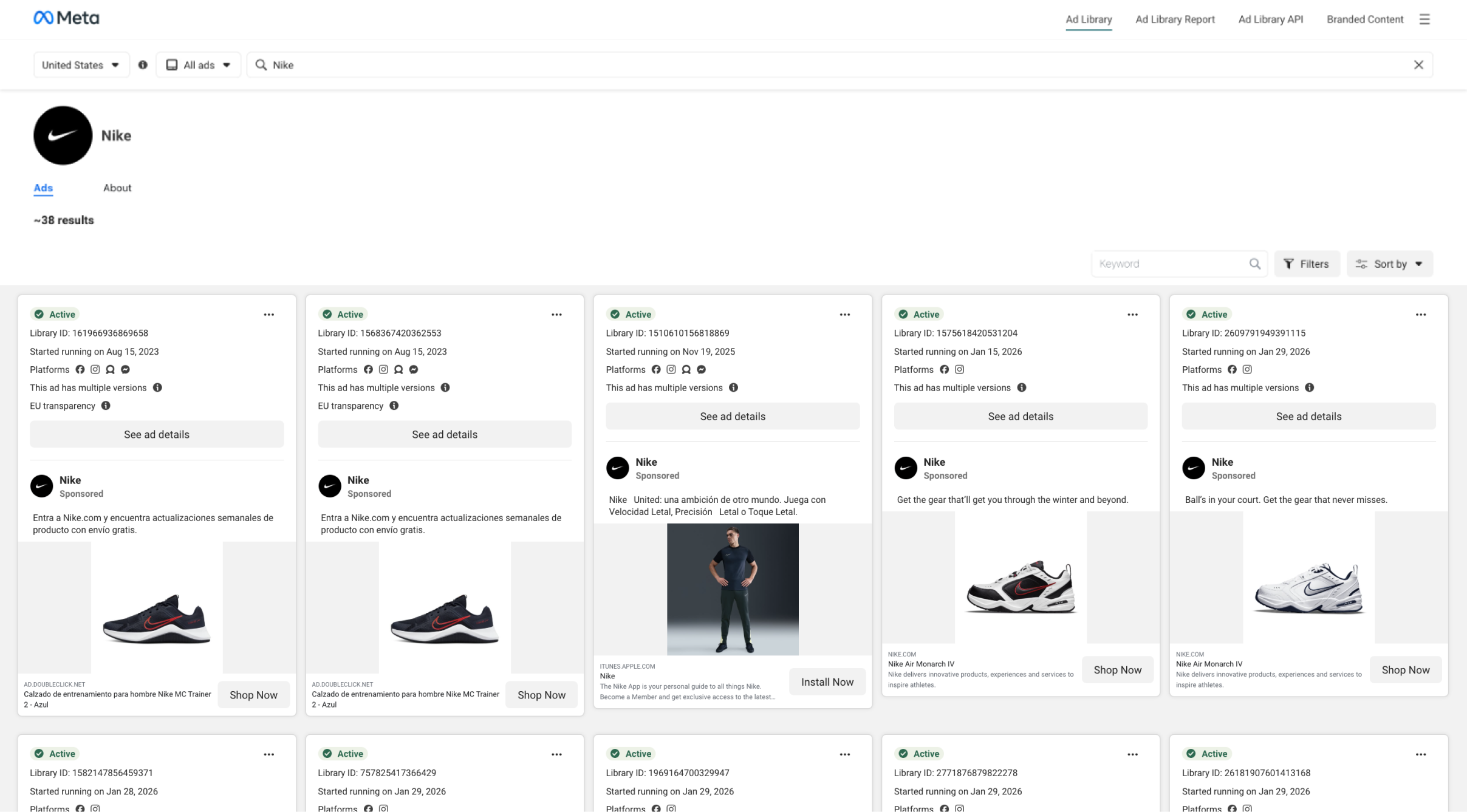
The Ad Library is a free, public online database of all the ads that are currently running on Facebook's platforms, such as Instagram and Messenger. You don't need an account to get to it. Just go to facebook.com/ads/library.
You can use the tool to look up live ads, creative previews, and campaign start dates by advertiser name, keyword, or category. Researchers, journalists, and marketers use it to keep an eye on advertising trends, look at what competitors are doing, and learn how brands talk to each other in different markets.
The Ad Library keeps a long-term archive of ads that have to do with social issues or elections to make things more clear. But for most users, including brand and performance teams, its real value is in giving them strategic insights.
This is not just a database for transparency. It's a treasure trove of competitive research.
You can:
- Check out your competitors: Find out what kinds of ads they are running, what they are saying, what their pictures look like, and what their calls to action are.
- Get ideas for your creative work: Find out what's popular in different fields, what types of content are getting more popular, and how different brands show off the same products.
- Look at trends over time: Use filters to keep an eye on changes in creativity, the speed of campaigns, and seasonal pushes.
- Set a standard for your category: Know how your own creative strategy compares to others in terms of style, tone, and variety.
For advertisers today, understanding how to use the Ad Library to your advantage can be incredibly impactful as it contains a wealth of data and information.
How to Access and Search the Ad Library
Anyone can use the Ad Library, but not many people do. Here's how to make it a regular part of your creative process.
Go to facebook.com/ads/library right away.
Pick a country: Choose what part of your research you want to focus on.
Choose a type of ad: Most of the time, "All Ads" is the best place to start.
Search by keyword or by advertiser: Try using brand names like "Nike," product terms like "running shoes," or even pain points like "back pain."
Use filters to limit results by type of media (image, video), start date, or active status.
You can see previews of ads, copies, and start dates for all of the listings. You can also filter to see ads that aren't running right now. This is useful for finding creative tests or campaigns that were turned off quickly.
You can switch between countries to see how creative execution differs by market if you run a global brand. It's easy for agencies to see how their clients' competitors act in different parts of the country.
No need to log in. No spending. Just a lot of data at your fingertips.
Why the Ad Library Matters for Performance Marketers
The Ad Library is important because it gives you a frame of reference.
In paid social, a lot of what we do is hidden from competitors. For example, targeting, bidding, and optimization all happen behind platform walls. Creative, on the other hand, is open to the public. That's why looking at it is one of the quickest ways to find out who's making new things and who's not.
When you use the Ad Library correctly, you can see all of your category in action. You can tell which brands release new ads every week, which ones use the same assets for months, and which ones suddenly flood the feed with new product drops.
Those signals tell a story.
1. It Shows Creative Discipline
Brands that test a lot leave marks. There will be several versions of the same image, each with slightly different text or calls to action. That's a clear sign of structured experimentation.
If you see a competitor running ten different ads for the same idea, you can be pretty sure they're testing hooks, offers, or creative framing. That's not a guess; it's a picture of how they test things.

2. It shows cycles of fatigue and refreshment
Every ad company has to deal with creative fatigue. You can tell when a competitor updates their assets or changes their formats by looking at their Ad Library often.
For example, a brand that has been posting UGC-style videos all spring suddenly switches to polished studio photography in July. That change could mean they got tired or that they're going after a new group of people. In either case, that's information you can use to predict changes in the market.
3. It helps you keep up with trends in messaging.
The Ad Library shows you how businesses in your field talk to customers. You can see which emotional tones are most common, such as urgency, humor, expertise, social proof, and community.
In 2025, there will be fewer "Buy Now" urgency hooks and more content-style headlines like "How we made the softest fabric on earth" or "Meet your new everyday sneaker." You can see that kind of storytelling-first approach in Ad Library data months before you see it in benchmarks or case studies.
How to Analyze Ads like a Strategist
Anyone can scroll. But few really know what to look for when looking at the Ad Library through a marketer’s lens.
Start with Longevity
The length of time an ad has been running is often a sign of how well it is doing. If an ad has been running for weeks or months, it's probably delivering some type of results.
Look at the start dates of each search result and see how they compare. The ads that have been running the longest are usually the ones that meet their key performance indicators (KPIs), such as conversion, CTR, or MER. These are the creative "keepers" that your competitors have.
Marketers who know about longevity also know that performance metrics only tell part of the story, just like we mentioned in our What is ROAS article. Results only make sense when they are connected to the entire creative discipline, not just one number.
Decode Themes and Angles
Go beyond visuals. What are the recurring storylines and themes? Are brands leaning on testimonials, before-and-after formats, influencer UGC, or bold price comparisons?
When you look at patterns across a number of competitors, you’ll start to identify themes and, just as importantly, themes that aren’t there. Those gaps often show ways to stand out.
That kind of thematic mapping is the basis for creative automation, which means making systems that show which stories work instead of just relying on creative intuition alone.
Observe Format and Placement Choices
Each Ad Library listing shows which platforms the ad runs on, such as Facebook Feed, Instagram Reels, Messenger, or Audience Network.
If a brand mostly runs ads on Reels and skips Feed placements, it’s likely that short-form video is doing better for them than static creative. You won’t find that data in benchmark reports; it’s a real-world signal.
You can learn a lot about both performance strategy and creative direction from the way you format and place things. This is especially true for catalog ads and carousel ads, where how the ad is laid out and how it works on different devices can have a direct effect on how many people click on it.
Track Visual Consistency
Some brands have a clear creative identity, while others seem all over the place. You can tell if an advertiser's visual system is consistent or broken by looking at their Ad Library profile.
You can also use that lens on your own campaigns. Check out your Ad Library listing and ask yourself, "Does this look like one brand or ten different voices?"
Design systems that are both flexible and structured are often the key to keeping things consistent at scale. Marpipe's design platform for product catalogs helps automate this with dynamic templates. When every visual version comes from the same creative base, scale makes things fit together.
The same rule applies to all placements. As Marpipe's guide to Meta's Adapt to Placement shows, the best advertisers make creative that works well in feed, story, and reel formats, so it always stays on brand.
Meta Ad Library Benchmarks: What The Data Tells Us
According to Meta's Ad Library data and 2025 performance reports, the best brands find a balance between trying new things and sticking to the basics of good performance i.e. the balance between cost-effectiveness and creative intelligence.

Cost Per Click (CPC) Benchmarks
The average cost per click on Meta platforms is very different depending on where and how the ad is shown.
- Facebook Feed Ads cost between $0.50 and $1.50.
- Instagram Feed Ads cost between $0.80 and $2.00, especially in the lifestyle and retail categories.
- Reels and Story placements cost between $0.40 and $1.20 and often get more engagement than static Feed ads.
- Carousel and catalog ads have lower cost-per-click (CPC) rates than single-image ads, usually by 20–30%, because people are more likely to want to look at them.
Click-Through Rate (CTR) Benchmarks
CTR benchmarks show how well creative gets people's attention:
- The average CTR on Meta platforms is between 0.9% and 1.5%, depending on the industry.
- E-commerce campaigns often get 2–3% CTR on carousel or catalog formats because people can interact with more than one product at a time.
- Video ads get 25–40% more clicks than static images, especially on Reels and Stories.
Cost Per Thousand Impressions (CPM) Benchmarks
CPMs are still unstable because of competition and the time of year:
- The average CPM for Meta is between $8 and $15.
- High-intent campaigns, like retargeting and conversion, can cost $20 to $25 CPM.
- Broad prospecting or UGC-style ads usually cost less than $10 CPM.
Ad Library data also shows how long the best ads run before they are changed:
- Ads that work well usually stay up for 4 to 8 weeks before people get tired of them.
- Over time, brands that change their creative every 6 to 8 weeks keep their CPCs lower and their CTRs more stable.
- Accounts that keep the same creative live for months tend to see CPC rise and CTR fall because people get tired of seeing the same thing over and over.
Building a Creative Swipe File That Works
Every marketer has some kind of inspiration folder with screenshots, Dropbox files, and saved posts. But the Ad Library is where those groups become useful.
The best way to use it is to make a live swipe file that is based on insight rather than looks.
Put it together like this:
- Column 1: Brand name and product
- Column 2: Hook or angle (“Problem–Solution,” “Social Proof,” “Lifestyle Story”)
- Column 3: Format (video, carousel, static)
- Column 4: Copy highlights or CTA patterns
- Column 5: Notes on tone, imagery, or positioning
Use Figma, Notion, or Airtable—whatever makes collaboration easiest.
Being consistent is the key. Updating it every week makes your team work with real-world creative data, not just what's in your ad account.
We see top-performing teams at Marpipe do this all the time. Their test briefs use real Ad Library insights instead of opinions, which helps them come up with better hypotheses, do better tests, and learn faster.
Advanced Workflows: Going Beyond Manual Search
Once you know the basics, the Ad Library is even more useful when you use it as part of your larger workflow.
Use the Ad Library API to automate data pulls.
For advanced users, Meta has an Ad Library API. You can use it to programmatically pull datasets for analysis, such as ad counts, start dates, and metadata across categories.
Developers or analysts can use that data to make dashboards that show how competitors' trends change over time, like when new ads come out, how long they run on average, or when the type of creative changes. This helps you see creative momentum on a large scale if you manage more than one brand.
Use Ad Library Insights with Your Testing Platform
The Ad Library shows you what's live. Marpipe tells you what works.
They all work together to close the loop. You can use the results from the Ad Library to come up with test hypotheses, like "This testimonial format is the most popular in our category—let's test our own version." Then you can see which combinations actually work.
That's what creative intelligence is all about: seeing something and trying it out.
Set up regular reviews
Set aside 30 minutes every Monday for competitive scans on your calendar.
Keep an eye on a few important metrics each time:
- Number of ads that are currently running for each competitor
- Creative angles that keep coming back
- Launching new products
- New styles or formats
These little check-ins help people in the institution become more aware. Before they show up on your performance dashboards, you'll start to see early signs of changes.
Common Mistakes to Avoid
When marketers fall for one of these tricks, they use the Ad Library wrong. The main difference between scrolling for ideas and analyzing for strategy is how deeply you think about what you see and what you do with it next.
1. Copying Instead of Learning
It's easy to want to copy what seems to work. But copying takes away differences, and without access to the underlying performance data, copying doesn't usually give the same results.
A strategist digs deeper. Instead of copying creative work, they decode it. What value proposition is at the heart of the message? What feeling is behind the hook? What kind of visual hierarchy or motion pattern could be affecting how people click? The goal is to get principles, not copy outputs.
The best advertisers make systems that turn what they learn into creative workflows that can be used again and again. With tools like Marpipe's creative automation suite, marketers can turn what they see into scalable design and testing frameworks. This way, you're not copying your competitors; you're learning faster than they can change.
2. Not paying attention to the situation
An ad may look nice, but that doesn't mean it works. The Ad Library doesn't show data on audience targeting, bidding strategy, or placement, all of which have a big effect on how well ads do.
A luxury skincare ad with cinematic visuals might look very polished, but it could be targeting people who look like high-income people on desktop placements. In the meantime, a UGC-style video with lower production value might be doing ten times better in mobile Reels because it fits the format so well.
The context also tells you why something works. When brands only care about how things look on the surface, the same creative principles that make catalog ads or carousel ads work well—like making sure that the feed data, offer framing, and visual rhythm all work together—often go away.
When you do strategic analysis, you look at creative in the context of the environment it will be in, not in a vacuum.
3. Overestimating Trends
The Ad Library can make trends seem more common than they really are. It's easy to think that a format is the new standard when you see a lot of brands using influencer-style UGC or low-quality testimonial videos. But when creative saturation happens, it usually means the opposite: those strategies are already too common.
The smartest brands know when to change direction. Like a trader studies market cycles, they study the life cycle of creative formats by getting in early, getting out before they get tired, and always testing new ideas.
That's when automation becomes useful. Teams can come up with new ideas on a large scale without having to start over every time by using dynamic design systems like Marpipe's product catalog design platform. You're not following trends; you're making enough creative changes to start them.
If you want to know more about how top brands stay flexible, Marpipe's breakdown of Meta's Adapt to Placement shows how adaptive design keeps creative fresh across changing formats and feeds.
4. Not looking at your own ads
Not looking at your own listing is one of the biggest mistakes you can make in the Ad Library. It's a direct reflection of your creative self—how your campaigns look to people who aren't on your dashboards.
Look through your brand's active ads and ask yourself tough questions:
Does the lineup seem to be the same? Does each ad get its point across clearly? Are you running different versions of the same thing?
Your Ad Library presence often shows problems that your internal analytics can't. You might see the same images over and over again, branding that doesn't match, or campaign clusters that show signs of fatigue. Those are problems with creative operations, not media. Better infrastructure can fix them.
Teams can keep their visual systems consistent even as they experiment more by using Marpipe's creative automation tools to handle design templates and product feeds. The outcome is a creative library, both public and private, that shows control, insight, and speed.
The Future of the Ad Library
The Ad Library isn't set in stone; it changes over time with Meta's ecosystem. Expect better filtering, more integration with tools that show you what's going on, and even more coverage on platforms like Threads and Messenger.
It's more interesting to see how brands are using the Ad Library. It's starting to show creative trends before they become popular. Marketers who study it regularly can now see changes in tone, pacing, and storytelling faster than those who only look at quarterly reports or platform benchmarks.
That kind of qualitative edge is important in a world where AI drives marketing. Automation might make delivery better, but creativity still gets the click. The Ad Library helps you stay in touch with the human side of advertising by showing you what people really see, feel, and do in real time.
How Marpipe Complements the Ad Library
The Marpipe platform is perfect for the next step after research. Once you’ve studied what’s live in the Ad Library, Marpipe helps turn those insights into actions.
- With Product-Level Video, you can transform your product catalog into dynamic video ads that mirror the formats and styles performing best across Meta and other platforms.
- Gen AI for Catalog Ads uses real-world creative data to automatically generate new variations, helping you test fresh angles and visuals inspired by what’s trending — without starting from scratch.
- And through Marpipe’s Optimization tools, you can identify which products are dragging your catalog campaigns, and automatically filter out the worst performers in real time to ensure ad spend focuses on the right products.
Brands that use Marpipe don't just keep an eye on creative trends; they put them into action. The result is that catalog and dynamic ad systems learn faster, have cleaner data, and work better.
The Ad Library is where you should start if you want to learn more about creative strategy. Marpipe is the engine that turns those ideas into growth.
The Ad Library is a Snapshot
The Facebook Ad Library lets you see everything your competitors are doing creatively, which is something most marketers only dream of.
But the real value is not in what you see, but in how you make sense of it. Scrolling without a purpose won't help you do better. Patterns, hypotheses, and testing ideas will help.
To master the Ad Library, you need to use it for more than just research. It shows not only your market, but also how you think as a marketer.
Brands that win in 2025 won't be the ones that just follow the trends. They'll be the ones who see what's missing and have the self-control to test into it.
Start exploring how Marpipe helps performance teams turn creative insight into scalable growth.
Frequently Asked Questions
1. What do people use the Facebook Ad Library for?
The Facebook Ad Library is a public database that shows all of the ads that are currently running on Facebook, Instagram, and Messenger. Marketers use it to learn about their competitors, find new creative trends, and compare their own campaigns to what is working in the market. It's one of the best free tools for figuring out how brands talk to each other in real time.
2. Do I need to have a Facebook account to use it?
No, you don't have to log in to use the Ad Library. To see active and inactive ads, just go to facebook.com/ads/library and search by keyword, brand name, or topic. It's an easy way to look at ad strategies from different fields without having to pay anything.
3. Can I find out how much my competitors are spending?
The Ad Library doesn't show exact spending, but it does show ranges of impressions that can help you understand the size of your campaign. These ranges can't replace full analytics, but they can show which ads are likely to do the best or last the longest, which is a good sign of success.
4. What kinds of filters are there?
You can narrow your search to the most relevant ads by filtering by media type (image or video), active status, country, or date range. It's easy to look at creative themes, formats, and timing with these filters, especially when looking at trends across regions or verticals.
5. How often should I look at the Ad Library?
Once a week at the very least. Regular reviews help you spot new creative trends and changes in your competitors before they completely fill up your feed. A lot of performance marketers use these insights with creative automation tools like Marpipe to quickly test different ideas based on what's working in the market.
