


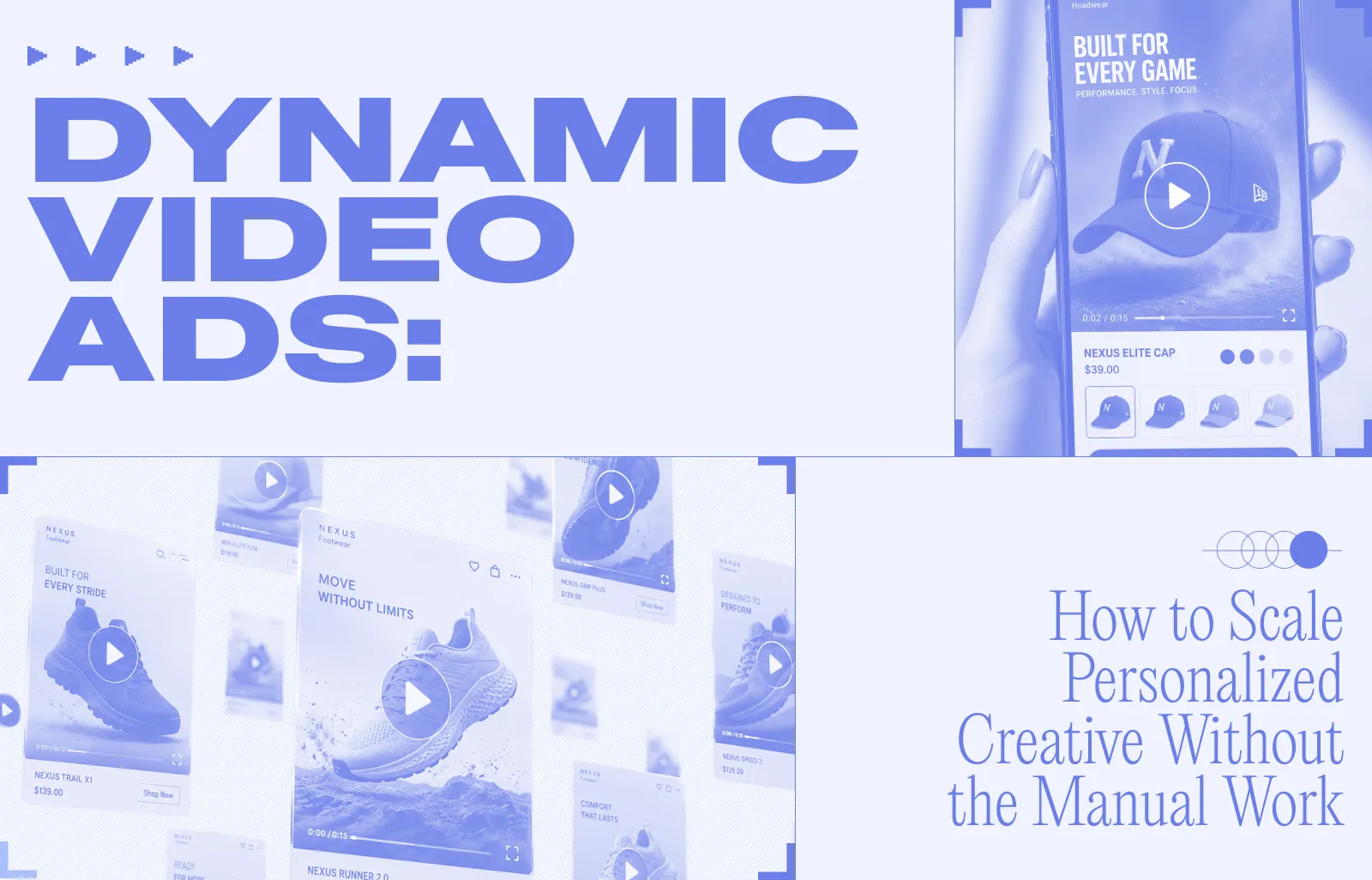
Dynamic Video Ads are video ads that automatically generate and personalize themselves based on data from a product catalog. The content changes automatically based on the situation (the type of customer, or the promotion being run) rather than being fixed or manually created each time.
Let's say you run a shoe store with 500 products. Instead of designing 500 separate video ads, the system automatically grabs each shoe's photo, price, and name from your catalog and drops them into a video template. This means a brand with thousands of products can have a unique video ad for each one without producing them individually.
In this article, we will show you how dynamic video ads actually work, what good campaigns look like across different industries, the best practices that separate them from one-off video production, and how you can ship your first dynamic video ad.
How do dynamic video ads work?
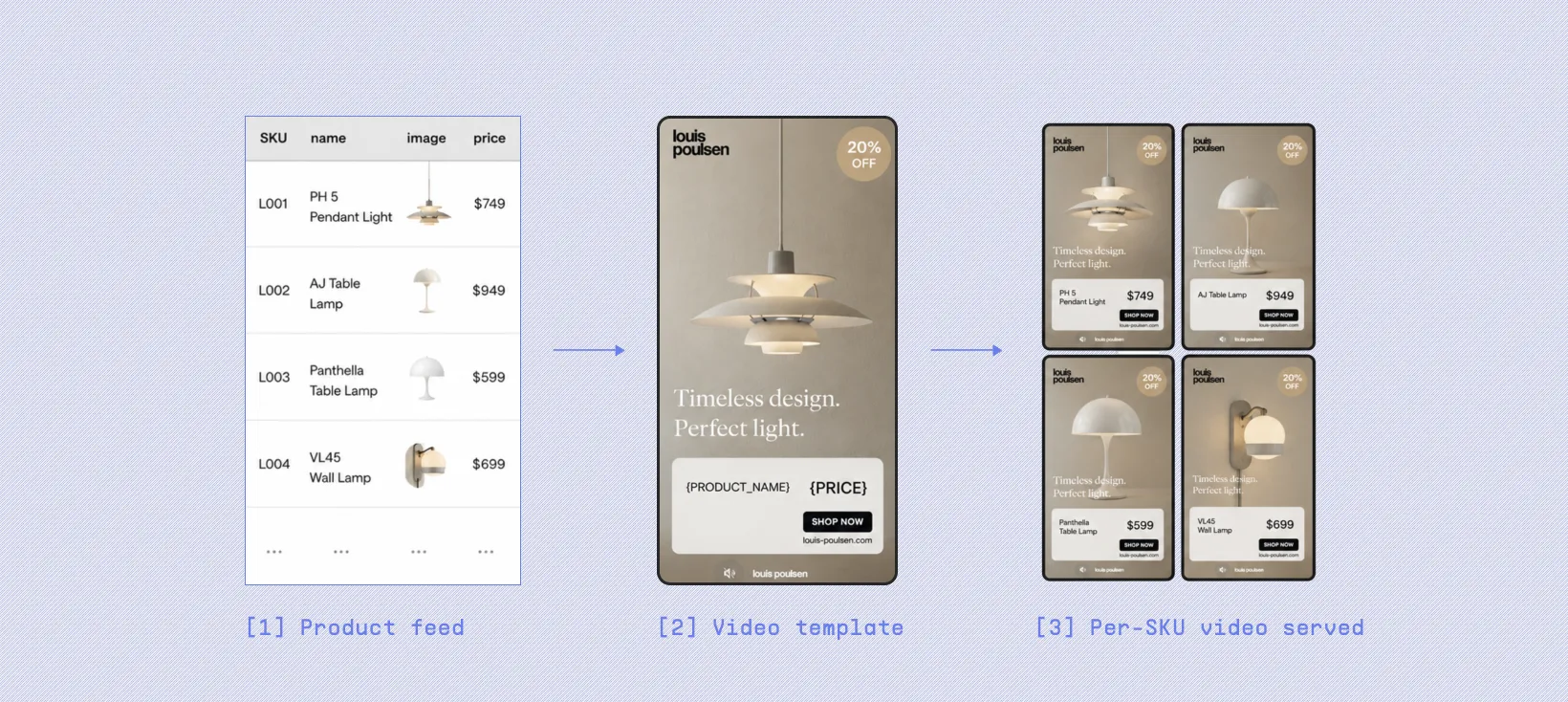
For dynamic ads to run, three pieces have to be in place:
- A product feed: One row per SKU. Columns for whatever you want to swap in: product name, price, image, discount, star rating, video clip, stock status.
- A video template: A short video where some elements are fixed (logo, intro animation, music) and other elements are bound to feed columns. The price text reads from the price column. The product image reads from image_url. The headline reads from product_name. When the template renders, every SKU produces its own version of the video.
- An ad platform that serves video in catalog ads: Meta is the main one. Its Advantage+ Catalog Ads will serve a per-SKU video creative, and the product feed can carry up to 20 video URLs per row. TikTok Catalog Ads supports video too. The platform picks which SKU (and therefore which rendered video) to show each user based on what it knows about them.
Examples of Dynamic Video Ads
Here's what dynamic video ads tend to look like across the kinds of catalogs Marpipe customers run:
Apparel and fashion:
- A men's shirt brand opens every video with the same studio shot of a folded shirt being lifted, then swaps in the product image, fit name, color variant, and price from the feed.
- One creative covers 200+ shirt SKUs, and a new seasonal color drop goes live the same afternoon the feed is updated.
Beauty and skincare:
- A skincare brand uses dynamic color extraction to pull each product's packaging color out of the image and use it as the background gradient, so every SKU's video tunes itself to the bottle on screen.
- A "best for [skin type]" tag pulls from a custom feed column, so the same creative produces eighty different SKU-level videos without the team touching them individually.
Home goods and bedding:
- A bedding brand pairs every product image with a lifestyle shot of the bed styled in the same color, both pulled from feed columns and alternating across an eight-second video.
- When the brand runs a flash sale, the price layer updates automatically the moment the feed changes — no re-rendering, no new exports.
Accessories and leather goods:
- A wallet brand shoots one intro clip (a hand reaching into a back pocket) and the rest of the video (product reveal, material name, color, price) is bound to the feed.
- A star-rating overlay appears only on SKUs where the feed's reviews column shows more than 50 reviews, so social proof only shows up where it's earned.
Electronics and tech accessories:
- A headphone brand starts with an unboxing-style clip, then dynamically swaps in product image, color, and the headline spec (battery life, noise cancellation, codec support) from feed columns.
- The same creative renders cleanly for over-ear, in-ear, and earbud SKUs because each category's relevant spec is pulled from a single "headline_feature" column in the feed.
Footwear and sportswear:
- An athletic shoe brand uses a 360-degree turntable rotation of the product, with model name, drop date, and price bound to the feed.
- Scarcity messaging like "only 200 pairs left" pulls live from a stock-count column, so new colorways and limited drops go live the same moment the SKU is added.
Best Practices for Dynamic Video Ad Campaigns
For a dynamic video ad the work happens at the template layer rather than the per-asset layer, every decision you make once propagates to every SKU. Here's what to get right:
Lead with the product in the first two seconds
Most viewers decide whether to keep watching before the third second of a video plays. Bind your product image to the opening frame rather than the third or fourth frame, and let your logo and intro animation come in after. Treat the first two seconds as the place where the viewer should already understand what is being sold.
Design for sound off, then treat audio as a bonus
The majority of social video plays muted, especially in Feed and Stories. Make sure the product name, price, discount, and any value proposition show up as on-screen text bound to feed columns, not as voiceover. If you add music or a voice track, treat it as something that enriches the ad for the minority of viewers who unmute, not as something the ad depends on.
Build your master template in vertical, then export the other ratios
Reels, Stories, and TikTok all run 9:16, while Feed performs best at 1:1 or 4:5. A 16:9 template gets letterboxed and looks like a TV ad that wandered onto the wrong platform. Build your master template in 9:16 inside Marpipe and let the platform export the other ratios from the same source, so your product feed data only has to be bound once.
Test at the template level, not at the SKU level
This is the unlock that justifies the format. Instead of producing five different videos and rotating them, build two or three templates that take genuinely different creative approaches (UGC intro versus polished studio intro, price-first versus rating-first) and let Advantage+ allocate spend toward whichever template performs best across your full catalog. You learn faster, and the lesson generalizes across every SKU in the feed rather than applying to a single hero product.
Audit your feed before you publish
A dynamic video ad is only as clean as the product feed behind it. Missing prices render as awkward empty spaces, broken image URLs render as black frames, and inconsistent product name lengths break your text layout on long-name SKUs. Use the per-SKU preview in Marpipe to spot these problems and fix them in the feed itself rather than trying to patch them inside the template.
Refresh templates on a cadence, not on a panic
Creative fatigue is real on Meta and TikTok, and the symptom is rising CPMs paired with flat or falling click-through rate. The advantage of templated production is that a refresh costs the price of editing one template, not the price of reshooting fifty videos. Plan a refresh roughly every four to six weeks for your highest-spend templates, and rotate in a fresh variant before the numbers start to slip rather than after.
Keep brand elements identical across templates
When you are running ten templates across three thousand SKUs, the only thing visually tying the campaign together is your brand system: logo placement, type, color, motion language. Lock those choices before you build your second template and resist the temptation to let individual templates drift. Consistency at the brand layer is what gives you permission to take real risks at the creative layer.
How to create dynamic video ads with Marpipe
Marpipe is a catalog ads platform that handles both static and video creative production in one place. The workflow has four steps, and most teams get their first template live in an afternoon. You just have to build one template, Marpipe renders one video per SKU, and your existing catalog ads infrastructure does the rest.
Step 1: Create your account and bring your team in
Sign up with your email, a Google account, or a Facebook account. Every Marpipe account includes unlimited seats at no extra cost, so you can invite your creative team and your paid social team in from day one rather than emailing files back and forth.
Step 2: Connect your product feed
Every account comes with a preloaded sample feed so you can poke around the editor before you commit, but the real work starts when you bring in your own catalog. You can upload a CSV you've built manually in a spreadsheet, export a feed directly from Shopify or another commerce platform.

Marpipe reads every column in the feed — product name, price, image URL, discount, star rating, sale flag — and treats each column as a variable you can bind to a video element in the next step.
Step 3: Build a video template
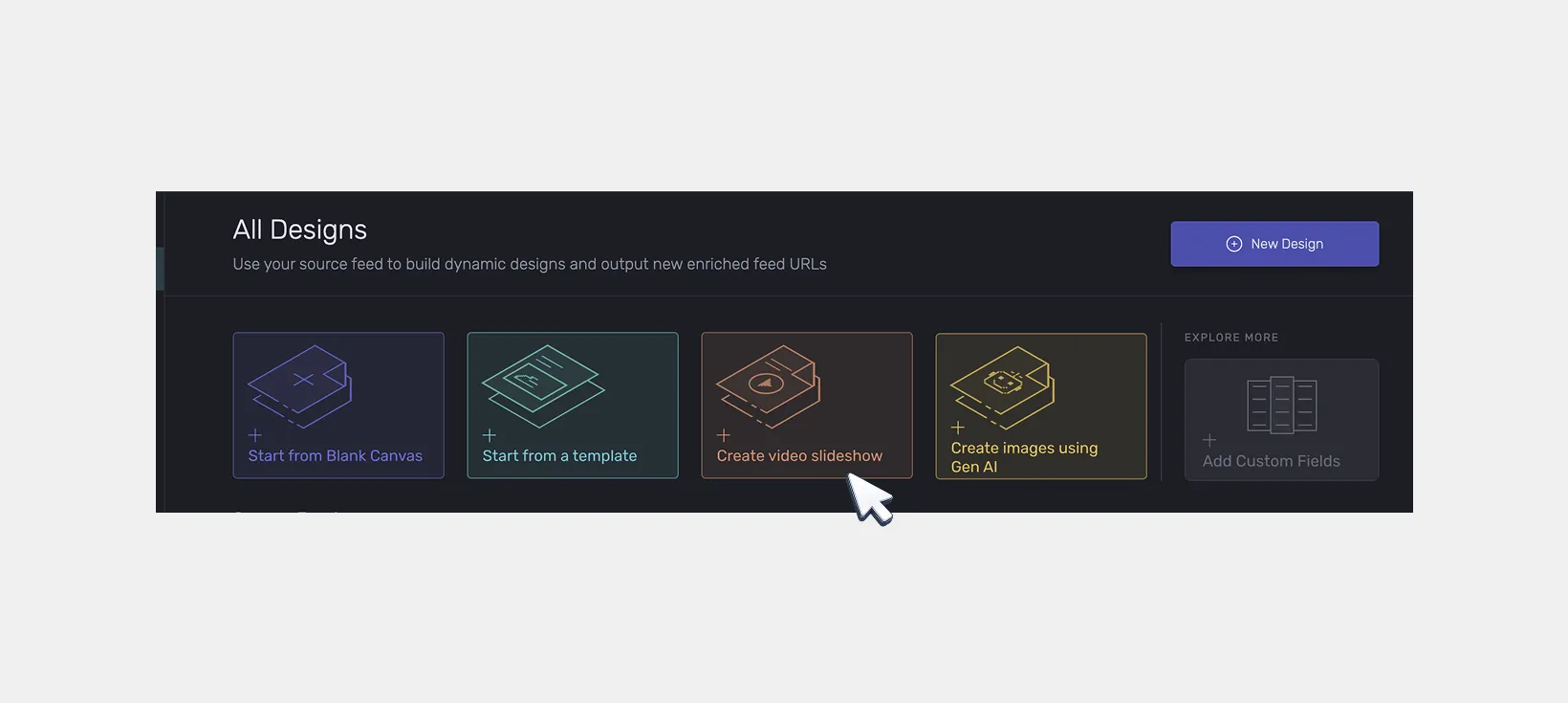
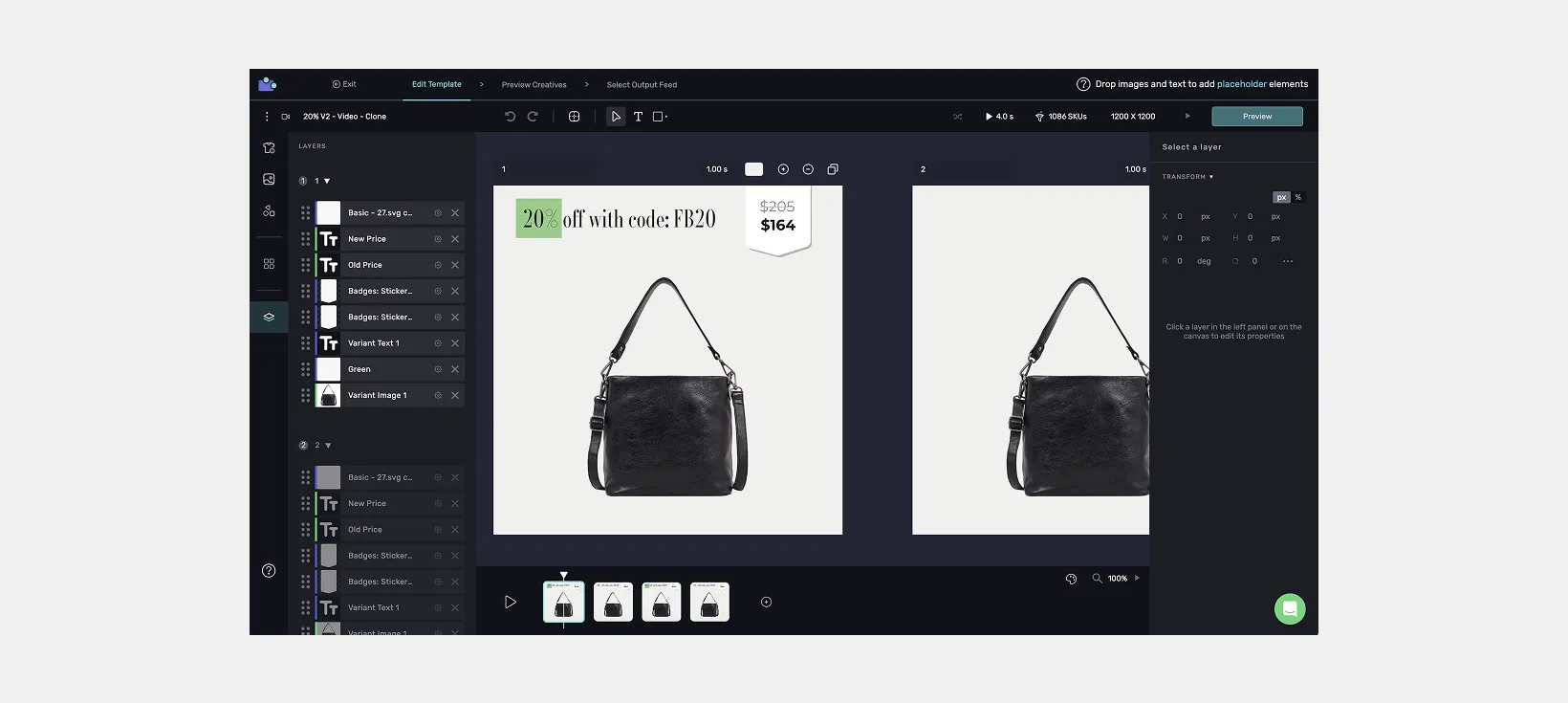
Open the editor and choose "Create Video Slideshow." A template is a short video, usually a few frames long, where you fix the creative elements that stay the same across every product (logo, intro animation, brand fonts, background music) and bind the rest of the elements to columns in your feed. You can stack multiple frames, animate transitions, add text overlays, and style shapes to match your brand guidelines.
When you bind a text layer to the price column or an image layer to image_url, Marpipe substitutes the actual value from each SKU at render time. One template becomes hundreds of videos, one per SKU, without you ever touching them individually.
Step 4: Preview every SKU, then publish
Before anything ships, Marpipe lets you scroll through the rendered output for every SKU in your feed so you can confirm that the price, image, and copy land cleanly on every product. Once the previews look right, publish the feed.

From there you can hand it to your feed management platform, or push it directly into Meta as an enhanced catalog. The videos travel with your product feed the same way product images do today, which means the rest of your Advantage+ setup stays exactly as it was.
Choose Marpipe to Build Your Catalog Ads
Product Level Video is one piece of a larger platform, and what separates Marpipe from the rest of the AI-video category is that Marpipe doesn't generate frames with AI. Your existing product images stay the source of truth, your brand system stays consistent across every SKU, and the output looks like your actual catalog instead of a hallucination of it.
Here are a few more things the editor does that matter once you start building real templates:
- Auto background removal: Strip backgrounds from any product image so it composites cleanly against your branded backdrop.
- Dynamic color extraction: Pull a color directly out of the product image and use it as an accent in the template, so the creative tunes itself to the product rather than fighting it.
- AI image fit: Resize and reposition product images automatically so they sit correctly inside the template regardless of source aspect ratio.
- Custom timing controls: Adjust how long each frame holds and how transitions move, frame by frame.
- Multi-frame layouts: Stack multiple frames in one video to show different angles, lifestyle shots, or product variants in sequence.
- Multi-platform export: Push the same source template out to Meta, TikTok, and anywhere else that takes a video feed, in the aspect ratios each one needs.
If you want to see what dynamic video ads look like against your own catalog and campaign goals, book a demo and the team will walk you through the workflow end to end.
Frequently asked questions
What's the difference between dynamic video ads and dynamic product ads?
Dynamic product ads (DPAs) pull a still product image from your feed and render one static ad per SKU. Dynamic video ads use the same feed-and-template mechanic, but the creative slot is a short video instead of a still image. So you get the same per-SKU personalization with the engagement lift that video formats earn on Meta and TikTok.
Are dynamic video ads AI-generated?
Not all of them, and the better ones usually aren't. AI-generated video tends to produce inconsistent, off-brand output across a large catalog because the model hallucinates details that don't exist in your source images. Template-based dynamic video ads — the kind Marpipe builds — use your existing product images and apply consistent motion, text, and branding to each one, which is what keeps the output on-brand across thousands of SKUs.
Do dynamic video ads work on both Meta and TikTok?
Yes. Meta's Advantage+ Catalog Ads is the most mature placement, and the product feed can carry up to 20 video URLs per SKU so the platform can serve the right SKU's video to the right user. TikTok Catalog Ads supports video creative per SKU as well, driven by the same product feed.
How many video variations can I run per SKU?
Meta supports up to 20 unique video URLs per SKU in the product feed, which is enough to test multiple creative angles (UGC intro versus polished studio, price-first versus rating-first) for the same product. Most brands start with one template and expand from there as they learn which moves work in their category.
Do I need to shoot new video footage to run dynamic video ads?
No. The whole point of dynamic video ads is that motion and branding get built around your existing product images, so the source images stay the same ones already in your catalog. If you already have product photos, you have enough raw material to start. You don't need a single new frame of footage.
