


Pinterest doesn’t get talked about the same way as Facebook, Instagram, or TikTok, but that’s exactly why it’s worth paying attention to. With over 522 million monthly active users, Pinterest is less crowded and more focused on one thing most platforms struggle with: product discovery. People aren’t just scrolling for entertainment. They’re actively searching for ideas, saving products, and planning future purchases.
That behavior changes how ads perform. Instead of interrupting users, Pinterest dynamic product ads show up when people are already looking. For ecommerce brands, that means a chance to influence decisions earlier in the buying journey, not just chase conversions at the end.
This guide breaks down how Pinterest DPAs actually work, how to launch them properly, and the best practices that improve performance. If you’re treating Pinterest like every other ad channel, this will help you fix that.
What Are Pinterest Dynamic Product Ads?
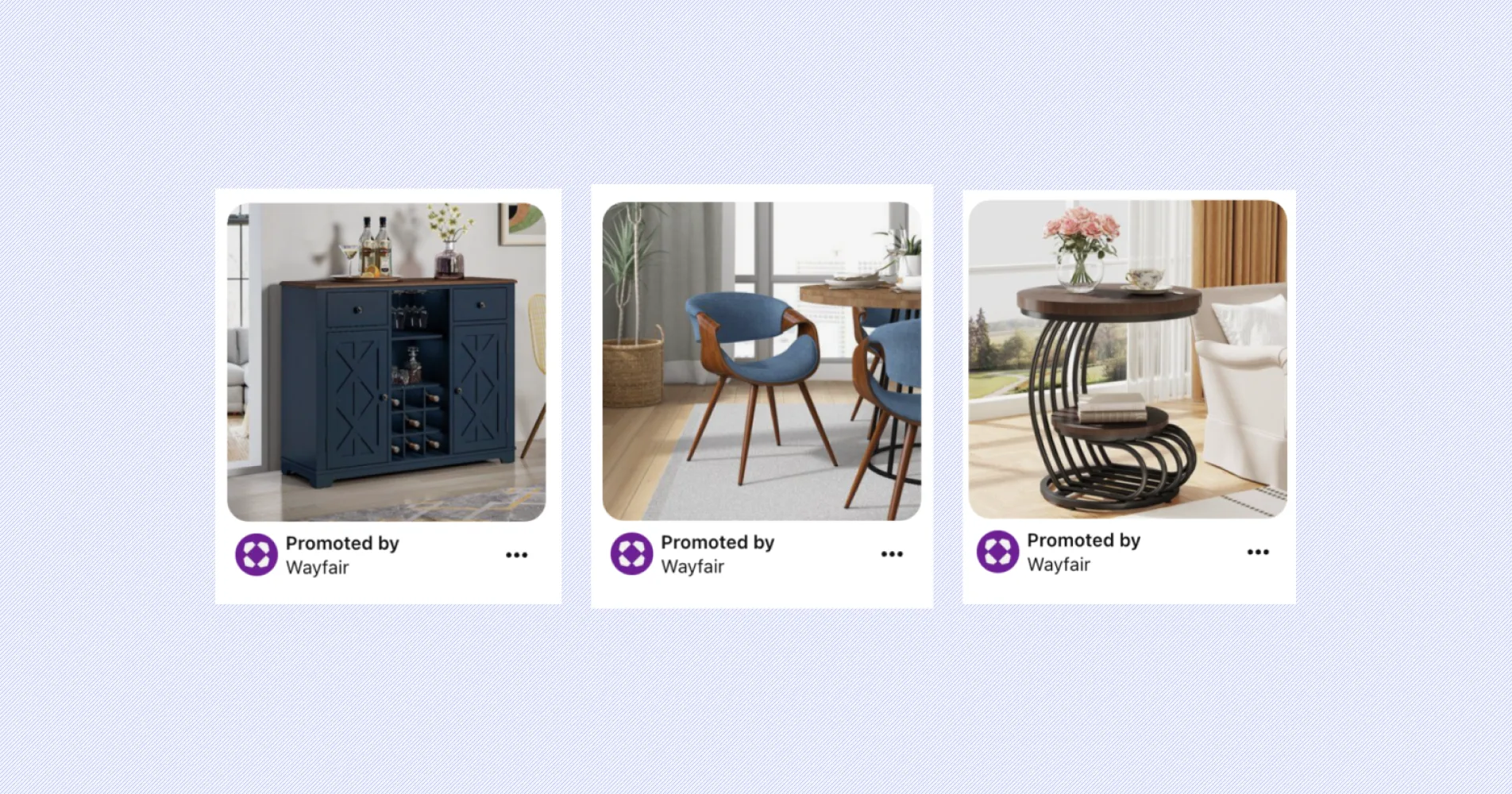
Pinterest dynamic product ads are ads that automatically pull products from your catalog and display them to users based on their behavior, interests, and search intent. Instead of manually building each ad, Pinterest uses your product feed to generate ads dynamically, including images, pricing, and descriptions. For example, if a user searches for living room ideas and saves a few couch designs, Pinterest may later show them your specific couch through Pinterest dynamic product ads. These ads work for both prospecting new audiences and retargeting users who have already interacted with your brand, which makes them versatile but also requires a more thoughtful strategy.
“DPA is bigger than anyone thinks. People are usually shocked to hear that 1/4th of all digital ads in paid social were dynamic product ads. Most major retailers and most major DTC brands are relying on DPAs as a workhorse in their ad accounts." - Dan Pantello, CEO of Marpipe
How Do Dynamic Product Ads on Pinterest Work?
Pinterest dynamic product ads work by combining user intent signals with your product feed to automatically generate and serve ads. When someone searches for a product, saves a pin, or interacts with content, Pinterest analyzes that behavior and matches it with relevant items from your catalog. It then dynamically builds an ad using your product data, including images, pricing, and descriptions. This process happens in real time, which means your feed quality directly affects how often and how accurately your ads are shown. Check out our guide to product feeds first and then come back to dive deeper into dynamic ads on Pinterest.
Pinterest DPAs work differently from Meta or TikTok because of how people use the platform. On Pinterest, users are actively planning purchases, not just scrolling for entertainment or reacting to past activity. That means ads need to match what users are searching for and thinking about, not just what they clicked before. As a result, Pinterest tends to drive slower but more intentional conversions, while Meta focuses on retargeting and TikTok leans into fast, attention-driven discovery.
How to Launch Your First Pinterest DPA Ad
Before you get started launching your first-ever DPA ads with Pinterest, there are a few things you need to set up to get the green light from them.
1. Create a Pinterest business account
Pinterest requires all companies that want to run DPA ads through their site to set up a business account with them. It doesn't cost anything to register, and it also gives you access to some great analytics tools to track the performance of your ads.
2. Upload and clean your product feed
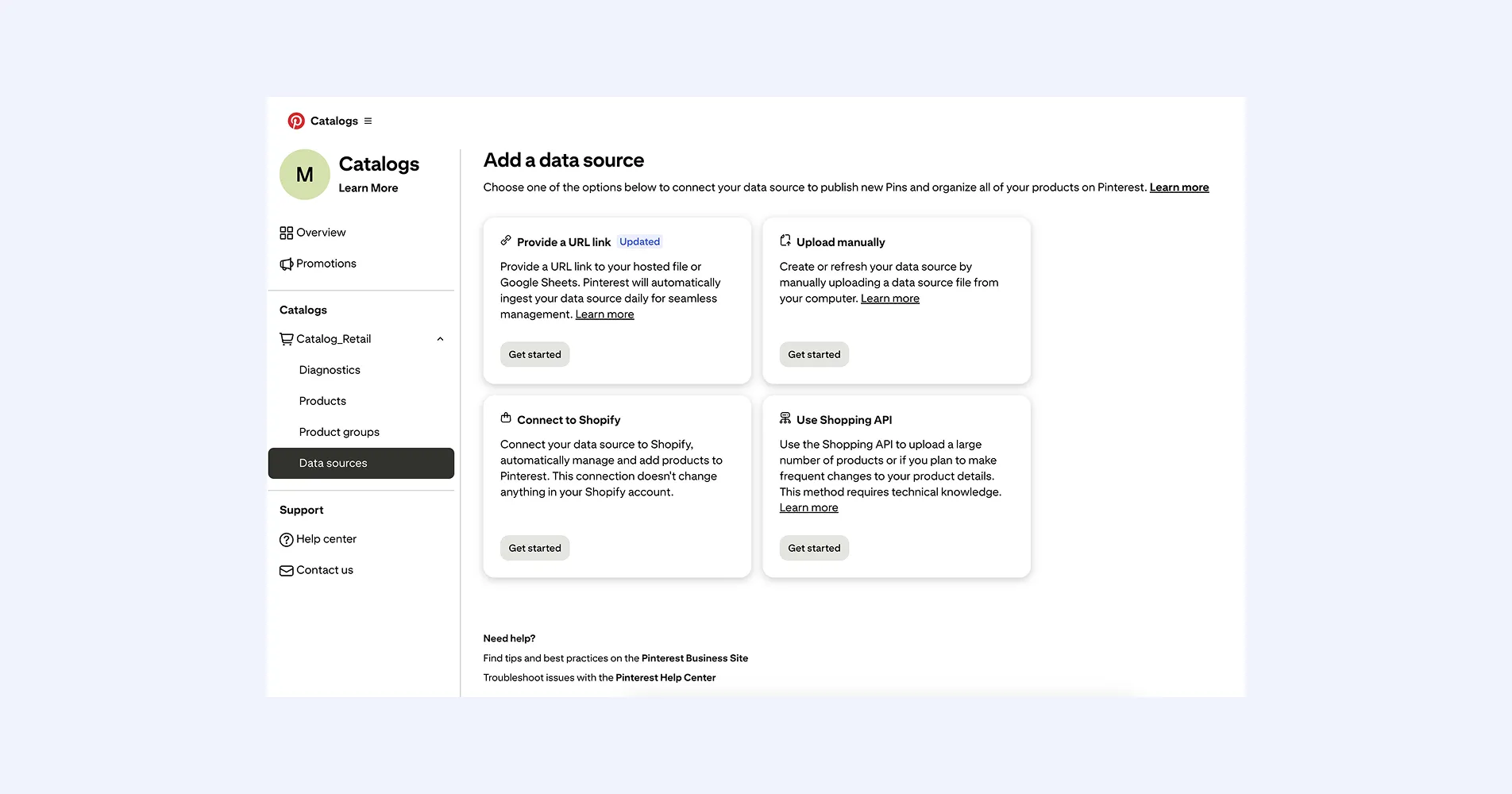
Pinterest DPAs depend on your product feed, which Pinterest calls a retail catalog or data source. You can upload it manually, host it at a URL, connect through the API, or use integrations like Shopify and WooCommerce. Focus on clear product titles, strong images, correct pricing, and detailed descriptions. Your feed is what Pinterest uses to match your products to user searches. Once uploaded, Pinterest can turn those products into shoppable product Pins and use them in shopping ads.
3. Install the Pinterest Tag
The Pinterest Tag is the tracking code that lets Pinterest measure what people do on your site after seeing or clicking your ad. This is what powers conversion tracking and stronger retargeting. If you are on Shopify, Pinterest says the Pinterest for Shopify app can install the tag and Conversions API for you.
4. Create your shopping campaign
Go to Ads Manager and choose a shopping or catalog sales campaign. Select the product group you want to promote, set your targeting, budget, and bidding. Start simple by focusing on best sellers or a specific category.
5. Launch and monitor performance
Publish your campaign and track key metrics like clicks, impressions, and conversions. Early performance will show whether your feed and targeting are working. From then on, you can adjust your product feed, test different creative variations, and refine your product groups. Small improvements in your feed and visuals can significantly improve your Pinterest DPAs over time.
Types of DPA Ads on Pinterest
Pinterest has three different formats for its dynamic product ads that you can leverage. These include standard shopping ads, video shopping ads, and personalized collection ads. Let's go through them to see which one will be best suited for your DPA strategy.
Standard Shopping Ads
Standard shopping ads are the traditional single-image ads; they're visually displayed as one product from a catalog on a user's Pinterest feed with a lone photograph. They're the easiest of the three to build, as they require minimal effort to create on the Pinterest platform.
Video Shopping Ads
If you want to take your advertising game up a notch, video shopping ads allow you to use video footage of your product to promote it. We’ll leave the creative part of making the perfect video ad to you. However, when setting up a video shopping ad campaign on Pinterest, all you need to do is include a link to the video asset in your product feed.
Collection Ads
Similar to a carousel format you'd find on other social media platforms, Pinterest's personalized collection ads are made up of four images. They feature one large "hero" image to grab attention and three smaller images highlighting other specific products. Say you wanted to push multiple products from your catalog at once; personalized collection ads would be a great solution since they provide more advertising opportunities.
Retargeting With Pinterest’s Shopping Ads
Pinterest’s focus on product discovery and the shopping experience makes it powerful for broad reach targeting but also for retargeting previous visitors to your website. Dynamic shopping ads on Pinterest are a great way to keep audiences engaged while delivering fresh creative messaging to further reduce that abandoned cart rate.
To ensure that you can take full advantage of this capability, don't forget to upload your product feed with all the necessary images, descriptions, and prices. Additionally, you'll need to install the Pinterest tag on your site and set up event tracking properly to further optimize your retargeting ads.
7 Best Practices That Actually Improve ROAS for Pinterest DPAs
- Start with Search-Driven Product Titles
Pinterest behaves more like a search engine than a social feed, so your product titles need to reflect how people search. Internal product names rarely work. Instead, describe the product clearly using real-world language. For example, “Modern beige linen sofa for small living room” will perform better than a generic product name. This helps Pinterest match your products to relevant searches and increases visibility.
- Make Your Images Feel Native to Pinterest
Pinterest is built around inspiration, not catalog browsing. If your images look like standard ecommerce listings, they will get ignored. Focus on lifestyle visuals that show the product in use. Internal Pinterest data and case studies have shown that adding brand context and lifestyle elements through formats like shopping templates can significantly improve results, with some brands seeing up to a 114% increase in return on ad spend. When your images match the inspiration phase of the user journey, users are less likely to scroll past them and more likely to engage.
- Segment Your Product Catalog for Better Control
Running your entire catalog in one group limits how much control you have. Instead, break your products into smaller, intentional segments based on performance, category, or price range. For example, separating best sellers from low-performing products allows you to allocate budget more effectively. This also helps Pinterest optimize delivery because it can better understand which products should be shown to which audiences.
- Test Creative Variations, Not Just Products
Most brands focus on testing different products but ignore creative variation. That limits performance. The same product can perform very differently depending on how it is presented. Test different backgrounds, formats, and messaging angles. Even small changes can lead to noticeable improvements in click-through and conversion rates.
- Align Your Ads with Planning Behavior
Pinterest users are often in planning mode, not buying immediately. Your ads should reflect that. Instead of pushing urgency, focus on helping users visualize how the product fits into their lives. For example, show how a piece of furniture completes a room or how an outfit works for a specific occasion. This builds intent over time and leads to stronger conversions later.
- Use Automatic Bidding to Find Efficient Conversions
Automatic bidding helps Pinterest prioritize users who are more likely to take action based on real-time signals. Instead of manually guessing bid amounts, you let the platform adjust dynamically to get the most value from your budget. This is especially useful early on, when your campaign is still learning. Think of it like cruise control. You’re not constantly adjusting speed, but you’re still moving efficiently toward conversions.
- Plan Carefully, Update Frequently
In e-commerce, it's normal for your products' features to change frequently, so it's important to keep your product feed up-to-date and as robust as possible. Campaign learning periods on Pinterest can take 3-5 days to exit and optimize, so be sure to plan accordingly when making time-sensitive changes!
Differentiate Your Pinterest Shopping Ads with Marpipe
Pinterest is an amazing platform for running DPA ads; its users are made up of 70% female and 30% male, most of whom use the platform for shopping ideas. However, its also a visually competitive platform, so don’t settle when it comes to creative execution and differentiation.
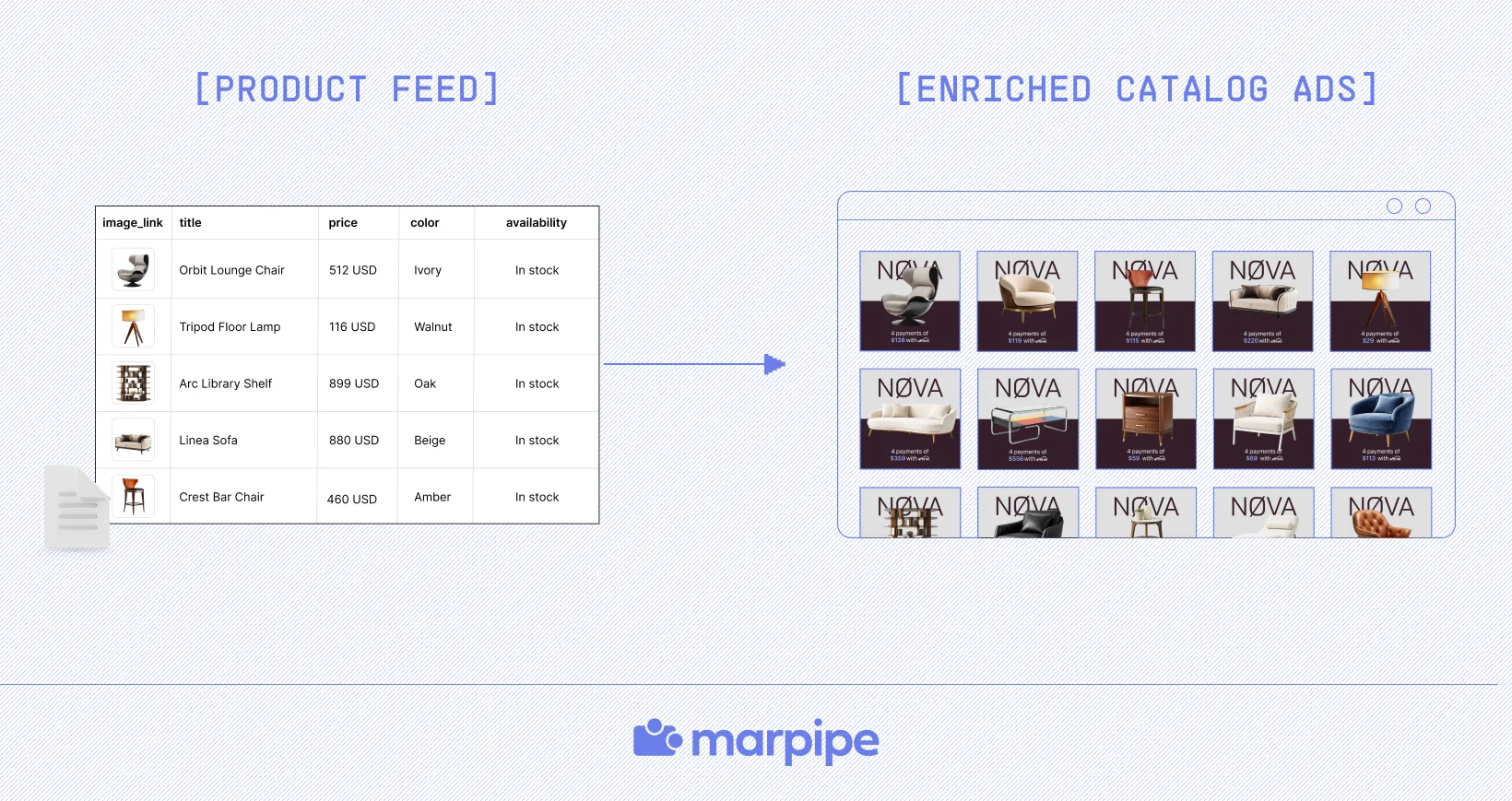
Marpipe further enhances your DPA strategy with a creative platform that includes powerful templates and generative AI tools to ensure your products stand out among all those pins. The best part is that Marpipe is powered by your existing product feed so that you can create an infinite amount of creative variations to test, learn, and optimize all your DPA campaigns across Meta, TikTok, and, of course, Pinterest.
Want to find out more? Book a demo with our team. Soon, you'll be crushing your goals for DPA ads on Pinterest!
Frequently Asked Questions
What results should you expect from Pinterest DPAs?
Pinterest dynamic product ads typically deliver slower but more intentional results compared to platforms like Meta. Users on Pinterest are often in a planning mindset, which means they may discover your product days or even weeks before making a purchase. Because of this, conversion windows are longer, but the quality of conversions is often higher. Many brands see stronger average order values, especially in categories like home, fashion, and lifestyle. Pinterest DPAs perform best in the discovery and consideration stages, helping you build demand rather than just capture it. Over time, consistent optimization leads to compounding returns.
Why are my Pinterest dynamic product ads not working?
If your Pinterest dynamic product ads are underperforming, the issue is usually your product feed. Missing details, weak titles, poor images, or outdated data can prevent Pinterest from matching your products to user searches. Your feed is what powers delivery, so improving it often has the biggest impact. Using a structured solution like a feed management tool can help you clean, enrich, and optimize your catalog for better results.
What type of products perform best on Pinterest DPAs?
Products that are visually appealing and tied to inspiration or lifestyle tend to perform best on Pinterest dynamic product ads. Categories like home decor, furniture, fashion, beauty, and wellness consistently see strong results because users actively search for ideas in these areas. Products that can be shown in context, such as a styled room or a complete outfit, usually outperform standalone items. Seasonal products also perform well since Pinterest users often plan for events, holidays, or life moments. If your product solves a visual or aspirational need, it is more likely to succeed on Pinterest.
Why are my Pinterest dynamic product ads not getting impressions?
Low impressions usually point to issues with your product feed or targeting setup. If your product titles and descriptions do not match what users are searching for, Pinterest may not show your ads at all. Poor image quality or missing attributes can also limit visibility. Another factor is overly narrow targeting, which restricts delivery. In many cases, the problem is not budget but relevance. Improving your product feed with clearer, keyword-driven descriptions and better visuals can significantly increase impressions and help your ads appear in more relevant searches.
How do I optimize my product feed for Pinterest DPAs?
To optimize your product feed, focus on clarity, relevance, and completeness. Use descriptive titles that reflect how people search, rather than internal product names. Include detailed descriptions, accurate pricing, and high-quality images. Adding extra attributes, such as materials or use cases, can also improve matching. Regular updates are important to ensure your data stays accurate. Think of your feed as the foundation of your campaign. The more useful information you provide, the easier it is for Pinterest to match your products to the right users.
