


Most Google Shopping advertisers are leaving creative on the table. While you can't manually pin a specific image to a specific placement the way you can on Meta, Google's Performance Max campaigns will automatically test and serve your best-performing images — including enriched creative and lifestyle photography — when you give them more to work with.
The mechanism is simple: supplemental feeds.
What's a Supplemental Feed?
Your primary Google Merchant Center feed contains your core product data — titles, prices, availability, and your main product image. A supplemental feed sits alongside it and adds or overwrites specific fields without touching the rest. For image creative, the two fields that matter are:
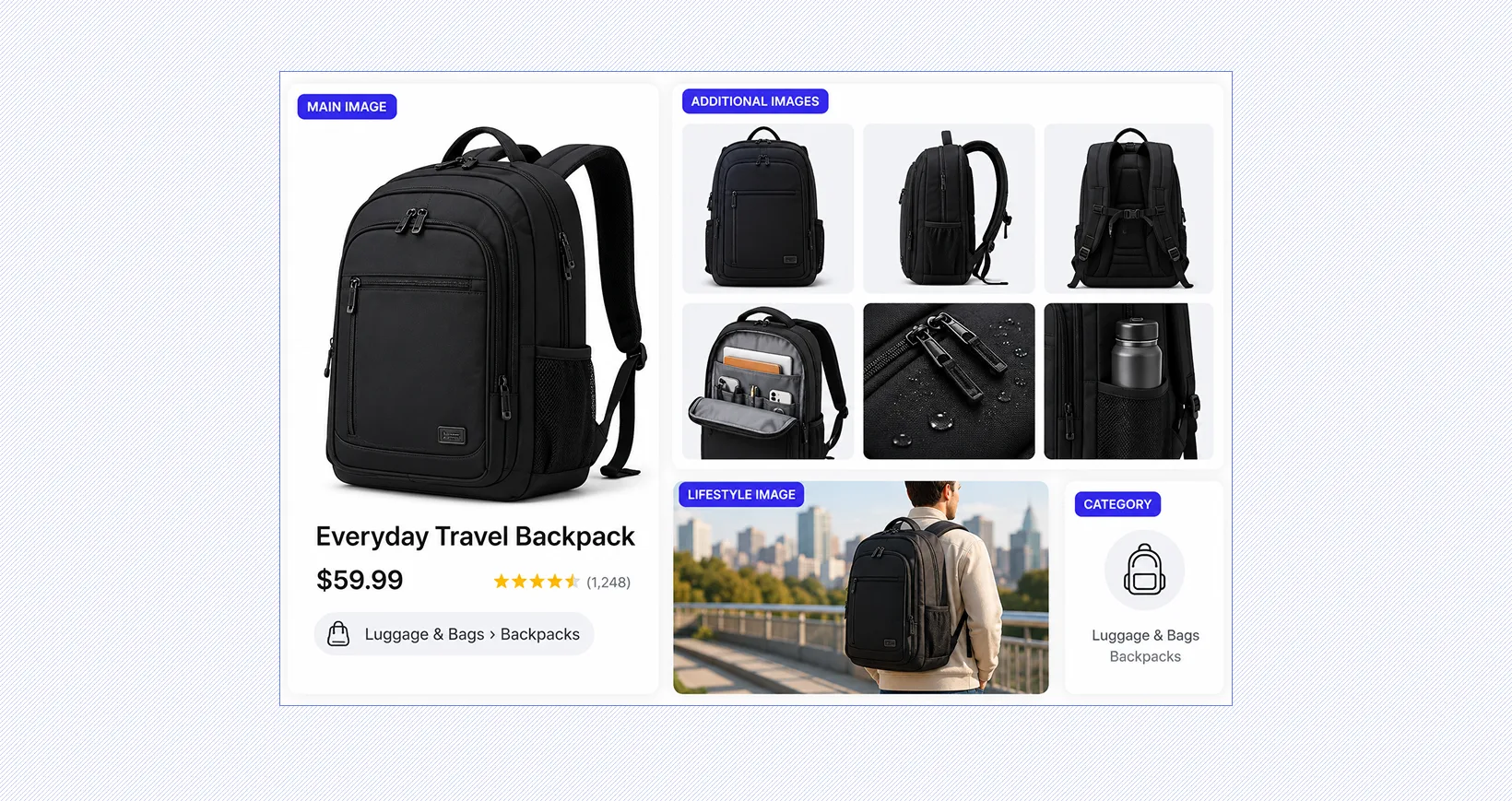
additional_image_link— alternate product shots, enriched creative with design treatments, or studio images from different angleslifestyle_image_link— in-context photography showing the product being used or worn
You can include up to 10 additional images per product and a separate lifestyle image. Performance Max pulls from all of them.
.png)
How PMax Uses These Images
When your PMax campaign is connected to a Merchant Center catalog, Google's ML automatically selects from every available image field — image_link, additional_image_link, and lifestyle_image_link — and tests which performs best across placements. You don't assign images to specific placements manually. Instead, you expand the pool of creative assets available, and Google optimizes from there.
How to Set It Up
- Build your supplemental feed. Create a feed with two columns: your product
id(matching your primary feed exactly) and the image field you're populating (additional_image_linkorlifestyle_image_link). Each product can have multipleadditional_image_linkentries — just include multiple additional_image_link columns. - Upload it to Merchant Center. In Google Merchant Center, go to Products → Feeds → Add supplemental feed. Paste your feed URL or upload the file, then link it to your primary feed.
- Let PMax do the rest. Once Merchant Center ingests the supplemental feed, your new images become part of the creative pool your PMax campaigns can draw from. No additional campaign configuration is needed.
What to Keep in Mind
Google's primary feed still wants clean, unobstructed product-on-white or product-in-context images for image_link. Supplemental images via additional_image_link have more room for enriched creative — branded treatments, overlaid callouts, and lifestyle context — and Google's enforcement here has become increasingly permissive. That said, enabling Automatic Image Improvements in Merchant Center can interfere with custom creative, so review that setting before uploading.
The Google Shopping Image Rules That Still Matter Most
Primary Product Image Requirements (image_link)
Your primary product image is still the foundation of every Shopping impression. It is the default image Google pulls first, the one most likely to serve in core Shopping placements, and the one most likely to trigger disapproval if it is wrong.
These Google Shopping image requirements are only approval thresholds. They are not performance targets. The recommended 1500 × 1500 is the real starting point because it gives Google more flexibility to render the image well across Shopping surfaces without losing detail. Uploading at 2000 × 2000 or above usually gives you more room to preserve clarity across higher-resolution placements.
This is also where consistency starts to matter. If your catalog has inconsistent crops, poor framing, or uneven product fill, Google may still approve the image, but the product will usually look weaker in-market. This is where tools like our Catalog Ad Creative become useful, since image cleanup, crop consistency, and formatting can be standardized before assets ever reach Merchant Center.
Additional Product Images (additional_image_link)
Google allows up to 10 additional images per product, and they follow the same technical rules as the primary image. That includes the same file standards, sizing expectations, and general quality requirements.
Most sellers upload one or two additional angles and stop there. In practice, that leaves most of the available image real estate unused. Additional images are where depth, context, product detail, and visual differentiation can start doing more of the selling work. This is where secondary angles, close-ups, packaging shots, in-use imagery, scale references, and alternate contexts can all start helping the shopper qualify faster.
Lifestyle Image Requirements (lifestyle_image_link)
The lifestyle_image_link attribute is optional. It allows Google to surface a more contextual version of the product in free listings, often using imagery that feels more natural and less transactional than a standard product shot. Because it is optional, most catalogs leave it blank. That makes it one of the easier competitive advantages to claim.
While most brands focus only on the hero image, lifestyle_image_link creates another opportunity to control how the product is visually framed when Google has more room to show context.
What Google Still Rejects in Shopping Images
Google may allow more creative range in some Shopping surfaces, but the base asset still has to behave like a compliant product image first. Google can still reject products for any of the following:
- promotional text or overlays like “Sale,” “20% Off,” or price callouts
- watermarks, including logos placed on the image
- borders, frames, or decorative edges
- placeholder images or generic stock visuals
- logos used as the primary product image
- thumbnails or low-resolution upscaled images
- multiple products shown when the listing is not a bundle
- products that are difficult to see or take up too little of the frame
The easiest way to think about it is this: your primary Shopping image still needs to function like a compliant catalog asset, even if the rest of the Shopping experience is becoming more visually flexible. That’s why the safest approach is still to treat the hero image as compliance-first, then build more creative variation around it in the places where Google gives you more room.
What Actually Changed for Google Shopping Creative
For years, Shopping creative was treated like a compliance task. The image existed to satisfy Google Shopping image requirements, and once it was approved, most teams moved on. That made sense when Shopping was mostly a static product grid and the image only needed to clear a technical check. That is no longer how Shopping works.
Google Shopping has become more visual, more placement-driven, and more dependent on how product imagery adapts across surfaces. Products now appear in more visually competitive environments, including richer Shopping placements, free listings, and YouTube Shopping surfaces where static, compliance-only product imagery has less room to carry performance on its own.
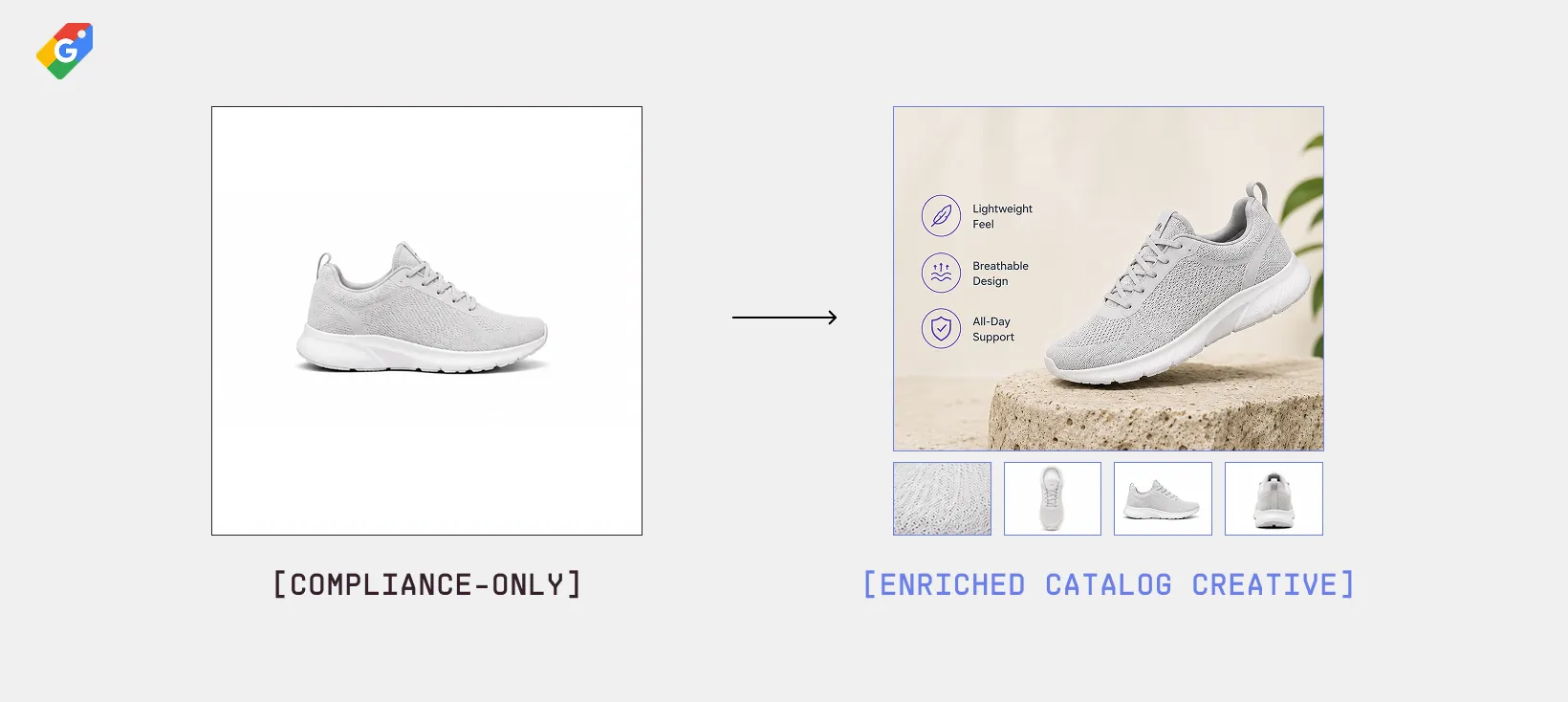
The primary product image still has to clear compliance, but it no longer has to carry the full creative burden by itself. Additional images, lifestyle imagery, richer product context, and more flexible creative treatments now play a much bigger role in how products are merchandised once they are eligible to serve.
That is the real change. Google Merchant Center image requirements still decide whether a product can enter the auction. Creative now plays a much bigger role in what happens once it gets there.
A More Strategic Way to Use Every Google Shopping Image Slot
Between the primary image, additional_image_link, and lifestyle_image_link, most products have enough image space to answer far more shopper questions before the click. The issue is whether each one is doing a specific job.
That’s the more useful way to think about Google Shopping image requirements. Not as a set of image fields to fill, but as a sequence of visual decisions that reduce hesitation, improve product clarity, and make the click easier to earn.
Not every product needs every slot filled, and not every category benefits from the same sequence. But products with only one or two usable images are usually asking the primary image to do too much on its own.
Google’s AI Image Rules
AI-generated product imagery is now common across ecommerce, but Google no longer treats it like an invisible workflow detail.
As of February 2024, Google requires AI-generated and AI-edited product images submitted through Merchant Center to include IPTC metadata labeling. That applies to primary images, additional images, and lifestyle images across both Merchant Center Classic and Merchant Center Next. That includes more than fully AI-generated product visuals. It also includes common ecommerce workflows like background swaps, AI-generated scenes, cleanup, and composite product imagery where a real product photo is placed into an AI-generated setting.
In practice, most ecommerce use cases fall into the first two categories. If the image was generated by an AI image model, it usually falls under TrainedAlgorithmicMedia. If the product is real but the background, environment, or scene was generated around it, CompositeSynthetic is usually the more accurate label.
Google has not published aggressive enforcement details yet, but this requirement now sits alongside other Google Shopping image requirements that already influence approvals and disapprovals.
Practical Ways to Improve Google Shopping Images
Once the feed clears compliance, the next gains usually come from making the image set more useful, more consistent, and easier for Google to merchandise well across placements.
Here’s a few practical improvements for bigger impact:
- Start at 1500 × 1500, not the minimum. Google may approve smaller files, but larger source images hold detail better across Shopping surfaces and give Google more flexibility in how the image is rendered.
- Optimize for product fill first. Products should usually take up 75 to 90% of the frame. Too small and the product gets lost. Too tight and important detail gets cropped out.
- Use additional images intentionally. Do not treat additional_image_link like overflow storage. Each image should answer a different shopper question, not repeat the same angle with minor variation.
- Treat lifestyle_image_link like free merchandising. Most sellers leave it blank, which makes it one of the easiest ways to add more contextual product framing without competing harder on price.
- Stop reusing PDP images without adjustment. Product detail page imagery is often designed for browsing. Shopping images need to work harder in smaller, faster, more competitive placements.
- Standardize crops across the catalog. Inconsistent framing makes the catalog look uneven and lowers perceived quality, even when the products themselves are strong.
- Build image logic by category. Apparel, beauty, home, and accessories usually benefit from different image sequencing. The strongest catalogs do not treat every product type the same.
- Keep the primary image clean, then diversify around it. The hero image still carries the compliance burden. The performance upside usually comes from what the rest of the image set adds around it.
- Use AI carefully and label it correctly. If AI is used to generate or modify product imagery, metadata now matters. Creative flexibility is useful, but only when it stays compliant.
Turning Google Shopping Image Strategy Into a Scalable Workflow with Marpipe
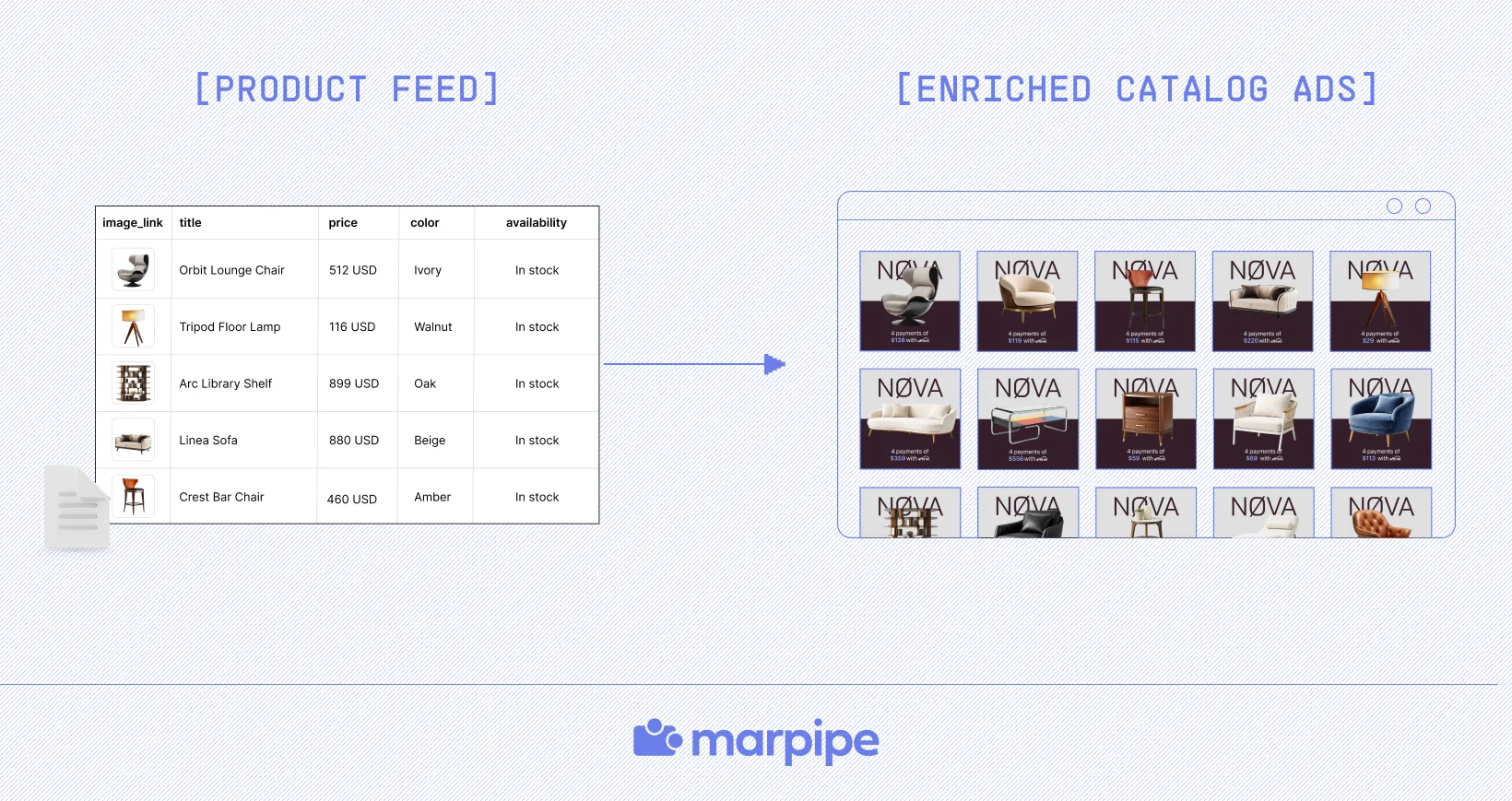
Most teams do not struggle to understand what better Google Shopping images should look like. The harder part is applying that logic across hundreds or thousands of products without turning image merchandising into a manual production task. This is where Marpipe becomes useful.
Marpipe helps teams move beyond static image management by turning Shopping image strategy into something more systematic. Teams can standardize crops, clean up inconsistent product imagery, organize products into usable groups, and apply image logic by category before those assets ever reach Google.
If your team is ready to make Google Shopping image strategy easier to scale, book a demo and see what our workflow looks like in practice.
Frequently Asked Questions
How often should Google Shopping images be refreshed?
Google Shopping images do not need constant redesigns, but they should be reviewed whenever product presentation starts falling behind how the product is actually sold. Seasonal inventory, packaging changes, merchandising updates, and shifts in category performance are usually good triggers for a refresh. If the product changed but the image set did not, the listing often starts underperforming before the feed shows obvious issues.
How do Google Shopping images affect overall Google Shopping performance?
Google Shopping images do more than make the listing look better. They shape how quickly a shopper understands the product, how confidently they compare it, and whether the click feels worth taking in the first place. That makes image quality part of the broader performance equation, not just a feed requirement. Our guide to Google Shopping optimization breaks down how stronger product presentation affects visibility, click quality, and Shopping performance overall.
Why do Google Shopping image problems usually start in the product feed?
Most image issues show up visually, but they usually start much earlier in the feed. Inconsistent crops, duplicate imagery, weak product titles, mixed supplier assets, and poorly structured product data often create image problems before the creative layer is even touched. That is why image quality is often a feed management issue before it becomes a design issue. Read more to see where those problems usually start and how to fix them upstream.
Do better Google Shopping images actually make catalog ads more effective?
Usually yes, because better images do more than improve aesthetics. They make products easier to understand, easier to compare, and easier to trust before the shopper clicks. That usually improves not just click-through rate, but click quality as well. It’s one of the clearest examples of why when the creative layer is doing more than simply filling inventory.
